Warehouse Management System (WMS) Guide: Core Features, Types, and Benefits
When you’re running a warehouse, there’s a lot to manage. You need to process your orders, track your inventory, forecast labour, optimise fulfilment, and arrange for shipping – all while coordinating every function to create a seamless flow.
Juggling everything all at once can seem overwhelming. That’s why brands operating their own warehouse often use a warehouse management system (WMS) to manage it all through one solution.
A warehouse management system gives you the tools, processes, automation, and reporting you need to streamline your warehouse operations and become more efficient.
Read on for a deep dive into what a warehouse management system is, its core features, and how your ecommerce brand can benefit from it.
Request WMS Pricing
Let’s talk. See if ShipBob’s warehouse management system is right for your warehouse.
A fulfilment expert will get back to you shortly. Privacy Policy
What is a warehouse management system?
A warehouse management system (or WMS) is a software solution designed to track and manage your end-to-end warehousing operations.
Specifically, a WMS lets you see and control how goods are received and stored, keep track of your inventory in real time, optimise your picking and packing operations, and coordinate shipping activities.
A WMS also uses physical technology like scanners and barcodes to track and record inventory movement as goods flow through your supply chain. This gives you a real-time visibility and a single source of truth (since all your vital data is in one place), ensuring better accuracy and efficiency.
To get an even better understanding of how a WMS works, here’s a breakdown of some of a WMS’s core features and modules:
Real-time inventory visibility and tracking
Warehouse management software gives you complete and real-time visibility into your inventory.
Leveraging barcode scanners that sync to your WMS software, every time a unit of inventory’s barcode is scanned (e.g., when it is stowed or picked), that action automatically updates your recorded inventory levels to reflect the change. This way, you see exactly how much inventory you have in stock at any given moment.
Some sophisticated WMSs even offer location-specific inventory visibility, so you know precisely where every item is stored within your warehouse.
This level of visibility allows you to gain real-time data and make more informed decisions when it comes to inventory.
Optimised picking and packing workflows
A WMS optimises picking and packing operations to make them more efficient and cost-effective. For example, a good WMS will:
- Enable the most efficient picking method for your business (e.g., batch picking, zone picking, or wave picking).
- Calculate optimal picking routes to reduce transit times and automatically generate pick lists accordingly.
- Use scanners to help pickers verify that they have the correct item before picking (which cuts down on costly mispicks to boost order accuracy).
- Have a built-in packaging selection algorithm that will calculate the ideal box or polymailer size for each unique combination of items to reduce human error, speed up packing, and save on shipping costs.
Streamlined return management and reverse logistics
With the ability to track incoming inventory, a WMS also streamlines return management. The scanning system helps you log returned items back into your inventory correctly, and the WMS’s platform should sync with any leading returns management platforms that you use for returns or refund processing.
Seamless shipping integrations and courier management
A WMS should directly integrate with any major shipping tools, partners, or couriers you use. Some WMSs (like ShipBob’s) give you access to real-time shipping rates and let you compare them across different couriers to find the best rate.
A WMS will also generate shipping labels and handle dispatch for you while providing real-time tracking for goods in transit.
Robust reporting and analytics tools
With the ability to collect data from across your end-to-end warehouse operations, a WMS provides comprehensive insights and data. This includes essential KPIs like on-time fulfilment, inventory days on-hand, inventory turnover, storage costs per unit, transit times, and more.
This gives you the insights you need to make data-driven decisions and optimise your warehousing processes.
How a WMS differs from traditional inventory management software and other warehousing software types
There are lots of software solutions out there (and lots of acronyms) designed to manage one aspect of warehousing (such as inventory tracking, order management, fulfilment, shipping, etc.). A WMS is a more advanced solution that combines several of these tools’ functionalities in one platform.
Here are some of the most common warehouse management tools on the market, and what they’re designed to do.
- WMS – Warehouse Management System: A warehouse management system gives you real-time visibility and control over all your warehousing operations. This helps you streamline everything from inventory receiving and storage to fulfilment and shipping.
- WCS – Warehouse Control System: A warehouse control system lets you assign tasks to different equipment within the warehouse, such as conveyors, carousels, and sorters. This enables you to coordinate the movement between different equipment and direct the flow of inventory accordingly.
- WES – Warehouse Execution System: A warehouse execution system manages and synchronizes tasks between human operations and automated workflows. It helps to coordinate day-to-day operations to ensure better efficiency and resource utilisation.
- MRP – Warehouse Material Requirements Planning System: A warehouse material requirements planning system helps you determine the raw material requirements for your manufacturing process. It helps you identify which materials you need, the quantities you need, and when you need them so you can seamlessly manage your production.
- ERP – Enterprise Resource Planning: Enterprise resourcing planning (ERP) software integrates the management of core business processes, including finance, manufacturing, supply chain, and even staffing. It serves as a centralised database to manage these aspects of the operation while letting you automate various repetitive tasks.
- OMS – Order Management System: An order management system is a software tool for managing the entire order lifecycle. It helps you process orders, manage all the necessary information about each order, and ensure accurate order fulfilment.
- TMS – Transportation Management System: A transportation management system lets you manage and coordinate the logistics of moving goods physically across the supply chain. It enables you to choose optimal transportation methods, plan routes, schedule shipments, and manage shipping documentation.
- IMS – Inventory Management System: An inventory management system is a software tool for tracking and managing stock across the supply chain. It lets you track inventory levels, record incoming and outgoing inventory, sync inventory data based on sales, analyse your inventory needs, and automate your replenishment orders.
5 benefits of a warehouse management system
Your WMS acts as the backbone of your ecommerce warehouse and will ultimately reduce inefficiencies and help grow your business. Here are just some of the benefits of using a WMS to power your warehouse.
1. Greater speed and accuracy with automations
A WMS is designed to automate many of the time-consuming, tedious tasks in warehousing. For example, it figures out the fastest routes for workers to pick items, which reduces travel time and speeds up picking. Barcode scanners help workers quickly find and check items, making picking both faster and more accurate.
A good WMS can also calculate and recommend the optimal box size for each order, so you don’t waste space or materials (or pay more for shipping than you should). It even auto-generates packing slips, which helps speed up packing and reduces mistakes.

2. Real-time inventory visibility and control
With the level of real-time inventory visibility that a WMS offers, you can get the most accurate understanding of your inventory needs. The system:
- Syncs data across all your sales channels and warehouses to ensure that your stock levels are always up-to-date.
- Alerts you when you’re running low on stock for a specific item so you can reorder on time and prevent stockouts.
- Tracks historical sales data and demand trends to improve your demand planning, helping you avoid stockouts and over-ordering.

3. Optimised labour and warehousing resources
A WMS automatically assigns tasks to the right people based on their skills and where they are in the warehouse. This keeps things running smoothly, reduces downtime, and helps you avoid costly overstaffing or understaffing.
The system also looks at historical data, past trends, and current needs to make sure you have the right number of workers scheduled—so you’re not overstaffed or understaffed.
It can even help you organise your warehouse layout and slotting strategy to use space more efficiently. This reduces congestion in your warehouse and makes it easier for workers to move around, which improves overall productivity.

4. Happier customers thanks to faster, more accurate fulfilment
Most WMSs build a system of checks and balances into the entire fulfilment process. This reduces the risk of mis-picks (and mis-shipments) and improves your order accuracy. With fewer mistakes in fulfilment, there will be fewer returns and exchanges, and more customers get exactly what they ordered and walk away happy.
By speeding up the fulfilment process as a whole, WMSs also make it easier for brands to offer fast shipping options like 2-day or next-day delivery – and faster delivery usually means even more satisfied customers. Plus, if your WMS supports branded packaging, you can create a more memorable unboxing experience, which always delights shoppers and leaves a lasting impression.
5. Seamless scaling as you grow
With the right choice of WMS, you get to invest in a technology solution that expands and grows alongside the needs of your business.
Your WMS should give you the option to add new products, sales channels, and fulfilment locations without needing major reconfigurations. This level of flexibility allows you to pivot quickly, adapt seamlessly, and enter new markets – while maintaining a single source of data and truth to guide you.

Types of WMS software
Not all WMSs are created equal. There are a few different kinds of WMSs, and which is best for your business will depend on your business’s unique needs and goals.
Standalone WMS
Standalone WMSs are designed to manage only a few supply chain processes.
While standalone systems will coordinate inventory management activities and warehouse operations, they usually do not oversee functions that involve collaboration with other platforms or technologies (such as order processing, procurement, or reverse logistics).
These types of systems can limit a business, as it does not always integrate with other platforms, but are usually more affordable than an integrated WMS.
For this reason, standalone systems are often best suited for smaller businesses that are just starting out, have smaller warehouses, and have just a few SKUs.
Integrated WMS
In contrast to a standalone WMS, an integrated WMS coordinates many different supply chain processes, including those outside of inventory and warehouse management. This type of WMS can also manage more integrated activities, such as order management and processing, returns, and even accounting.
Integrated WMSs enable a business to consolidate and manage almost all operations through one system. For some businesses, this centralised approach is even more cost-effective in the long run (as it saves the trouble and cost of juggling multiple tools).
However, if an integrated WMS is not intuitive to use or is prone to bugging or breaking, it can seriously derail your supply chain – so before committing, you’ll need to make sure your integrated WMS is reliable.
Generally, integrated warehouse management systems are used by enterprise brands, third-party logistics providers, and distribution hubs that have a lot of stock and manage hundreds (or thousands) of SKUs.
Cloud-based WMS
A cloud-based WMS relies on a web application and data stored in an online cloud, rather than specific pieces of hardware (like specific computers or monitors). Because it is cloud-based, merchants using this kind of WMS can usually access it on any device that has an internet connection.
Merchants typically do not own the software, nor the servers that host the cloud. Rather, merchants will usually pay a license fee (monthly or yearly, in most cases) to the company that does. This means that your business isn’t responsible for maintaining the software or installing any servers.
Leveraging a cloud-based WMS is a great solution for brands that operate their own warehouse but need software that integrates with their existing tech stack, gives them advanced reporting, and is compatible with warehouse technology like scanners and tablets.
On-site WMS
On-site WMSs still rely on a digital application, but typically involve using servers hosted and run by the warehouse. Installation and tech support can be trickier and more involved, but on-site WMS models are often more customisable to your business’s specific workflows.
This solution is best for large businesses that want to rely on hardware (as opposed to cloud-based systems) within the warehouse and have a desire for a greater level of customisation. However, an on-site WMS can be more complicated and expensive to troubleshoot and maintain.
On-premise vs. cloud-based warehouse management software
One of the biggest considerations you need to make when choosing a WMS solution is whether it’s on-premise or cloud-based. Check out this table summarizing the main differences between them, and click to expand each option below for an in-depth description of each.
| On-premise WMS | Cloud-based WMS | |
| Cost | Higher upfront costs | Lower upfront costs with subscription-based pricing |
| Scalability | Requires additional investment in hardware, infrastructure, and software upgrades | Easily scalable based on demand |
| Maintenance and Support | Requires in-house IT resources and ongoing maintenance fees | Third-party providers handle maintenance, updates, and support |
| Control and Customisation | More control over data and customisation options | Customisation options are often limited |
| Integration | May involve complex integrations | Integrates easily with other cloud-based systems |
On-premise WMS
With an on-premise or on-site WMS, the WMS software is installed and run on your brand’s own servers. This gives you better control over the data and systems without having to rely on internet connectivity.
However, it typically involves higher setup costs up front, along with added maintenance and infrastructure costs. Implementation timelines also tend to be longer, and on-site WMSs offer less flexibility to scale (as they may require additional software upgrades and hardware investments over time).
Top on-site or on-premise WMS examples:
- Fishbowl Warehouse
- Manhattan Supply Chain
- Epicor WMS
Cloud-based WMS
A cloud-based WMS is hosted and maintained by a third party, which provides your brand access to the software via the internet.
The service is typically offered as a subscription-based model, allowing for lower upfront costs. Since it doesn’t require nearly as many hardware investments, the long-term maintenance costs in this model are minimal. This also means that it can scale easily with the growing needs of your business.
Moreover, cloud-based WMSs enable remote accessibility, making it ideal for businesses managing multiple warehouses in different places.
All that said, the reliance on internet connectivity could be a major drawback if your warehouses are in areas with unstable connectivity. Moreover, you have less direct control over the system compared to an on-site WMS, making it less customizable.
Top cloud-based WMS examples:
- ShipBob WMS
- Oracle WMS Cloud
- NetSuite WMS
How to choose the best WMS for your business
With so many options out there, it can be hard for brands to know what to look for in a WMS. Here are some of the key factors to take into consideration when shopping around the WMS market.
Business-specific considerations
Not every business will use a WMS in the same way, because different brands have different business models, goals, and needs.
Make sure to think through some of the biggest business-specific considerations when choosing a WMS solution, including:
- Industry-specific needs: Make a list of the key features that you’ll need based on your industry. For instance, an apparel brand will need a WMS that can handle a high volume of SKUs along with seasonal demand fluctuations, while a snack brand will need a WMS that offers lot and expiration data management.
- SKU counts: How many SKUs do you typically manage? Some WMS solutions are capable of handling and lots of SKUs, while others may only be able to support a few.
- Customisation features: You’ll also want to consider your customisation needs and look for a WMS that can support them. For instance, does it support custom-branded packaging? Can it handle kitting and bundling? Can it use rules you set and logic to determine which orders to customise?
- Scalability: Scalability is one of the key concerns for businesses that plan on expanding their operations. Whether you need to add more SKUs, expand to different regions, or fulfil more orders, the WMS should be able to effortlessly support your business however you anticipate growing next.
Must-have features for 3PLs and logistics providers
Warehouse management systems aren’t just for ecommerce businesses; if you want a top-of-the-line WMS to power your warehouse operations, look at what WMSs the third-party logistics providers are using to power their professional-level services. Those systems include key capabilities like:
Real-time inventory tracking
With 3PL companies and logistics providers managing inventory for hundreds of customers across multiple warehouses and sales channels, real-time tracking features are a must-have. The WMS should sync with all your sales channels while collecting data as inventory moves through the warehouse. That way, inventory data will be updated in real-time to ensure a high level of accuracy and traceability.
Order management
3PLs need accurate order data to streamline the fulfilment process. A WMS that syncs with all your sales channels helps to optimise order management.
It can automatically process orders, pull order details, and direct orders to the most suitable fulfilment centre. This significantly speeds up your warehouse operations while reducing human error.
Multi-courier management
Since 3PLs and logistics providers have to coordinate shipments between different couriers, it’s important to find a WMS that offers multi-courier integrations. This allows you to compare courier rates for different shipments, choose the most optimal courier option, generate shipping labels, and more.
Returns management
Managing return is one of the most complicated parts of ecommerce logistics, so having a WMS that streamlines the process is essential.
The WMS should be able to integrate with leading returns management tools, allowing you to effortlessly track, coordinate, and manage return logistics. It should let you record returned items back into inventory or arrange (or even automate) other methods of managing them.
Reporting and analytics
Whether you’re an ecommerce brand or a professional logistics partner, every business needs comprehensive visibility into their fulfilment performance and overall operational efficiency.
A WMS with robust reporting and analytics features enable you to keep track of key warehouse and fulfilment metrics to measure speed, efficiency, accuracy, and cost, and quickly identify opportunities for improvement across your operations.
Ecommerce platform integrations
For a WMS to act as your single source of truth when it comes to orders and inventory, it has to connect seamlessly with your ecommerce platform. This connection helps orders get processed quickly and correctly across all your sales channels, while keeping your inventory data updated in real time.
When your WMS is integrated with your ecommerce platform, it can automatically start the order fulfilment process as soon as an order is placed, which saves time and reduces mistakes.
It also shares passes order details directly from your website to the WMS, so there’s less opportunity for human error. Similarly, because your inventory quantities are synched with your sales platform, you always know exactly how much stock you have and can automatically stop selling an item on your website once you run out of stock (which help you avoid accidentally selling invenotry you don’t have).
Your WMS should integrate with any and all sales platforms you currently sell on, or that you anticipate expanding onto. ShipBob, for instance, integrates with major ecommerce platforms and marketplaces like Shopify, BigCommerce, Magento, BigCommerce, Walmart, and even TikTok Shop.
ERP integrations
Effective warehouse management goes hand in hand with enterprise resource planning. Managing your warehouse operations is easier when you can do it with a broader view of your resources across the organisation. That’s why it’s important to work with a WMS that can easily integrate into your larger enterprise software system (if you need one).
Integrations with major ERP solutions like Oracle’s NetSuite make a WMS like ShipBob’s the ideal option for managing your entire ecommerce operation in one place. This helps you make more informed decisions based on financial, transactional, and operational data across different ecommerce functions.

How to know if your business is ready for a new WMS
Whether you’re looking for your first WMS or exploring alternatives to your current solution, it’s important to ask yourself: does your business actually need a new way of managing warehouse operations?
While there’s no one-size-fits-all answer, your brand might be ready for a new WMS if:
- Your current solution doesn’t support a capability or growth lever you need (e.g., custom packaging, batch picking, another warehouse, an integration with your ecommerce platform, etc.).
- You’re outgrowing your current solution’s capacity (whether in order volume, global reach, or sales channels).
- You’re seeing lots of mistakes in orders and/or your workflows are highly inefficient.
You’ll also need to consider the financial aspect of implementing a WMS. Here are a few ways to figure out if a WMS is worth the investment for your brand.
How to calculate the true cost and ROI of a WMS
To really understand how valuable a WMS is for your business, you need to look at both what it costs and what you get in return. This means adding up all expenses – not just the price of the software, but also the costs to set it up, train your team, and keep it running.
Similarly, look at the benefits (monetary or otherwise) you would gain from using your space more efficiently, saving on labour, improving customer service, managing inventory effectively, and more. Once you add up those benefits and subtract the total costs, you’ll get a good idea of the ROI that the WMS brings to your business.
Evaluate the total cost of ownership (TCO)
The cost of a WMS isn’t just the price to buy the software or subscribe to the service; it’s the total cost of ownership long-term. This includes everything that’s not a part of the initial sticker price, including:
- Original software licensing fees
- Installation and implementation costs
- Hardware upgrade and modification costs
- Ongoing maintenance and support costs
- Cost of staff training
- Cost of hiring new staff to manage the system
Measure ROI: Key metrics and potential savings
While the costs of a WMS are fairly easy to quantify, the benefits are less so. A lot of the ROI from a WMS is trickier to translate into monetary value – but not impossible.
First, calculate any cost-savings you gain from a WMS, including money saved from:
- Improving order accuracy and cutting down on costly returns and reshipments
- Increased throughput and labour hours saved from efficiency improvements
- Lower shipping costs thanks to courier rate shopping and box selection algorithms
Next, evaluate the more intangible benefits a WMS offers, such as:
- Increased customer satisfaction and loyalty from higher order accuracy and faster delivery
- Better demand forecasting due to historical data tracking and visibility
- Less money wasted on deadstock and fewer sales opportunities lost in stockouts (because you have access to real-time inventory data)
Compare the cost of switching vs. staying
Once you have your costs and ROI figured out, it’s time to consider whether switching to a different WMS is worth it. This basically involves seeing which WMS option offers you the most value for the least cost – but the cheapest option is not always the best option. Focus first and foremost on meeting your brand’s needs, and finding a solution that excels in the categories that are most important to you.
If you’re thinking of switching to a new WMS, carefully assess the cost of switching, such as the cost of implementation, hardware upgrades and modifications, staff training, etc. How does it compare to the cost of staying with your current WMS provider? Does the cost of recurring performance issues outweigh the cost of switching?
How ShipBob’s WMS simplifies fulfilment
ShipBob isn’t just an industry leader in outsourced fulfilment; we also offer our proprietary WMS – the same one that powers out entire fulfilment network – to ecommerce merchants to use to master their own operations.
Here are just some of the ways ShipBob’s WMS is designed to streamline your warehousing while optimising for accuracy, speed, and cost.
Cloud-based WMS software for omnivisibility
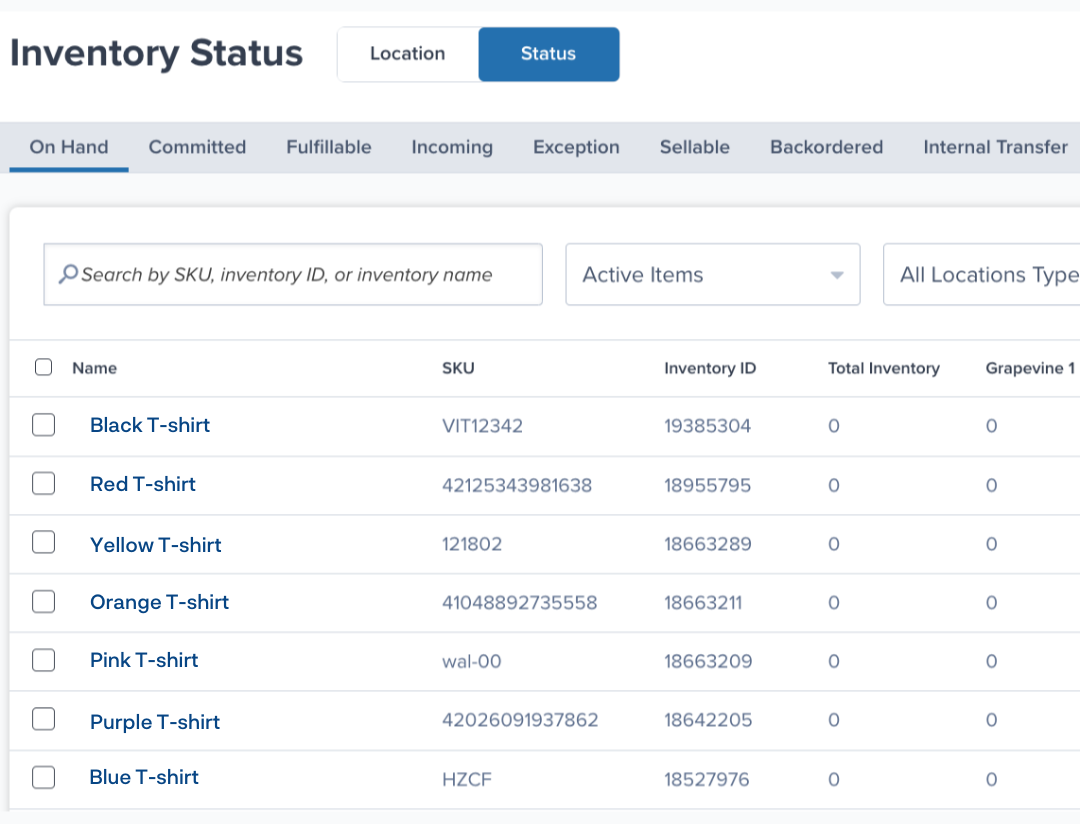
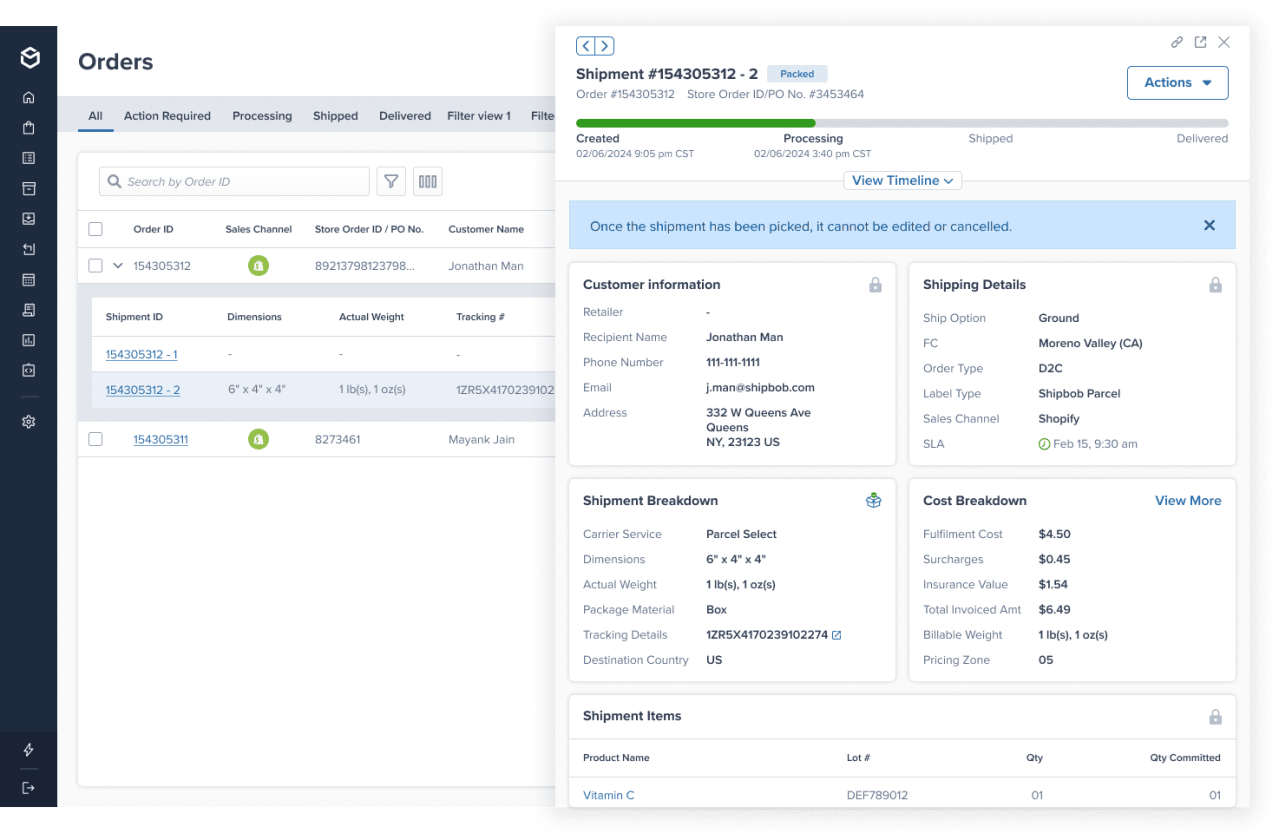
ShipBob’s cloud-based WMS offers a powerful solution to manage all aspects of your ecommerce warehouse from a single platform. You can monitor orders, inventory, fulfilment performance, shipping, and more at a granular level across all your sales channels and locations, so you know exactly what’s going on in every supply chain stage.
If you have multiple warehouses, ShipBob’s WMS gives you visibility into your entire network without having to juggle multiple tools or providers. The software features automated order routing capabilities to ensure that each order is directed to the right fulfilment centre based on proximity and inventory availability, speeding up the overall fulfilment process and ultimately saving you money on shipping.
Optimised workflows designed for time- and cost-savings
We built our WMS to make our ecommerce logistics as fast, accurate, and cost-efficient as possible, and brands leveraging it can see those same benefits in their own logistics. For example, using ShipBob’s WMS, business can:
- Achieve real-time, location-specific inventory visibility that helps you avoid costly stockouts and backorders.
- Use the picking workflow that works best for your business to maximum efficiency.
- Guide packing with prescriptive, visual step-by-step packing flows and built-in visuals to reduce errors.
- Optimise your warehouse layout to streamline activities and get the most value out of your square footage.
- Track staff productivity to improve labour forecasting and save money.
- Automate tedious warehousing tasks such as pick list generation, replenishment reminders, and inventory count updates for more accurate results while saving time.
Flexible fulfilment with in-house operations, ShipBob’s network, or both
If your brand wants to keep some ecommerce fulfilment in-house, but doesn’t have the resources to establish your own warehousing network, you have another option: go hybrid.
ShipBob’s hybrid fulfilment solution lets you use ShipBob WMS to run your own warehouse, and at the same time, leverage any of ShipBob’s dozens of fulfilment centres across the globe.
This lets you store inventory closer to customers, tap into new markets, and scale seamlessly without infrastructure costs – and because everything’s powered by ShipBob WMS, operations and quality are standardized across all your locations.
“It turns out that ShipBob’s WMS was exactly what we needed. The beautiful thing about it is everything was connected. I could log on to our ShipBob account and see everything in one place, no matter if I’m looking at our facility in Kankakee, IL, or the ShipBob fulfilment centres in Canada or Europe. It was all the same system. I didn’t have to learn various different platforms or deal with support representatives at different companies. Plus, if we experience any issues with syncing orders between systems, there’s one place we go to reconcile it. ShipBob is connected to our ERP, NetSuite, which is our single source of truth. Now we only have one place to troubleshoot and resolve potential issues across all logistics. The hybrid fulfilment solution is a connected web. The interconnectedness is why we chose ShipBob.”
Adam LaGesse, Global Warehousing Director at Spikeball

Limitless brand growth with key value-adds
Your WMS shouldn’t limit how your brand can grow. ShipBob WMS offers important capabilities and growth levers for your business to enable when the time is right, including:
- Support for custom branded packaging (including boxes and poly mailers)
- Marketing inserts, gift notes, and inserts to level-up the unboxing experience
- 2-day express shipping options
- Turnkey integrations with all major ecommerce platforms and marketplaces
- Virtual or on-site implementation with zero down time, led by operations experts
- A dedicated Account Manager for one-on-one support and quick troubleshooting
- Reporting and analytics dashboard at no additional cost
With these and more, your brand can delight customers, save money, and run a more efficient business – all while scaling to new heights.
“Being able to expand our business without having to look for new partners was huge for us – and ShipBob makes it possible. ShipBob has a growth mindset, and is constantly adding new features and capabilities that are super beneficial to us, so we haven’t needed to look elsewhere for the tools to scale. There’s just so many ways we can grow with ShipBob, and we’re excited to take advantage of all of them.”
Jessica Cedarleaf, VP of Operations at Tonies
Companies using ShipBob’s warehouse management system software
To get an even better understanding of the difference ShipBob’s WMS can make, hear how real merchants have leveraged it to optimise their warehousing.
Spikeball uses ShipBob WMS to connect systems and streamline operations
Before using ShipBob WMS, Spikeball was relying on multiple platforms and software that were working independently from each other. This included a label generation software tool that required their manager to rely on tacit knowledge and print labels herself order by order. Not only was this inefficient, but it was prone to errors, leading to higher shipping fees.
Now, ShipBob WMS automates the whole process, and has saved the brand $400,000 and 40% in total fulfilment costs.
The ShipBob WMS also helps them reconcile inaccuracies and discrepancies as it connects to their ERP, allowing them to ensure the data is synced and updated across different systems.
“Not only is the ShipBob WMS a lot less expensive than other ones I was looking at, but it is also more intuitive and user-friendly. I’m not a supply chain expert by any means, so ShipBob’s WMS was really appealing because it was cost-effective and so easy to learn.”
Adam LaGesse, Global Warehousing Director at Spikeball
PitViper uses ShipBob WMS to optimise workflows and reduce mispicks
ShipBob WMS was the first warehouse management system that PitViper ever used, but ShipBob’s hands-on onboarding support made the implementation process simple. With expert help at each step of the way, the brand was able to customising workflows and handle the complexities of warehouse mapping, SKU syncing, and software integrations with ease.
With the WMS enabling them to run multiple checks and balances throughout the fulfilment process, they were able to significantly reduce mispicks. PitViper went from a 92% accuracy rate to 99.7%, translating to 2,100 fewer mispicks a year.
“Our order picking and routing has also greatly improved with ShipBob. With the ShipBob WMS, we can create the most efficient routes through the warehouse, which has cut down on an insane amount of time and made picking, packing, and shipping so much more efficient.
Running a warehouse is unpredictable. But ShipBob has definitely helped with that. Thanks to ShipBob’s WMS, we have access to more data. Now we know how many orders an employee can complete in an hour so we can forecast for labour a lot better than we did before.”
Jourdan Davis, Operations Manager at Pit Viper
For more information on how you can use ShipBob’s WMS to power and optimise your own warehousing operations, click the button below to get in touch.
Warehouse management system FAQs
Here are some answers to the most common questions about warehouse management systems.
How does a WMS integrate with my existing systems?

A WMS can integrate with various systems to connect multiple aspects of your operations. You can find WMS integrations for ERP systems, order management systems, ecommerce platforms, returns management systems, and more.
What’s the difference between a WMS and an ERP?
While a WMS focuses on optimising your warehouse operations, an ERP helps you manage resources across your broader business operations. A WMS offers features tailored to inventory tracking, labour management, and order fulfilment. Meanwhile, ERPs usually include features to optimise purchasing, accounting, and human resources.
Can a WMS help with omnichannel fulfilment?
A WMS integrates with all your sales channels, so any order placed on any of your channels is automatically processed and routed to the most optimal fulfilment centre. As inventory and order data are centralised in a cloud-based system, fulfilment teams across different warehouses can seamlessly access the information no matter where they’re located.
How do I implement a WMS?
The WMS implementation process typically involves syncing inventory data, mapping the warehouse layout, integrating with existing software, and creating customised workflows for your operation. Depending on the size and complexity of your operation, the process may take anywhere between three months to a year.
What kind of training is required to use a WMS?
The WMS training process involves educating staff on how to navigate the system and leverage its various features. The onboarding team will provide role-based training, so each team knows how to use the system to perform their assigned tasks like receiving, putaway, picking, packing, and shipping.
What sets ShipBob’s WMS apart from competitors?
ShipBob’s cloud-based WMS offers powerful features with comprehensive integrations to serve as an all-in-one solution for managing your warehouse operations. It supports omnichannel fulfilment and scales with your business needs, offering a high level of flexibility for global fulfilment. It even supports customisation and value-added services, including custom packaging, bundling, kitting, and expedited shipping.
Can ShipBob’s WMS be used for in-house fulfilment?
Yes, ShipBob’s WMS can help you manage your in-house fulfilment operations. Additionally, you have the option to leverage the ShipBob fulfilment network as needed for a hybrid approach.
