

A legacy WMS can still technically work. It processes orders, tracks inventory, and generates reports.
But “working” and “supporting growth” aren’t the same thing. As ecommerce operations become more complex, warehouse management systems (WMS) built for a different era often struggle to keep pace.
This guide helps you assess whether your WMS has become a bottleneck, and which modernization path fits your business. You’ll walk away with a quick diagnostic for spotting legacy system symptoms and a practical decision framework for choosing between upgrading or replacing your WMS (or outsourcing fulfillment entirely).
What makes a WMS “legacy” (and how to spot it quickly)
A legacy WMS isn’t defined by age alone. Some 15-year-old systems run beautifully because they’ve been well-maintained and fit their operational requirements. Others become “legacy” within five years because they can’t adapt to new business realities.
In practice, a WMS built with legacy technologies can significantly reduce business efficiency. Common issues include:
- A slow system performance that delays order management and inventory tracking.
- Limited scalability that creates bottlenecks.
- Time-consuming system updates.
- Complex maintenance with challenges finding qualified personnel.
A modern warehouse management system, by contrast, operates on a subscription model with automatic updates handled by the vendor.
Cloud-based WMS systems excel in scalability since resources like storage or computing power can be quickly scaled up or down. They’re built with an API-first architecture, enabling integrations with ecommerce platforms, ERPs, and shipping tools without extensive custom coding.
💡
The question isn’t “how old is your WMS?” but rather “can it support how your business operates today?”
Here’s how to tell the difference.
⚙️ Common legacy WMS symptoms
- Batch syncing instead of real-time updates: If your inventory counts only update hourly or daily, you’re operating with stale data that leads to overselling and stockouts.
- Data silos between systems: When integrated systems evolve and a WMS doesn’t keep pace, integration issues become nearly inevitable. Outdated software versions, limited API support, and data isolation can create significant challenges — especially when trying to integrate with modern systems.
- Limited reporting capabilities: If generating a custom report requires IT involvement or waiting days, you’re missing opportunities to identify and fix operational issues.
- Slow change cycles: Adding a new picking workflow or adjusting putaway logic shouldn’t require a six-month development project.
- Peak-season scaling struggles: A legacy WMS geared toward daily cycles will struggle to keep up with the real-time capabilities of automation and the volume spikes that come with promotional periods.
- Multi-site complexity: Managing inventory across warehouses often requires spreadsheet workarounds or separate system instances that don’t communicate effectively.
🚩 Red-flag moments that signal it’s time to act
- Inventory discrepancies between your WMS and sales channels appearing regularly.
- Teams creating manual workarounds just to ship orders on time.
- Significant delays when adding a new marketplace integration or opening a second warehouse.
A legacy WMS in action: Bunker Branding
Bunker Branding, a print-on-demand merchandise company serving over 90 YouTube creators and influencers, experienced firsthand the limitations of legacy processes before adopting a modern WMS approach. The company needed systems that could keep pace with their growth while maintaining quality.
Before implementing ShipBob’s WMS, Bunker Branding relied on manual picking processes and paper-based workflows. These approaches created inefficiencies, increased error rates, and limited their ability to scale.
Today, they use ShipBob’s WMS to ship more than 10,000 orders per month. Bunker Branding now boasts an error rate of less than 1%, with high efficiency attributed to their WMS. The system calculates the best routes for pickers and integrates inventory tools to reduce human error.
“We have been able to set some standard practices of what’s fulfillable and what can be done in a day. In our old system, we knew we had a certain amount of orders to get to in a day, but we didn’t know which ones to prioritize. Our managers had to manually go in and see which orders took priority.
Using ShipBob’s WMS has cleared up a lot of time for our managers because now they don’t have to dictate which orders need to be fulfilled first, the system does that for us.”
Clint Sanders, VP of Operations of Bunker Branding
How a legacy WMS can create cost, risk, and slower fulfillment as you scale
Recognizing legacy WMS symptoms is one thing. Understanding what they cost your business is another. These operational headaches tend to ripple outward into customer experience, profitability, and growth capacity.
Key risks of operating on a legacy WMS
- Pain compounds with growth. If you use a legacy WMS, some of your processes can’t be streamlined and automated because it holds you back. Insisting on using a legacy system creates a bottleneck for your company’s evolution. Higher order volume, more SKUs, and additional warehouses can all amplify existing problems.
- Maintenance and customization costs escalate. Maintenance of legacy systems is more expensive than people realize. It’s not only the cost of hiring someone with the right skill set but also training new employees on legacy technology. Infrastructure expenses and ongoing consulting fees also drain budgets that could fund growth initiatives.
- Manual workarounds reduce productivity. Older systems often rely heavily on manual data entry and tedious processes, creating more work for users. Workers on the floor suffer most from the pitfalls of a legacy WMS, dealing with excess time spent correcting inventory reports and constant input errors. More touches per order means more training time and slower onboarding of seasonal labor.
- Stale or mismatched data increases errors. Accurate inventory tracking is the key to a well-functioning warehouse. Relying on a legacy WMS can sometimes lead to discrepancies between actual and reported inventory levels. Mispicks, mis-ships, and inventory discrepancies erode customer trust and drive up returns.
- Slower fulfillment creates customer-facing issues. An outdated WMS may not be optimized to handle the demands of modern logistics. This results in inefficient workflows that lead to delays in order processing and missed delivery deadlines. More “where is my order” inquiries strain support teams, and missed service-level expectations damage relationships with retail partners.
The bottom line:
System limitations aren’t just an IT frustration. When your warehouse can’t keep pace with demand, customers notice and competitors benefit.
How modern cloud WMS can change day-to-day fulfillment operations
Understanding what you’re missing helps clarify whether modernization makes sense. Modern cloud WMS platforms handle core warehouse workflows fundamentally differently than legacy systems, and that difference shows up in daily operations.
Cloud eliminates lengthy implementation cycles and heavy capital outlays and even lets mid-size operations roll out enterprise-grade functions quickly. But the real value becomes apparent when you examine how each approach handles the workflows your team executes every day.
Core workflow differences
Here’s how legacy WMS and modern cloud WMS compare across key warehouse workflows:
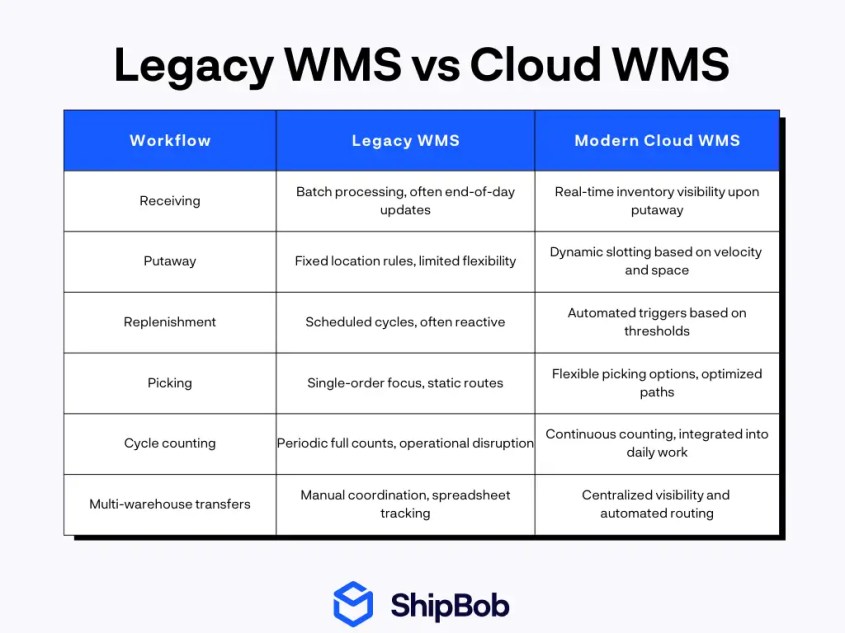
Integration is often the breaking point. On-premise systems require custom coding and IT coordination for each integration — slowing deployment and driving up costs. Cloud WMS platforms come with pre-built APIs that connect to ERPs, ecommerce platforms, and shipping tools without extensive development.
When inventory data doesn’t sync smoothly across systems, you can’t make accurate stock promises to customers. Delayed updates undermine available-to-promise calculations and marketplace listing accuracy.
However, real-time visibility is the differentiator teams actually feel. Modern WMS platforms show inventory on hand, allocated, and available at any moment. Teams can track order milestones in real time, access throughput dashboards from anywhere, and spot bottlenecks before they become crises.
That visibility transforms warehouse management from reactive firefighting to proactive optimization.


Choose the right modernization path for your business
Modernization isn’t binary. “Move to the cloud” isn’t the only answer, and ripping out your entire system isn’t always the smartest play. The right path depends on your current situation, growth trajectory, and operational priorities.
Four distinct approaches exist, each suited to different circumstances. The decision framework below helps match your situation to the right strategy. Here’s how to evaluate each option across the factors that matter most.
Here is a little more detail on each path to help you better figure out your path:
Upgrade
When your core WMS is stable but needs better configuration, integrations, or reporting, upgrading can deliver value quickly with minimal disruption. This path works well if your system is still supported and your team can handle incremental improvements.
Replace
If custom code sprawl and brittle integrations make every change slow or risky, replacing your WMS may be the only way to unlock future growth. This approach requires more upfront investment and planning but pays off with long-term flexibility and scalability.
Outsource fulfillment
For some brands, modernizing doesn’t mean replacing a legacy WMS at all — it means reevaluating whether warehouse operations should remain in-house. Outsourcing fulfillment can remove operational bottlenecks and provide access to modern systems, automation, and scale without owning the infrastructure.
This path often makes sense for brands facing headcount constraints, peak volatility, or international expansion. ShipBob’s network, for example, supports fast, cost-effective shipping from dozens of fulfillment centers to over 250 destinations.
Hybrid
If you want to keep part of fulfillment in-house but need faster coverage or global expansion, a hybrid approach lets you use ShipBob’s WMS in your own warehouse (US only) while outsourcing to ShipBob in other countries. This model provides unified visibility and flexibility as you scale.
Decision factors to evaluate
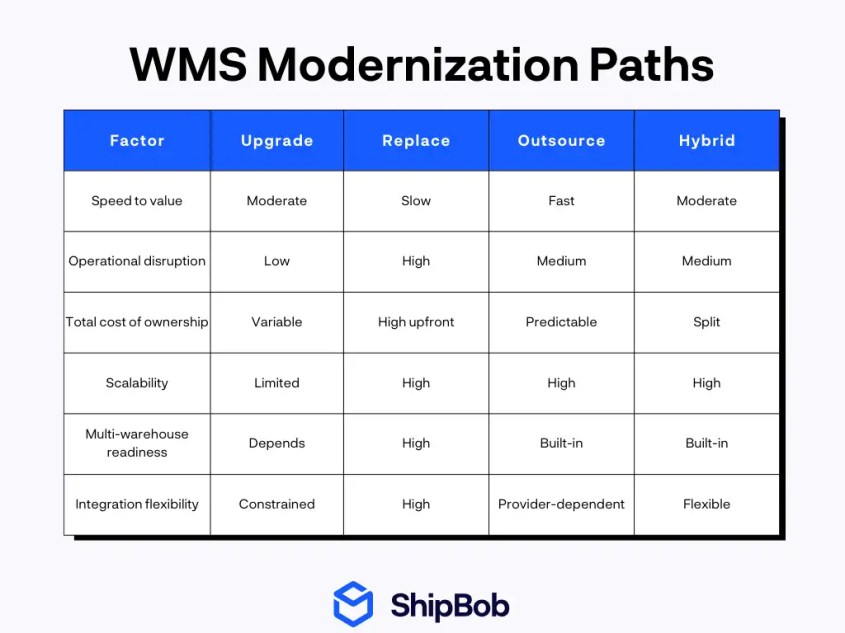
No matter which path you choose, you also need to think carefully about your approach to change management:
- Start with process mapping and a clean data audit. This includes reviewing SKUs, locations, and order statuses.
- Then pilot changes in one warehouse or order stream before expanding.
- Run parallel reporting during cutover to catch discrepancies early.
- Align stakeholders on success metrics like time-to-ship and inventory accuracy.
A thoughtful rollout reduces risk and builds confidence across your team.
How ShipBob helps you move beyond legacy WMS limitations
ShipBob offers multiple paths forward depending on your operational needs: outsource fulfillment entirely, use ShipBob WMS in your own US-based warehouse, or combine both approaches in a hybrid model.
Each option gives you access to modern, cloud-based technology without the burden of building and maintaining legacy infrastructure.
Here’s how ShipBob supports brands moving beyond legacy WMS:
Real-time inventory visibility
ShipBob’s dashboard provides a single source of truth for inventory across all locations and channels.
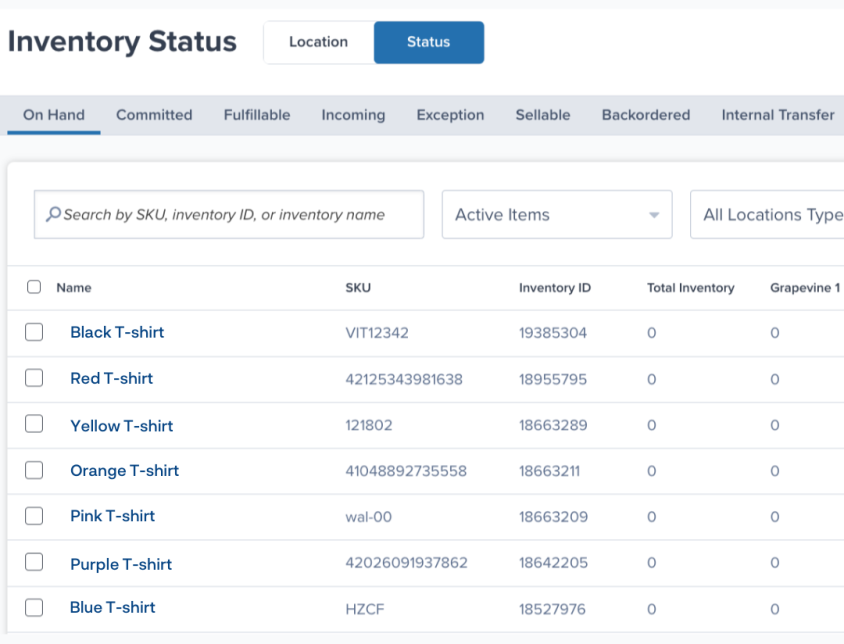
Brands like Tonies and Dossier, for example, have reduced errors and support tickets by relying on real-time data instead of batch updates.
“I can’t say enough about ShipBob’s software and reporting capabilities. It really has made things easy for us to look at the data and make better decisions. Not all partners are set up that way – oftentimes when you’re using other providers’ technology, you have to pull the data yourself, and there’s a lot of work to be done on the back end.”
Ryan Steffenson, Senior Manager, Channel Operations at Tonies


“ShipBob’s dashboard is super intuitive and easy to navigate. I love that you can view orders based on when they are processing, completed, on hold, and in other stages. It is super helpful for us to have that and track the order every step of the way. We have a Shopify store but do not use Shopify to track inventory. In terms of tracking inventory, we use ShipBob for everything — to be able to track each bottle of perfume, what we have left, and what we’ve shipped, while getting a lot more information on each order.”
Ines Guien, Vice President of Operations at Dossier


Seamless integrations
With 40+ native integrations and a developer API, ShipBob connects your ecommerce stack. It syncs orders, updates inventory, and pushes tracking automatically. This eliminates manual workarounds and delays.
“Since working with ShipBob, I’ve saved hundreds of hours. Each week, 2-3 hours’ worth of work has been taken off my plate, especially around integrations. ShipBob is a big company, and we work with some of the biggest ecommerce platforms and tools, so I know that whatever software we want to integrate, ShipBob can handle it.”
Cody Allen, Co-Founder of Cuso Cuts
Multi-warehouse management
ShipBob WMS supports picking, packing, and inventory management across multiple warehouses without adding headcount.
Earthley, for instance, improved productivity and pick speed by switching to ShipBob’s system.
“ShipBob’s WMS has more than doubled, if not tripled, our productivity in terms of labor hours. Our average days to ship is now only 0.8 days, so most packages are shipping same-day or next-day, with rare exceptions.
We’ve cut 4 days of lead time because orders are getting processed, fulfilled, and shipped more efficiently. When we first started with ShipBob, we were doing about 15K orders per month, and now we’re processing 30K — double what we were doing just six months ago.”
Ben Tietje, Co-Founder and CEO of Earthley


Scalable fulfillment network
ShipBob’s network enables fast expansion into new markets. It offers cost-effective shipping from dozens of centers to 250+ destinations.
The Inventory Placement Program also reduces shipping zones by placing inventory closer to customers, cutting costs and transit times.
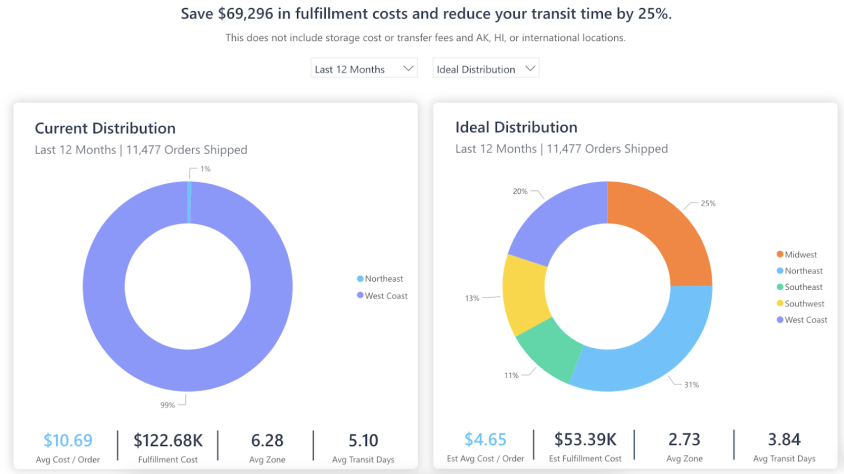
“Expanding our warehouse network from 2 to 4 warehouses has translated into $1.5 million in freight cost savings for Our Place. It also cut our fulfillment and shipping times in half, from 5 or 6 days to just 2.5 days.”
Ali Shahid, COO of Our Place
Ready to see how ShipBob can help you modernize your fulfillment operations? Click the button below to explore your options.
Legacy WMS FAQs
Here are answers to some of the most common questions about legacy warehouse management systems.
What are the most common symptoms of a legacy WMS?

Common symptoms include batch data syncing, data silos, and limited reporting. You might also experience slow change cycles and frequent manual workarounds. These issues often lead to inventory discrepancies, slower fulfillment, and difficulty scaling.
What’s the difference between on-prem WMS, cloud WMS, and hybrid WMS?
On-prem WMS runs on local servers and often requires custom code and manual updates, while cloud WMS is delivered as a SaaS solution. It offers real-time updates, easier integrations, and remote access.
Hybrid WMS combines both, allowing brands to use cloud-based tools in their own warehouses while outsourcing some fulfillment.
When does it make more sense to outsource fulfillment instead of investing in a new WMS?
Outsourcing makes sense when internal warehousing has become a growth bottleneck — whether due to headcount constraints, peak-season volatility, or the desire to expand into new markets without building local infrastructure.
If managing warehouse technology and operations distracts from your core business, partnering with a tech-enabled fulfillment provider lets you access modern WMS capabilities without the implementation and maintenance burden.
Can I use ShipBob if I want a hybrid model?
Yes, ShipBob supports hybrid models. You can use ShipBob WMS in your own US warehouse and outsource fulfillment to ShipBob’s network in other countries, maintaining unified visibility and control from a single dashboard.


