
Table of Contents
** Minutes
How to set up your first Amazon business (step-by-step)
Benefits of Amazon FBA for ecommerce businesses
Limitations and risks of using Amazon FBA
How to manage inventory for consistent FBA success
Expanding globally with Amazon FBA
Ecommerce brands selling on Amazon may opt to fulfill orders using Amazon’s “Fulfillment by Amazon” (or FBA) solution. Through FBA, Amazon stores, picks, packs, and ships your products to end customers in Amazon-branded packaging.
While FBA offers Prime eligibility and simpler operations, it’s not ideal for every product or business. Success depends on knowing when and how to use FBA strategically within your overall fulfillment approach.
This guide covers the essentials of Amazon FBA: its mechanics, profit-maximizing strategies, and optimization techniques. Whether you’re new to FBA or looking for an alternative solution, you’ll find actionable tips to navigate Amazon’s ecosystem and grow your business.
What is Amazon FBA?
Amazon FBA (Fulfillment by Amazon) lets sellers use Amazon’s logistics network to handle storage, picking, packing, shipping, and customer service.
Brands send their inventory to Amazon’s warehouses, and Amazon manages storage, fulfillment, and delivery.
FBA is appealing to Amazon sellers because it helps brands avoid the headaches of managing warehouses, hiring staff, and coordinating shipping. This frees brands to focus on what really grows their businesses: product development, marketing, and expansion strategies.
Products sold through FBA automatically become Prime-eligible, offering customers 1-2 day shipping. This Prime badge attracts Amazon’s most loyal shoppers, boosting products’ visibility and appeal and often resulting in higher sales and customer satisfaction.
How does Amazon FBA work?
In Amazon FBA, sellers begin by preparing their inventory according to Amazon’s guidelines: properly packaging products, applying Amazon barcodes, and meeting compliance requirements.
After shipping inventory to an Amazon fulfillment center, Amazon’s team receives and organizes products by size, category, and demand for efficient storage and retrieval.
When a customer orders an FBA product, Amazon handles picking the item from storage, packing it for shipment, and delivering it through their logistics network.
Amazon also manages all customer service and returns. If customers have questions or need to return items, they contact Amazon’s support team. This comprehensive service helps maintain customer satisfaction and builds trust in your Amazon products.

How to set up your first Amazon business (step-by-step)
Starting an Amazon business is straightforward – with the right preparation. Before setting up your Amazon account, establish these three essentials:
1
Research your niche: Verify market demand, analyze competitors, highlight your product’s unique features, and set competitive prices.
2
Secure reliable suppliers: Whether you manufacture products yourself, use wholesalers, or work with overseas partners, focus on quality and strong relationships.
3
Create a concise business plan: Define your goals, target audience, marketing strategy, and financial projections to guide your growth.
With this foundation in place, you’re ready to launch. Here are the key steps to get started and implement FBA.
Create or upgrade your Amazon Seller Central account
To start selling on Amazon, you’ll need to create a Seller Central account. If you already have an individual seller account, consider upgrading to a professional account, which is required for FBA and offers additional features and benefits.
During the registration process, you’ll need to provide basic information about your business, such as your company name, address, and tax identification number. You’ll also need to set up your payment and deposit methods to ensure you can receive payments from Amazon.
Once your account is set up, take some time to familiarize yourself with the Seller Central dashboard and its various features. This is where you’ll manage your product listings, inventory, orders, and performance metrics.
List your products
With your Seller Central account ready to go, it’s time to create your product listings. When adding a new product, you’ll need to provide key details such as the product title, description, images, and relevant keywords to help customers find your items.
Be sure to review Amazon’s category-specific requirements and restrictions to ensure your products are compliant. Some categories, such as health and beauty or groceries, may have additional certification or labeling requirements.
When creating your listings, optimize your product titles and descriptions for search by including relevant keywords and highlighting your product’s unique features and benefits. High-quality images are also essential for attracting customers and showcasing your products in the best light.
Prepare inventory to meet Amazon’s requirements
To ensure a smooth and efficient FBA experience, it’s crucial to prepare your inventory according to Amazon’s guidelines. This includes proper packaging, labeling, and shipping requirements.
Start by reviewing Amazon’s packaging and prep requirements for your specific product categories. You may need to use certain types of boxes, polybags, or bubble wrap to protect your items during shipping and storage.
Next, ensure your products are labeled correctly with the appropriate barcodes and identifiers. Amazon uses a system called FNSKU (Fulfillment Network Stock Keeping Unit) to track and manage inventory. You’ll need to apply these labels to each individual product unit before shipping to Amazon’s fulfillment centers.
For larger shipments, you may need to palletize your inventory according to Amazon’s specifications. This involves properly stacking and securing your boxes on a pallet, with appropriate labeling and wrapping.If Amazon’s robust inventory preparation requirements are challenging for you to manage on your own, consider outsourcing to an expert supply chain enablement platform like ShipBob. ShipBob offers an FBA preparation solution that can be used in tandem with our outsourced fulfillment for DTC, retail distribution, and dropshipping orders.
Ship inventory to Amazon’s fulfillment centers
Once your inventory is prepped and ready to go, it’s time to create an FBA shipment in Seller Central. This process involves providing details about your products, quantities, and the Amazon fulfillment centers you’ll be shipping to.
Amazon will provide you with shipping labels and packing slips to include with your shipment. You can choose to use Amazon’s partnered carriers for discounted shipping rates or arrange your own shipping through a carrier of your choice.
When scheduling your shipment, be mindful of lead times and potential delays to ensure your inventory arrives at Amazon’s fulfillment centers in a timely manner. You can track the progress of your shipment within Seller Central and receive notifications when your inventory is received and available for sale.
Monitor performance and manage inventory levels
With your products live on Amazon and your inventory in FBA warehouses, it’s essential to regularly monitor your performance and manage your stock levels to ensure continuous sales and avoid stockouts.
Use Amazon’s inventory management tools to track your current stock levels, monitor sales velocity, and set up automatic restock alerts. This will help you stay on top of your inventory and make informed decisions about when to reorder or adjust your stock levels.
As you gather sales data over time, start implementing basic inventory forecasting techniques to predict future demand and optimize your stock levels. Consider factors such as seasonality, sales trends, and upcoming promotions when making your projections.
By staying proactive with your inventory management, you can minimize the risk of stockouts, reduce excess storage fees, and ensure a smooth and profitable FBA operation.
Benefits of Amazon FBA for ecommerce businesses
Amazon FBA transforms how you fulfill orders by handling logistics while connecting you to millions of shoppers. Here’s how it can benefit your business:
Prime eligibility and increased sales potential
FBA products automatically qualify for Prime shipping, giving you access to Amazon’s most valuable customers.
Prime members spend more than double ($1,400 vs $600 annually) compared to non-Prime shoppers. This badge not only attracts high-value customers but also improves your chances of winning the Buy Box: Amazon’s algorithm favors FBA listings when determining which seller gets featured.
Simplified logistics and operations
Running your own fulfillment operation consumes significant time and resources. With FBA, you simply ship inventory to Amazon, and they handle storage, picking, packing, and shipping.
This eliminates the need for warehouse space, staff, and equipment while allowing you to focus on growing your business instead of managing day-to-day logistics.
Professional customer service and returns handling
Amazon’s customer service team manages all inquiries, returns, and refunds for your FBA products.
Their streamlined returns process creates a hassle-free experience for customers while saving you the time and resources typically required to maintain quality customer support.
Your business benefits from Amazon’s reputation for excellent service without building an in-house team.
Scalability during peak seasons and growth periods
FBA can make it easier to handle demand fluctuations, whether during holiday rushes or after successful marketing campaigns. Amazon’s extensive fulfillment network accommodates inventory increases without requiring you to secure additional warehouse space or hire seasonal staff.
For example, if you sell seasonal products like beach towels, you can simply send more inventory to Amazon during summer months and their system handles the increased volume seamlessly. This helps promote timely delivery and uninterrupted business growth.
Limitations and risks of using Amazon FBA
While Amazon FBA offers many benefits, understanding its limitations and risks is crucial for making informed decisions and developing strategies to protect your business.
💸 FBA fees and cost considerations
FBA’s fee structure is robust, and can be tricky to understand. In general, FBA comes with 4 main costs:
- Fulfillment fees based on product size and weight
- Monthly storage fees based on inventory volume
- Long-term storage fees for items held over 365 days
- Removal and disposal fees for unsold or returned inventory
These costs add up quickly, especially for low-priced or slow-moving products.
Calculate the true cost of FBA for each product by comparing all fees against potential sales and customer satisfaction benefits.
To manage costs effectively, you should:
- Review pricing regularly to maintain sufficient margins.
- Monitor inventory to prevent overstocking.
- Remove slow-moving inventory promptly.
- Consider alternative fulfillment for low-margin products.
📦 Inventory and storage restrictions
Amazon’s strict inventory controls can create challenges, especially for sellers with large catalogs.
The Inventory Performance Index (IPI) measures how efficiently you manage FBA inventory. Low scores can trigger storage limits, preventing new inventory shipments until performance improves (which can be particularly problematic during peak seasons).
Amazon also imposes storage limits based on category, sales volume, and seasonality, with tighter restrictions during holidays.
To navigate these restrictions:
- Monitor your IPI score and improve it by reducing excess inventory.
- Plan ahead for seasonal storage limits.
- Stay updated on Amazon’s policy changes.
- Use third-party warehouses for overflow or slow-moving inventory.
🚫 Limited branding and customer relationship control
With FBA, Amazon controls much of the customer experience. This means:
- Products ship in Amazon’s generic packaging, limiting branding opportunities.
- Amazon retains customer data and communication channels.
- Direct customer engagement becomes difficult.
- Building loyalty and gathering feedback is challenging.
To overcome these limitations, you can try to:
- Use custom branding for products fulfilled through other channels.
- Encourage social media follows and newsletter signups.
- Provide exceptional service for direct customer inquiries.
- Use Amazon’s “Request a Review” feature to gather feedback.
⚖️ Competition and marketplace saturation
Amazon’s massive marketplace means intense competition. This often leads to:
- Price pressure as sellers compete for the Buy Box.
- Reduced profit margins.
- Difficulty standing out in saturated categories.
- Challenges for new sellers with limited brand recognition.
To position your brand more competitively on Amazon, try:
- Offering unique, high-quality products with clear value.
- Optimizing listings with compelling content and keywords.
- Using Amazon’s advertising tools to increase visibility.
- Encouraging reviews to build social proof.
- Monitoring competitors and adapt your strategy accordingly.
How to manage inventory for consistent FBA success
Smart inventory management is essential for FBA profitability. Poor practices lead to stockouts and lost sales, while overstocking ties up capital and increases fees.
Here’s how to optimize your approach:
Forecast demand and plan inventorylevels
Predict future demand by analyzing historical sales data, considering seasonality, promotions, and market trends.
Improve your forecasting by:
- Using Amazon’s sales reports to analyze past performance.
- Leveraging third-party analytics for advanced insights.
- Accounting for holidays, events, and product lifecycles.
- Updating forecasts regularly with new data.
Set appropriate reorder points and include safety stock to handle unexpected demand spikes or supply chain issues.
Sync inventory across multiple sales channels
When selling through multiple channels (your website, marketplaces, physical stores), maintain consistent inventory by:
- Using an inventory system that integrates all channels with real-time updates.
- Setting up automated allocation rules to prioritize channels strategically.
- Reconciling inventory data regularly to catch discrepancies.
This prevents overselling and ensures consistent customer experience everywhere you sell.
Understand Amazon Warehousing and Distribution (AWD)
For high-volume sellers with steady demand, AWD offers:
- Lower storage fees than standard FBA.
- Storage options for up to 12 months.
- Streamlined bulk shipping and receiving.
Determine if AWD fits your business by evaluating inventory turnover, calculating potential savings, and assessing supply chain impact. AWD works best for businesses with larger, stable inventory volumes.
Prevent costly storage fees and inventory issues
Minimize storage costs by:
- Regularly checking inventory age to avoid long-term storage fees.
- Creating strategies to move aging inventory (promotions, bundles, removal orders).
- Improving your Inventory Performance Index (IPI) score.
- Using third-party warehouses for slow-moving or seasonal items.
Proactive inventory management maintains healthy profit margins and sustainable operations.
Leverage data for smarter inventory decisions
Make data-driven decisions by tracking key metrics such as:
- Sales velocity and turnover rates.
- Inventory age and storage duration.
- Stock-to-sales ratios.
- Product and category profitability.
- Forecast accuracy.
Regularly analyzing these metrics helps you optimize inventory levels, pricing, and product mix, which can reduce costs while boosting sales and profitability.
Expanding globally with Amazon FBA
Amazon FBA can help sellers reach international markets while simplifying cross-border logistics.
Here’s how to leverage Amazon’s global network to grow your business worldwide:
Understanding international FBA programs
Amazon offers several key international programs:
- European Fulfillment Network (EFN): Store inventory in one European country to fulfill orders across all European marketplaces
- Pan-European FBA: Distribute inventory across multiple European fulfillment centers for faster, cheaper delivery
- North America Unified Accounts: Manage US, Canada, and Mexico operations from one account
- Global Selling: Sell worldwide with local FBA centers handling fulfillment
Choose the right program by evaluating:
- Target markets and customer demand.
- Product compliance requirements.
- Cultural and language considerations.
- Import/export regulations.
- Profitability after all costs.
Navigating customs and international shipping
To overcome customs challenges:
- Research country-specific import requirements.
- Ensure products meet all safety and labeling standards.
- Use correct Harmonized System (HS) codes for classification.
- Factor duties and taxes into your pricing.
- Consider working with customs brokers for complex shipments.
Creating effective international listings
Localize your listings by:
- Researching local customer preferences and competitors.
- Adapting product content to highlight locally relevant benefits.
- Properly translating and localizing all content (measurements, idioms, cultural references).
- Optimizing for local search terms and Amazon’s algorithms.
- Meeting all local legal and disclosure requirements.
Managing multi-country inventory efficiently
Optimize your global inventory by:
- Analyzing market-specific demand patterns and seasonality.
- Setting appropriate stock levels for each country.
- Using Amazon’s Global Inventory Viewer to monitor performance.
- Implementing third-party inventory management tools.
- Regularly adjusting inventory based on performance data.
Partnering with global fulfillment partners for comprehensive coverage
Supplement Amazon FBA with expert global fulfillment partners like ShipBob to gain:
- Access to additional fulfillment centers in key markets.
- Support for both Amazon and non-Amazon sales channels.
- Custom packaging and branding options.
- Advanced analytics and inventory visibility.
- Expert guidance on international shipping and compliance.
How ShipBob supports a blended Amazon fulfillment strategy
Balance your Amazon strategy by combining FBA with ShipBob’s complementary fulfillment solutions.
Here’s how ShipBob helps you overcome the challenges we’ve discussed while maximizing your Amazon success.
Streamlining FBA prep with ShipBob
ShipBob handles all FBA preparation requirements, from proper labeling and packaging to palletization. This ensures your inventory meets Amazon’s strict standards and reduces compliance errors and rejection rates while freeing you from time-consuming prep work so you can focus on growing your business.
Having the ability to see the statuses of these orders – being able to see they’re in the picking stage, the packing stage, if they’ve been shipped – has also been game-changing. It lets us either adjust timelines, give the proper information to the order’s recipient, or (when we’re reaching out to our freight carriers) see which dates we can expect FBA inbound shipments to arrive, sometimes down to the hour.”
“We use ShipBob’s FBA prep solution to kit orders and send them to Amazon for FBA. It’s really straightforward, but the best part of the service is the visibility we get. In ShipBob’s dashboard, we can see exactly how inventory is moving, and make sure everything is kitted properly. It’s been really helpful and eye-opening in some cases. It’s even helped us tidy up some of our current processes.
Oscar Gutierrez, Operations Fulfillment Manager at goPure
Optimizing Amazon FBM with ShipBob’s integration
ShipBob offers a Fulfilled by Merchant solution for Amazon brands that want an alternative to FBA.
With a direct Amazon Seller Central integration, ShipBob enables seamless order processing for your Fulfilled by Merchant listings, where orders flow automatically to the nearest ShipBob fulfillment center and are fulfilled by ShipBob’s team. This allows you to offer Prime-competitive shipping speeds without FBA fees or restrictions.
“We recently decided to start selling our products on Amazon. While the knockoff risk is strong, it’s one of the most effective ways to get in front of customers, so it was worth the risk – especially with ShipBob helping us master the logistics side of things.
We use a combination of FBA and FBM, so we rely on ShipBob to both prepare our FBA orders and fulfill some of our Amazon volume for us. Ramping up with both these programs was very smooth, because ShipBob walked us through exactly how to how to connect into Amazon and how to execute fulfillment effectively.
We’re new to this and we don’t know how to do it, so ShipBob’s team’s been very strong in working through the details with us, and showing us how it all works.”
Cali Carleton, Founder and CEO of Domino & Juliette
Leveraging ShipBob’s WMS for in-house fulfillment
ShipBob’s warehouse management system (WMS) streamlines your operations, whether you’re fulfilling from your own facility or using ShipBob’s network. The system helps you efficiently manage both Amazon and non-Amazon inventory while providing advanced features that boost productivity and accuracy across all sales channels.
“Before ShipBob, our fulfillment was completely manual. We stacked boxes along the warehouse walls with different socks and styles of apparel. Inventory management was a nightmare. We had to manually divide stock between Shopify, Amazon, Etsy, and wholesale channels. There was no single source of truth. We had to physically count open boxes and cross-check inventory to make sure we had enough for each channel.
As we grew, operating this way became unsustainable. We knew we needed a more efficient fulfillment solution, so we connected with ShipBob about their warehouse management system (WMS). Thanks to ShipBob WMS, we’ve made major improvements to our fulfillment process. With their processes and inventory visibility, we don’t have to second-guess stock levels or spend time recounting products.”
Beth Welch, Co-Owner and Co-Founder, and Maddie Crawford, Fulfillment Manager, at Forest Ink and Groovy Things Co.
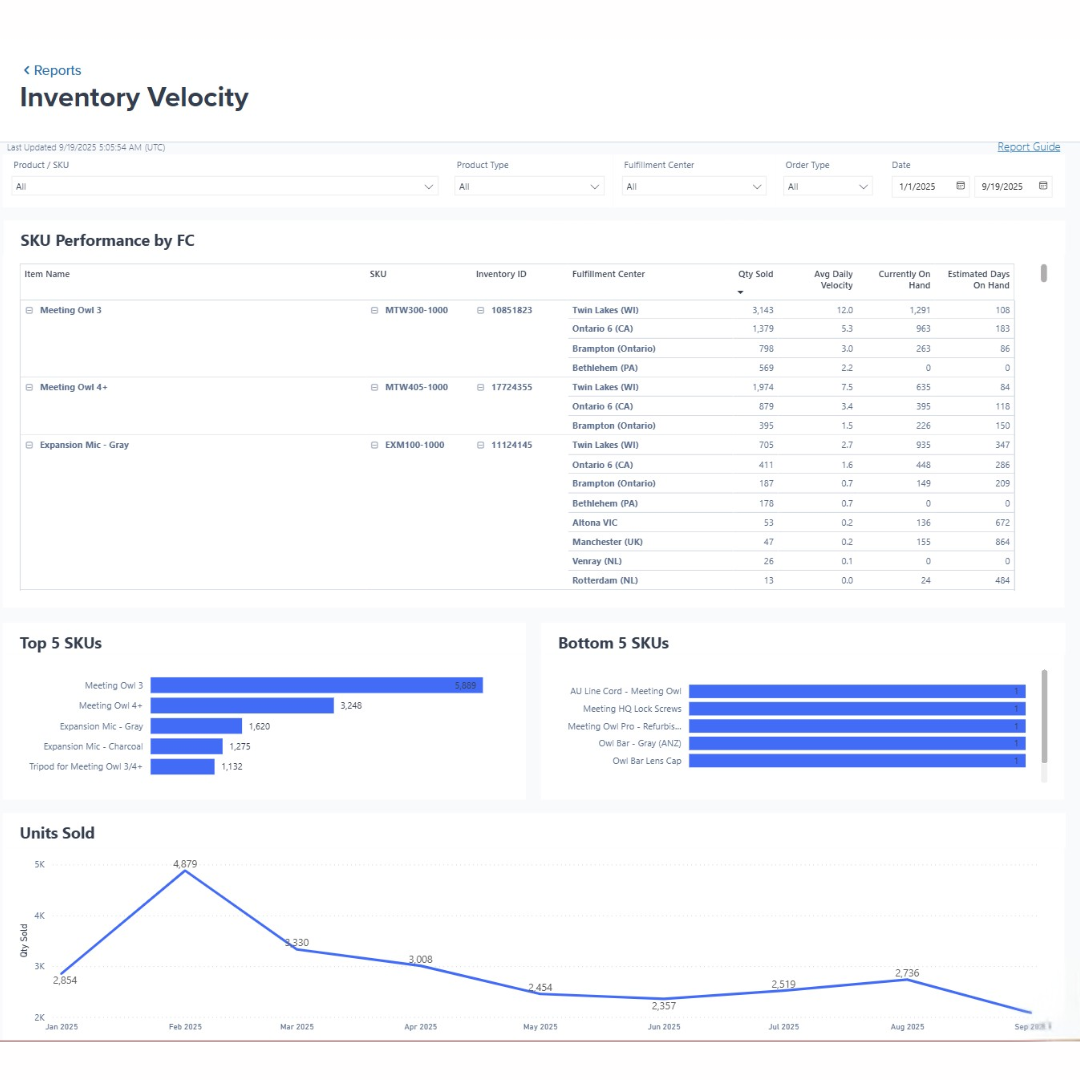
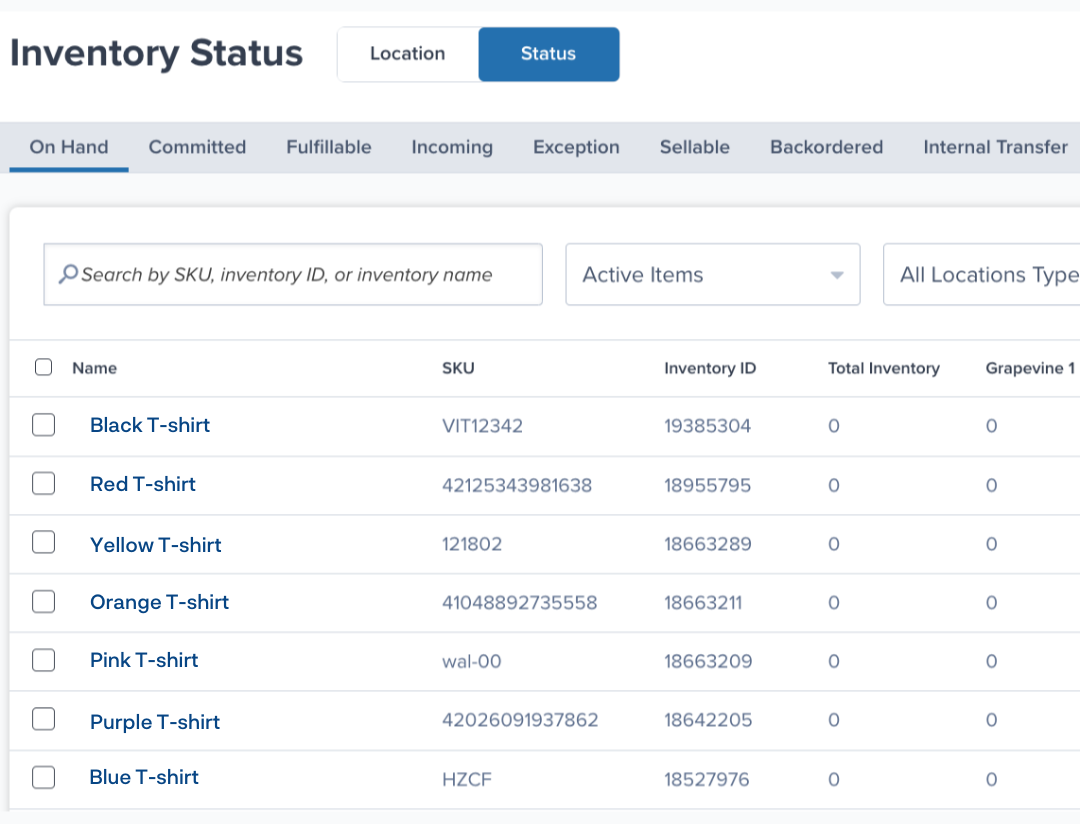
Making data-driven decisions with ShipBob’s inventory dashboard
Brands can gain complete visibility into your inventory across all channels with ShipBob’s real-time analytics dashboard. These insights help you optimize inventory placement, prevent stockouts, and reduce unnecessary storage costs by placing the right products in the right locations based on actual demand patterns.
Creating consistent brand experiences with custom packaging
Unlike Amazon (which uses Amazon-branded packaging across all merchant shipments), ShipBob offers custom branding options that reinforce your business’s unique identity. This creates memorable unboxing experiences that boost customer satisfaction and loyalty, helping you build lasting relationships beyond the Amazon marketplace.



For more information on how ShipBob can help you optimize your Amazon fulfillment strategy or implement FBM or FBA Prep solutions, click the button below to get in touch.
FAQs about selling with Amazon FBA
Below are answers to common questions encountered by Amazon FBA sellers and merchants.
How does Amazon FBA handle returns, and do I need to do anything?

Amazon manages the returns process for FBA items, from providing return labels to inspecting returned products. As a seller, you can choose to have returned items that pass inspection automatically restocked, sent back to you, or disposed of if unsellable.
Can I run both FBA and FBM simultaneously?
Yes, many successful sellers use both fulfillment methods strategically, using FBA for smaller, lightweight items with high sales volume, and FBM for larger, heavier products or those with lower turnover.
Managing inventory across both channels requires careful tracking. Implement an inventory management system that integrates with Amazon and your other fulfillment channels to streamline operations.
What is the process for replenishing inventory in Amazon’s warehouses?
To replenish FBA inventory, create a shipping plan in Seller Central with product details, quantities, and shipping method. Amazon provides shipping labels and preparation instructions for your shipment.
How do Amazon’s storage fees work, and how can I minimize them?
Amazon charges two main storage fees: standard monthly fees (per cubic foot, higher during Q4) and long-term storage fees (for inventory older than 365 days).
You can attempt to minimize these costs by:
- Monitoring inventory levels and sales velocity to prevent overstocking.
- Removing slow-moving inventory before long-term fees apply.
- Optimizing product packaging to reduce size.
- Using Amazon’s Inventory Age and Health reports to identify at-risk stock.
Does ShipBob help with Amazon FBA compliance and shipping?
Yes, ShipBob offers an FBA Prep solution that includes labeling, packaging, and palletizing inventory bound for Amazon’s FBA warehouses to ensure your products meet Amazon’s requirements. Simply send your inventory to a ShipBob fulfillment center, and their team handles all necessary prep work.
This partnership reduces compliance errors, prevents costly delays, and ensures your products always meet Amazon’s standards. ShipBob’s strategic fulfillment network also positions your inventory closer to Amazon’s warehouses, reducing shipping costs and transit times.
Is Amazon FBA suitable for international expansion?
FBA can help your brand grow globally using Amazon’s worldwide fulfillment network, helping you enter new markets without building your own infrastructure.
Be aware of challenges: higher fees, longer delivery times, complex customs regulations, and country-specific compliance requirements.
For greater flexibility, consider pairing FBA with a global fulfillment partner like ShipBob. ShipBob’s international fulfillment centers help position inventory strategically for faster, cheaper shipping.
How does inventory forecasting work with a blended fulfillment strategy?
When using multiple fulfillment methods, manage each channel separately. Create distinct forecasts for FBA and other channels based on their unique sales patterns, seasonality, and promotions.
Distribute inventory according to these forecasts, maintaining sufficient stock in each channel. You may need to transfer inventory between fulfillment centers as demand shifts.
Implement an inventory system that connects all channels with real-time updates. ShipBob’s inventory analytics, for instance, help monitor inventory across your entire network and optimize placement, ensuring products are always where they need to be.
What are the most common mistakes sellers make with Amazon FBA?
Some of the most common Amazon FBA pitfalls include:
- Underestimating costs. Factor in all fees (fulfillment, storage, removal) when calculating profitability.
- Poor shipment preparation. Amazon’s strict requirements for labeling and packaging can cause costly delays if not followed.
- Inventory mismanagement. Overstocking leads to high storage fees; understocking causes lost sales.
- Ignoring policy updates. Amazon frequently changes requirements and best practices.
A proactive, data-driven approach with the right partnerships helps you avoid these mistakes and build a thriving Amazon business.


