

Product bundling has become one of the most reliable growth levers for Shopify merchants. And while Shopify has made it increasingly easy to create bundles with its growing ecosystem of bundling apps, fulfilling them accurately, especially at scale, can be surprisingly complex.
Once bundle orders start flowing in, brands often run into complications such as mismatched SKUs, inaccurate inventory counts, split shipments, manual kitting backlogs, and returns workflows that don’t map cleanly to how the bundle was sold at checkout.
In other words: there’s a structural gap between the digital bundle a shopper sees on the website and the physical bundle a fulfillment team must assemble.
This article helps merchants bridge that gap.
You’ll learn how Shopify’s bundling logic works, where the operational challenges typically emerge, and how to translate digital bundles into clean, efficient, scalable fulfillment workflows.
How bundles work in Shopify (and why they matter)
Product bundles on Shopify are simply groups of products sold together as a single offer.
On the storefront, a customer sees one bundle listing — but behind the scenes, the bundle is composed of individual SKUs that need to be tracked, picked, packed, and ultimately shipped in the correct configuration.
Shopify and third-party bundle apps make it easy to build this “digital logic.” The challenge is translating that front-end experience into accurate inventory movement and fulfillment once orders arrive (more on that later). Before we get into the operations, it’s useful to understand what Shopify bundles are and why they’ve become so important.
Common bundle types (with examples)
Most Shopify bundles fall into one of a few proven formats:
1. The Buy One, Get One (BOGO) bundle
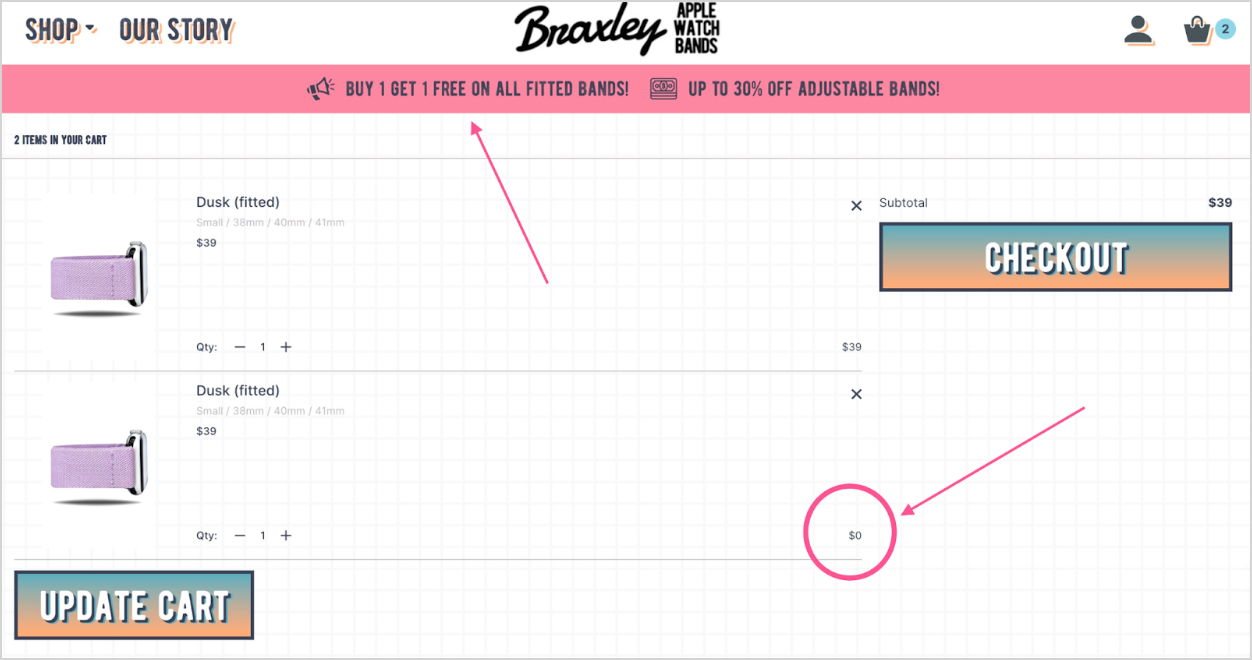
A classic bundle structure where customers receive an extra item for free or at a steep discount.
Why it works:
- Extremely familiar and easy to understand
- Encourages higher unit volume
- Ideal for consumables with high repeat purchase behavior
2. The build-your-own bundle
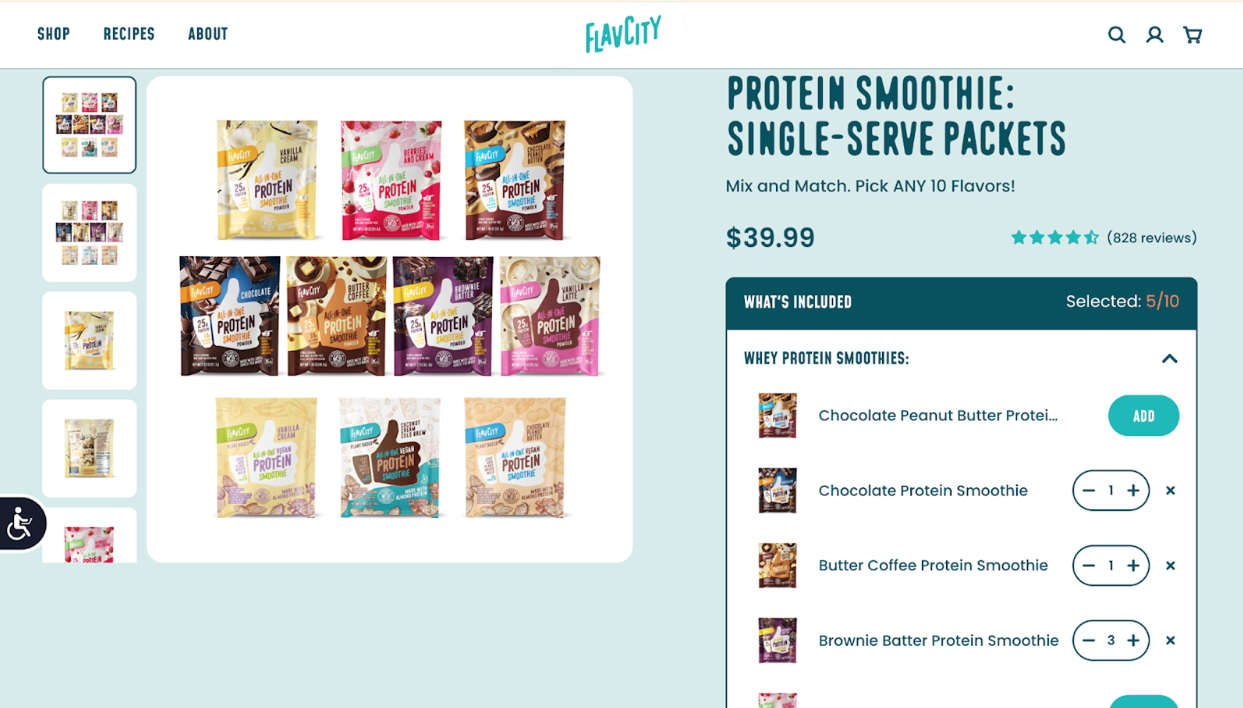
Customers choose their own flavors, scents, colors, or variants.
Why it works:
- Reduces decision fatigue
- Increases engagement and time on page
- Great for categories with lots of SKUs (beauty, wellness, food & beverage)
3. The limited edition bundle
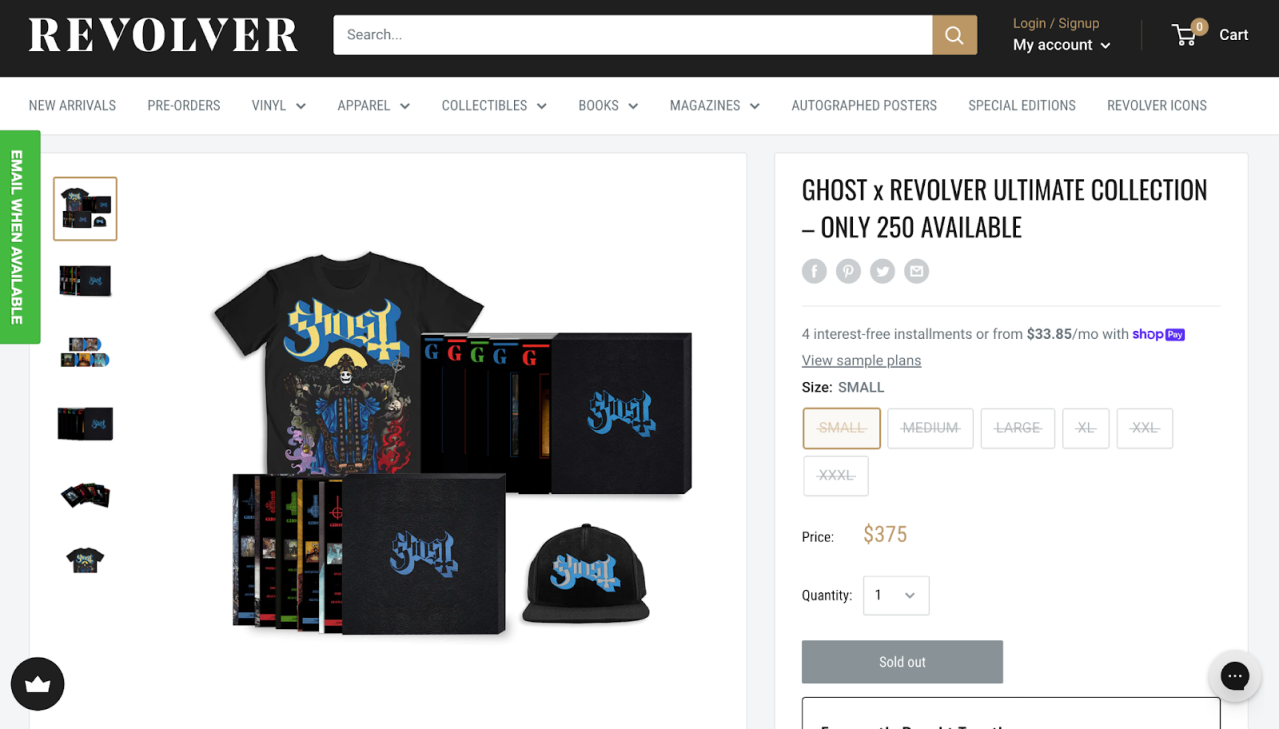
Seasonal or event-based bundles with a scarcity trigger.
Why it works:
- Drives urgency (“only 250 available”)
- Perfect for holidays, collaborations, or product drops
- Offers strong creative and campaign opportunities
4. The subscription bundle
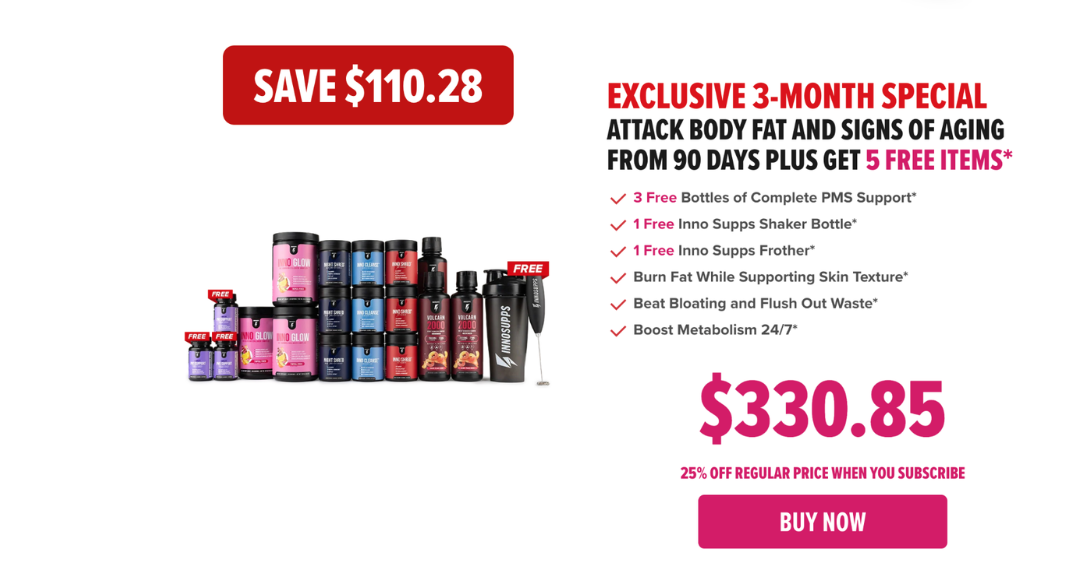
A bundle designed for recurring shipments or onboarding customers into a subscription program.
Why it works:
- Converts one-time shoppers into subscribers
- Offers immediate value while encouraging long-term retention
- Built for consumables like coffee, supplements, and skincare
5. Frequently Bought Together bundle
A set of products commonly purchased together based on customer behavior.
Why it works:
- Mirrors Amazon’s proven UX pattern
- Removes friction during consideration
- Surfaces complementary items naturally
6. Volume discount bundle
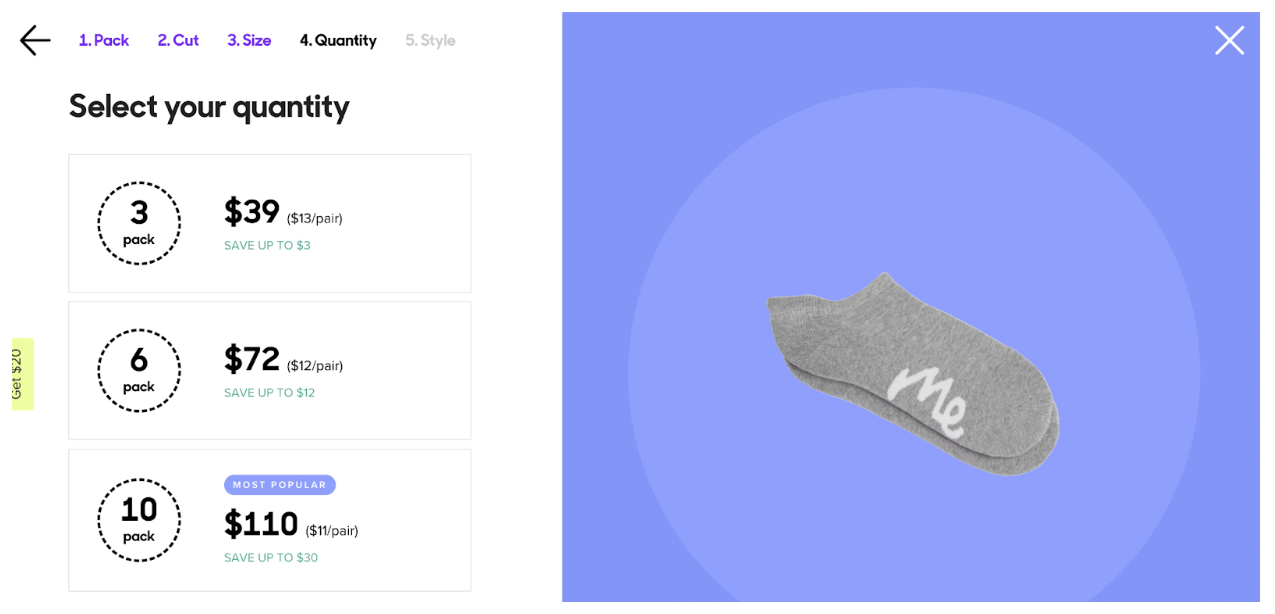
Progressive discounts based on quantity purchased.
Why it works:
- Perfect for CPG (snacks, beverages, supplements)
- Encourages bulk purchasing
- Great margin-protection tool when modeled correctly
7. B2B or wholesale bundle

Large case-packs designed for retailers, studios, or bulk buyers.
Why it works:
- Streamlines B2B ordering within Shopify
- Supports carton-level SKUs
- Reduces manual invoicing or draft order workflows
8. Free Gift With Purchase (GWP) bundle
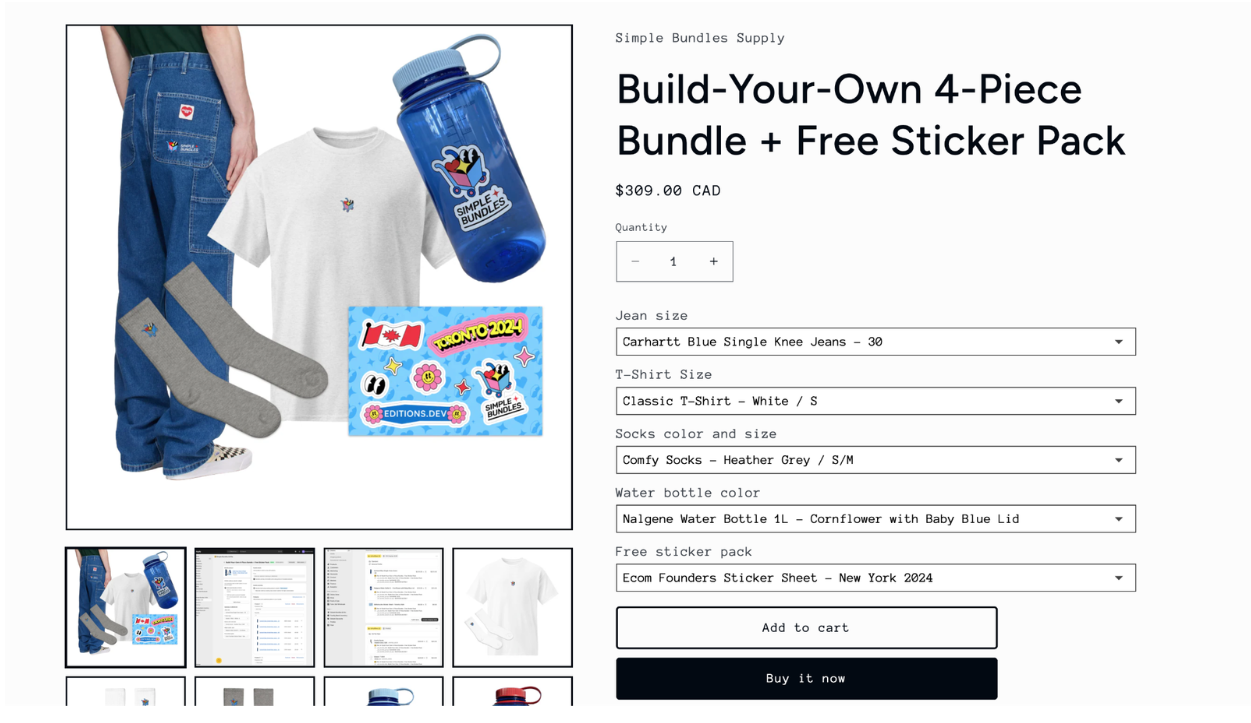
Shoppers receive a bonus item after purchasing a specific item or bundle.
Why it works:
- High perceived value at low cost
- Encourages upsells without feeling promotional
9. Single-SKU multipacks
A bundle containing multiples of the exact same item.
Why it works:
- Simple to fulfill
- Great for replenishment customers
- Reduces pick complexity
Shopify bundling tools: Native Bundles vs. third-party apps
Shopify gives merchants two primary paths for creating bundles:
- Shopify’s native bundles app, designed for straightforward fixed bundles and multipacks.
- Third-party bundle apps, which add more flexibility, customization, and advanced logic.
Many merchants start with the native app but quickly reach its limits as their catalog grows, AOV strategies mature, and operational workflows become more complex.
Where Shopify bundles has limitations
These constraints become noticeable as soon as brands experiment with more advanced merchandising or operational logic:
- Limited variant and component flexibility
- No backend inventory rules beyond simple deduction
- Not designed for build-a-box or dynamic bundling
- Limited support for subscriptions, POS, and wholesale
- No customizable frontend experience
Third-party apps are what enable more sophisticated bundle catalogs, AOV optimization, and operational accuracy.
Top Shopify bundle apps
Shopify’s app ecosystem offers dozens of bundling apps, but only a handful support both modern bundling UX and operational consistency. Below are the key players and where they fit.
1. Simple Bundles
Best for: Flexible bundle options, operational accuracy, Shopify POS, 3PL/ERP workflows
Rating: ⭐ 4.9 (570+ reviews)
Pricing: Free plan available; Paid plans from $24/month
Simple Bundles is one of the most operationally reliable bundling apps in the Shopify ecosystem. Unlike many frontend-heavy bundle builders, Simple Bundles is engineered around clean backend logic, accurate BOM mapping, and real-time inventory syncing — making it ideal for merchants scaling fulfillment through a 3PL or multi-location network.
Because Simple Bundles avoids loading unnecessary scripts or theme code by default, it’s highly performance-friendly and works well with headless storefronts.
Key features
- Real-time SKU-level inventory syncing
- Automatic bundle breakdown for fulfillment (component lines on order)
- Compatible with POS, Markets, draft orders, and multi-location setups
- Supports dynamic bundles with tiered logic
- App blocks + UI extensions for storefront customization
- “Infinite options” architecture for merchants who need to surpass Shopify’s variant/option limits
- Detailed bundle-level analytics
Things to know
- Complex front-end experiences (build-a-box flows, flavor selectors, swatches) may require developer support
- Out-of-the-box UI is intentionally lean — it’s meant to be extended, not dictate design
- Ideal for developers and ops teams who want a controllable, extensible bundling foundation
Great for: Build-your-own gift sets, B2B size packs, subscription kits, bespoke experiences
2. AOV.ai
Best for: AI-powered bundling and automated AOV optimization
Rating: ⭐ 4.9 (510+ reviews)
Pricing: Free plan available; Paid plans from $19/month
AOV.ai focuses on maximizing revenue by using AI to analyze shopper behavior and automatically generate relevant bundle suggestions — similar to Amazon-style “Frequently Bought Together” but more adaptive.
Key features
- AI-driven bundle, upsell, and cross-sell recommendations
- Multiple bundle types: fixed bundles, mix-and-match, volume discounts, bundle builder
- Smart front-end widgets that update dynamically
- Especially useful for brands with high traffic volume
Things to know
- Not built for backend SKU logic or accurate BOM mapping
- AI suggestions improve with more traffic (learning period required)
Great for: AI-powered upsells, dynamic AOV optimization, storefront personalization
3. Zoorix
Best for: Tiered pricing, volume discounts, and customizable mix-and-match logic
Rating: ⭐ 5 (380+ reviews)
Pricing: Free plan available; Paid plans from $7.99/month
Zoorix is ideal for merchants who want strong discount logic and front-end control without the complexity of a fully custom build.
Key features
- Build-a-box experiences with mix-and-match logic
- “Buy X, Get Y,” fixed-price bundles, or percentage-off bundles
- Variant-level quantity breaks and thresholds
- Flexible design options (CSS customization)
- Helpful AI-driven bundle suggestions
- Basic analytics for performance monitoring
Things to know
- Some setup requires manual configuration
- Does not support backend SKU breakdown for operations
- Works within Shopify’s 2,000 variant limit and cannot exceed it
Great for: Tiered discounts, custom promo bundles, low-lift mix-and-match kits
4. Koala
Best for: Brands prioritizing visual merchandising and polished bundle displays
Rating: ⭐ 5.0 (602+ reviews)
Pricing: Free plan available; Paid plans from $19.99–$49.99/month
Koala Bundles focuses on clean, visually appealing bundle merchandising, making it a strong fit for design-conscious storefronts and mobile-first brands.
Key features
- Attractive bundle layouts and promotional displays
- Quantity break bundles to boost AOV
- Post-purchase upsell flows (one-click upsells)
- Built-in announcement bars, timers, and urgency tools
- Optimized for mobile shopping
Things to know
- Limited advanced discount logic
- Not ideal for complex operational workflows
Great for: Visual brands, mobile-heavy stores, lifestyle products
5. Unlimited Bundles & Discounts
Best for: Merchants wanting unlimited bundle flexibility with stackable discounts
Rating: ⭐ 4.8 (667 reviews)
Pricing: Free plan available; Paid plans from $13.99–$29.99/month
Unlimited Bundles & Discounts is a generalist app with a broad suite of bundling structures. It’s beginner-friendly but flexible enough for mid-market brands.
Key features
- Automated, stackable discounts
- Mix-and-match, volume discounts, BOGO, build-your-own bundles
- Collection-based bundles
- 24/7 live chat support
Things to know
- Cannot apply discounts to specific variants
- Not built for complex SKU or location-based logic
Great for: First-time bundlers, multi-location stores with moderate complexity
How to choose the right bundling setup
Here’s a simple decision framework to keep things clear:
Choose Shopify bundles if you want:
- Simple fixed bundles or multipacks
- Fast, no-code setup
- Native performance and minimal app load
- Basic component-level inventory sync
Choose a third-party app if you need:
- Mix-and-match or build-a-box flows
- Tiered logic, dynamic pricing, or advanced bundle rules
- Subscriptions
- POS compatibility
- B2B size packs or wholesale cartons
- Multi-location routing logic
- Customizable UI or high-performance headless models
Your checklist for configuring product bundles in Shopify
Setting up bundles in Shopify can be straightforward, but doing it correctly — with clean data, accurate inventory syncing, and predictable pricing behavior — is essential before you scale.
Below is a practical checklist that walks through both native and app-based bundle configuration, along with QA steps needed before launching.
Shopify bundles: Quick setup checklist
Use this if you’re building a fixed bundle or simple multipack using Shopify’s native Bundles app.
1. Create a bundle product
- Add a new product in Shopify
- Set it as a bundle using the Bundles app
- Add all component SKUs and specify quantities (e.g., 2x moisturizer, 1x serum)
2. Configure pricing, availability, and sales channels
- Choose whether the bundle is priced as a single SKU
- Confirm which channels it’s available on (Online Store, POS, Shop app)
3. Confirm inventory deduction at the component level
Native bundles automatically deduct component inventory, but you should still verify:
- Inventory is tracked for all component SKUs
- Location availability is correct
- The bundle becomes unavailable when a component stockout occurs
4. Test PDP, cart, and checkout
Run a test order to validate:
- The bundle displays correctly on the PDP
- Discounts stack the way you expect (or don’t stack, depending on your settings)
- Tax and shipping rates behave as intended
- Cart drawer apps don’t break styling or add duplicate items
5. Add merchandising elements
- “What’s included” bullets or accordion
- Product comparison (“Save X% vs. buying separately”)
- Value framing badges
- Lifestyle imagery demonstrating the bundle use case
6. Publish and monitor analytics
Use Shopify Analytics to track:
- Units sold
- AOV lift
- Conversion rate changes
- Attach rate for related items
If you need more complex logic (custom UI, mix-and-match, tiered discounts), move to an app.
App-based bundle setup: Quick configuration checklist
If you’re using Simple Bundles, Zoorix, AOV.ai, Koala, Unlimited Bundles & Discounts, or similar apps, the general setup steps are consistent — even though each app has unique UX and capabilities.
1. Install and connect the bundle app
Confirm settings for:
- Component SKU mapping
- Inventory syncing rules
- Location-level availability
- POS/Markets/draft order behavior (if applicable)
2. Build your BOM (bill of materials)
This step is essential for operational accuracy:
- Map each bundle to its component SKUs
- Set quantities per component
- Define pricing logic (fixed, tiered, dynamic, BOGO, etc.)
- Determine whether components are hidden or visible at checkout
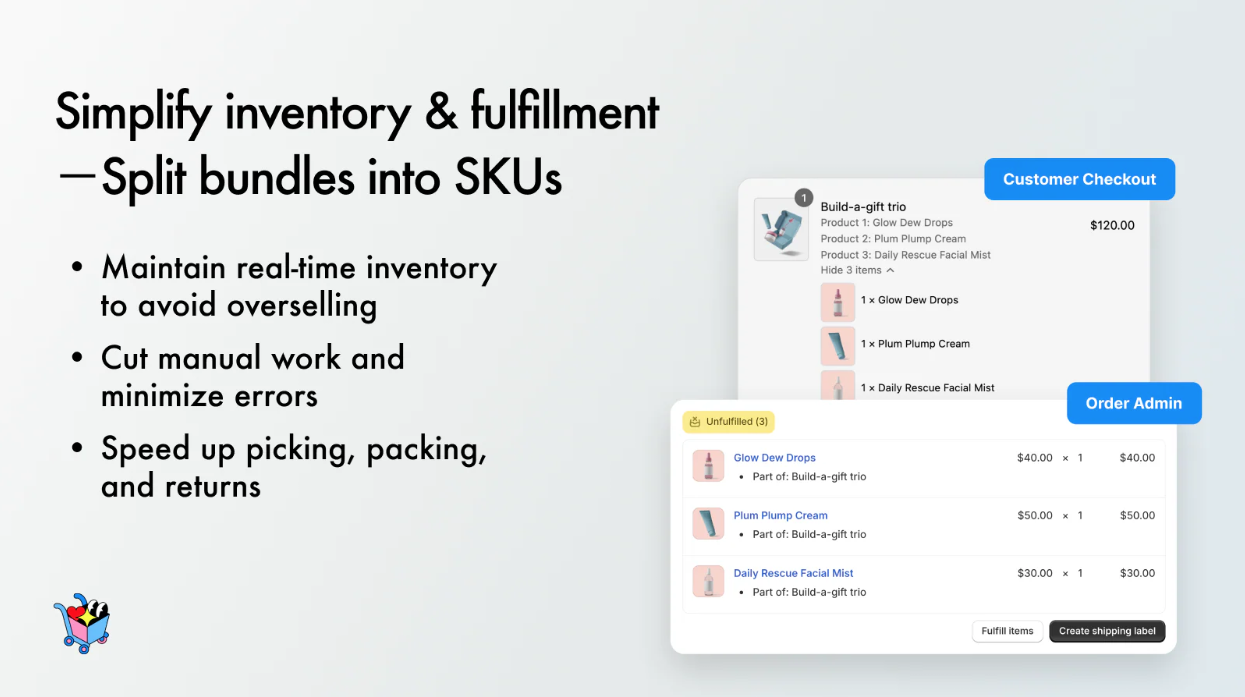
Apps like Simple Bundles automatically break bundles into component lines for fulfillment, which is crucial for fulfillment accuracy.
3. Configure storefront widgets
Depending on the app, set up:
- Mix-and-match selectors
- Build-a-box UI
- Volume discount tables
- Upsell widgets
- Conditional logic (Buy X, Get Y)
Some apps offer plug-and-play widgets; others (like Simple Bundles) are more developer-extensible.
4. Validate checkout behavior
Before going live, test:
- How bundles render in the cart (parent line item vs. component breakdown)
- How they appear on the order in Shopify Admin
- Whether shipping rates calculate based on component weight/dimensions
- How discounts apply (especially during BFCM or sitewide promos)
5. Test fulfillment handoff
For in-house fulfillment or an outsourced fulfillment provider:
- Ensure the bundle breaks into components on the order
- Confirm picklists reflect the correct quantities
- Validate scan behavior (items are scanned individually, not as a parent SKU)
- Check that returns tools can handle component-level restocking
6. QA with apps, themes, and scripts
Common pitfalls to check for:
- Cart drawer conflicts
- Duplicate quantity rules from other discount apps
- Theme styling issues on mobile
- Speed score impacts
7. Review analytics
Apps often provide bundle-level data, such as:
- Bundle revenue
- Most-selected variants in mix-and-match bundles
- AOV impact
- Conversion rates per bundle type
Time to mirror digital bundles in operations (inventory architecture and 3PL handoff)
Creating bundles in Shopify (whether through the native Bundles app or third-party tools) is just the beginning. The real challenge begins when those bundles move from digital configuration to physical fulfillment.
This is where merchants often see issues such as overselling, manual kitting backlogs, inaccurate picklists, inconsistent shipping rates, and confusing returns workflows. The root cause is almost always the same: the bundle was created in Shopify, but the supporting operational systems were never aligned.
This section outlines how to translate Shopify bundles into clean, predictable, scalable backend operations, especially when working with a fulfillment partner.
Map bundle SKUs to components with a clean bill of materials (BOM)
A clear BOM ensures that every bundle SKU in Shopify corresponds to the exact set of items your warehouse or fulfillment partner needs to pick and pack.
Your BOM should define:
- Parent bundle SKU
- Component SKUs
- Quantities of each component
- Whether components are visible or hidden at checkout
- Inventory deduction rules
- Substitution logic (if applicable)
Why it matters operationally
- Every picklist is accurate
- No more “what goes in this kit?” confusion
- Inventory levels stay consistent across all locations
- No manual kitting or workarounds for holiday, promo, or BFCM bundles
A loose or undocumented BOM is one of the top reasons bundles fail in fulfillment.
Set multi-location rules and inventory buffers
Most Shopify brands eventually expand into multi-location fulfillment — either through multiple fulfillment center nodes or a hybrid in-house + fulfillment center model. Bundles add both opportunity and complexity here.
Important considerations
- A bundle is only available if all components are available in the chosen location
- Shopify will mark a bundle “out of stock” if any single component runs out
- Regional availability can differ dramatically (e.g., toner stocked out in the East Coast, but not in the West Coast)
- Safety stock buffers should apply per component, not per bundle
Operational risks
Without a synced system, merchants often see:
- Overselling bundles because one location wasn’t updated
- Split shipments because components fulfilled from different nodes
- Higher shipping costs due to avoidable cross-zones
- Unplanned backorders
A fulfillment provider with real-time inventory syncing reduces these risks dramatically.
Handle stockouts, backorders, and preorders
Bundles amplify the impact of stockouts because one missing component breaks the entire offer.
Best practices
- Define a bundle-level out-of-stock rule
- Decide whether to allow partial fulfillment or require all items to ship together
- Set preorder/backorder logic per component
- Communicate ETAs clearly on PDP and checkout
- Use bundles strategically to move excess inventory only when stock levels allow
For subscription bundles
Timing becomes even more important:
- Reservation windows should align with subscription cycles
- Skip/swap logic must consider component availability
- Avoid re-kitting bundles mid-cycle unless essential
When pre-kitted SKUs make sense
Not all bundles should be picked on demand. Some are better pre-assembled or “pre-kitted” — especially if they ship frequently or require complex assembly.
Choose pre-kitting if:
- The bundle accounts for a large share of order volume
- You run frequent promos or seasonal campaigns
- You want faster pick/pack SLAs
- Packaging requires assembly (e.g., gift boxes, protective inserts)
Where to kit
- At the manufacturer (most cost-efficient)
- At a 3PL (faster assembly and inventory checks)
- In-house, if you manage local fulfillment
Kitting reduces per-order pick time and ensures every bundle is shipped with consistent presentation.
Create a 3PL brief and validation plan
Your fulfillment partner should not be guessing how to fulfill your bundles. A clean setup document prevents operational errors and ensures your bundle logic works in real life.
Your 3PL brief should include:
- Full bundle BOMs
- SKU mappings (parent → components)
- Packing rules (box size, inserts, branded materials)
- Scan behavior (scan parent? scan components? both?)
- Labeling preferences
- Exceptions rules (e.g., substitutions, out-of-stock logic)
- Pre-kitting guidelines
- QA and testing procedures
Validation steps
Run multiple test orders covering:
- Standard bundle fulfillment
- Mix-and-match selections
- B2B bundles
- Subscription bundles
- POS orders
- Partial returns
Shopify’s front-end logic is only half the bundle equation. Real-world success requires translating that logic into accurate routing, inventory syncing, picking, packing, and returns workflows.
Brands that treat bundling as both a merchandising tactic and an operational process avoid the common pitfalls that derail scale.
How to keep promises, post-purchase: Shipping, checkout, and returns for bundles
Once a customer checks out with a bundle, the post-purchase experience becomes a major factor in whether they buy again. Bundles can easily complicate shipping rate accuracy, delivery timelines, and returns, especially when component SKUs span multiple locations or have different dimensional profiles.
This section covers how Shopify calculates shipping for bundles, how to avoid unexpected split shipments, and how to design returns and exchange workflows that maintain both customer satisfaction and operational accuracy.
Checkout and shipping rate accuracy
Even though a bundle appears as a single item on the PDP, Shopify calculates shipping based on the combined components inside the bundle. This is true for both native Shopify Bundles and most third-party app implementations.
How Shopify calculates shipping for bundles
Shipping rates at checkout are determined by:
- Weight of each bundled component
- Dimensions (or dimensional weight) of each component
- Shipping origin (location-level assignment)
- Assigned shipping profiles
- Carrier service rules (zone, service level, surcharges)
If you’re using an app that breaks bundles into component line items, Shopify treats the order like a multi-SKU cart.
Common problems merchants run into
Without proper setup, merchants often see:
- Checkout rates that don’t match actual fulfillment costs: Bundle appears small on the PDP, but dimensional weight of components makes shipping expensive.
- Split shipments: One bundle, two fulfillment locations → higher cost and slower delivery.
- Unexpected surcharge fees: When a bundle forces the order into an oversized box.
- Incorrect shipping quotes for international or cross-border orders
Best practices for accurate rates
- Set component weights and dimensions accurately (never use placeholders).
- Assign components to the correct shipping profiles.
- Keep bundles stocked across regional fulfillment centers to avoid cross-zone shipping.
- For U.S. merchants, consider using a distributed fulfillment model to cut zone costs — for example, spreading inventory across ShipBob’s multi-node network.
- Use pre-kitted SKUs when dimensional consistency is important (e.g., gift boxes, fragile sets).
Accurate shipping promises require clean product data and synced location-level availability. That becomes even more important when bundles involve large or fragile products.
Managing multi-origin fulfillment and avoiding split shipments
Bundles are at their best when they ship in a single package. But many brands unknowingly create scenarios where a single bundle must be split into two or more shipments — increasing costs and confusing customers.
Why split shipments happen
- Components are stored in different fulfillment centers
- Bundle includes items restricted to certain regions
- Some SKUs are stocked only in the “default” location
- Subscription or B2B bundles require unique picking rules
- Safety stock is set unevenly across nodes
How to prevent them
- Keep all bundle components stocked in every active fulfillment location
- Use inventory placement or smart allocation rules when using a fulfillment partner
- Set clear routing logic so bundles always ship from the same warehouse
- If necessary, pre-kit high-volume bundles so they exist as a single SKU
Split shipments aren’t always avoidable, but they should never be accidental.
Returns and exchanges for bundled products
Bundles are great for AOV, but they introduce new complexities in returns, especially when only part of the bundle is being returned.
Most brands choose one of these policies:
1. Whole-bundle returns only
The shopper must return the entire bundle. Good for:
- Gift sets
- Thematic or routine bundles
- Seasonal bundles
- Any bundle priced as a single unit
2. Component-level returns
Individual items can be returned or exchanged. Good for:
- Mix-and-match bundles
- Apparel bundles with size variation
- Subscription bundles
- B2B bundles
This requires careful inventory and refund tracking.
Refund calculations for component-level returns
If the shopper returns only part of a discounted bundle, how much should they be refunded?
Common approaches include:
- Pro-rated refund: Apply discount evenly across all components
- Item-level refund: Refund based on standalone product price
- Conditional refund: Require a minimum number of items to keep the discount
This logic must be consistent across:
- Your return portal
- Your fulfillment partner’s restocking rules
- Shopify order edits
- Accounting and revenue recognition policies
Apps like Loop and AfterShip support component-level return logic and integrate with fulfillment partners like ShipBob to restock units correctly.
Restocking rules and operational handling
Once a return is processed, components need to be restocked accurately and quickly.
Be explicit with your fulfillment partner about:
- How to handle partially used/consumable items
- Where to restock components within the warehouse
- Whether pre-kitted bundles can be broken down into components when returned
- How to handle bundles with free gifts
- Whether returns should be quarantined for QA
A clean return workflow prevents stock discrepancies that can cause bundle overselling.
Omnichannel and wholesale considerations
Bundles behave differently across Shopify channels. It’s essential to ensure consistency across POS, Markets, Wholesale, and marketplace integrations.
Shopify POS
- Barcode scanning can either trigger the bundle parent SKU or its components
- Some brands create POS-specific bundle SKUs to simplify scanning
- Pre-kitted SKUs work well for in-store environments
Wholesale (B2B)
- Bundles often represent case packs (6-pack, 12-pack, 24-pack)
- Pricing rules differ from DTC bundles
- Draft orders and price lists may require separate bundle SKUs
- Ship-to-store workflows rely heavily on dimensional accuracy
Marketplaces
- Amazon, Walmart, and Target+ have strict rules for bundle labeling
- Some require a unique UPC for bundled sets
- FBA fees (like Amazon FBA fees) may differ from Shopify shipping costs
Ensuring bundle consistency across all channels protects both operational efficiency and customer experience.
Digital strategy and product operations must move in sync
Whether you’re launching your first starter kit, building interactive mix-and-match experiences, or scaling wholesale case packs, treat bundling as both a customer experience tool and an operational framework.
When these backend processes are aligned from day one, bundles scale smoothly. Merchants avoid overselling, eliminate manual kitting, reduce shipping errors, and maintain accurate inventory across multiple locations.
And when working with a tech-enabled fulfillment provider, bundle SKUs are mapped cleanly, fulfillment rules are automated, and real-time inventory sync prevents costly surprises.
How ShipBob bridges the gap between Shopify and fulfillment
Creating bundles in Shopify is one thing, but fulfilling them efficiently is another. That’s where ShipBob comes in as the fulfillment layer that connects your Shopify bundle logic to physical execution.
ShipBob automates the entire bundle fulfillment process, from mapping virtual SKUs to their components, to kitting, returns processing, and global distribution. Real-time inventory syncing ensures your bundles never oversell, while intelligent warehouse automation keeps orders moving fast and accurate.
Bundle products in ShipBob’s Product Catalog
Merchants can create virtual bundle SKUs directly in ShipBob’s dashboard, mapping each bundle to its individual component SKUs. This creates a single source of truth for bundle fulfillment while maintaining component-level inventory visibility.
The benefit? Real-time inventory tracking at the component level prevents overselling.
Automated kitting and pre-packing
ShipBob supports two kitting approaches: pre-kitted bundles, which are assembled and stored in advance, and kitting, which is assembled when an order is placed. This flexibility lets you balance storage efficiency with fulfillment speed based on your product mix and order volume.
On-demand kitting can reduce fulfillment time, as compared to manual assembly, with fewer touchpoints that could introduce errors. You can also configure packaging preferences, including custom inserts and/or branded boxes, ensuring your bundles deliver a premium unboxing experience without warehouse confusion.
Accurate shipping, returns, and exchanges
Bundle returns don’t have to be complicated. ShipBob simplifies post-purchase logistics by integrating with platforms like Loop and AfterShip to handle partial returns, exchanges, and refunds seamlessly.
ShipBob maintains a 99.97% order accuracy rate across its fulfillment network, giving you confidence that bundles ship correctly the first time, reducing costly returns and customer service tickets.
Global bundle fulfillment and multi-location support
ShipBob’s global fulfillment network spans the US, UK, EU, Canada, and Australia, allowing you to store bundle components closer to your customers. Smart routing and allocation logic automatically fulfill orders from the nearest warehouse, minimizing shipping costs and transit times.
This distributed approach makes international expansion feasible without the complexity of managing multiple 3PLs or customs paperwork. ShipBob handles duties, taxes, and compliance, so you can focus on growing your bundle strategy globally.
How to build your Shopify bundle fulfillment workflow with ShipBob
- Create a bundle in Shopify (via native Bundles app or third-party app).
- Connect Shopify to ShipBob using the direct integration.
- In ShipBob, set up your bundle SKU and map components.
- Choose pre-kitted or on-demand fulfillment.
- Sync real-time inventory tracking between Shopify and ShipBob.
- Monitor performance in ShipBob’s analytics dashboard.
Start fulfilling with ShipBob
Unlock efficient, scalable order bundling with ShipBob. Connect with our team to get started.
FAQs about Shopify product bundling
Do I need Shopify Bundles or a bundle app for mix-and-match and build-a-box?

Shopify’s native Bundles app works for simple fixed kits and multipacks, but it doesn’t support complex mix-and-match logic or build-a-box experiences.
For customizable bundles, dynamic pricing, flavor/variant selectors, or subscription bundles, you’ll need a third-party app such as Simple Bundles, Zoorix, AOV.ai, Koala, or Unlimited Bundles & Discounts.
How do Shopify product bundles affect inventory across multiple locations?
Bundle availability depends on the stock of each component SKU in each location. If any component is out of stock in a specific region, the entire bundle becomes unavailable for that location.
Without synced systems (or a 3PL integration), this can cause:
- Regional inconsistencies
- Accidental overselling
- Split shipments
Multi-location brands should use apps or 3PL integrations that maintain real-time component-level c
How are shipping rates calculated for bundles at checkout?
Shopify calculates shipping based on the combined weight and dimensions of each item inside the bundle. This means:
- Dimensional weight can push shipping costs higher
- Components stored in different locations may cause split shipments
- Incorrect product data leads to inaccurate rate quotes
Pre-kitted SKUs help when bundles require consistent packaging.
How should I handle partial returns or exchanges of a single component in a bundle?
For partial returns or exchanges on a bundle, you can either:
- Require whole-bundle returns, or
- Allow component-level returns, which requires prorated refunds and precise inventory restocking.
If you allow partial returns, returns tools like Loop and AfterShip can enforce component-level logic and sync the restocking process with your fulfillment partner.
When should I create pre-kitted SKUs instead of using virtual bundles?
Use pre-kitted bundles when:
- The bundle sells at high volume
- The packaging requires assembly
- You want faster picking SLAs
- You want predictable dimensional weight for shipping
Use virtual bundles when:
- You want flexibility or seasonal variations
- You run mix-and-match or build-a-box flows
- Components change frequently
- You manage subscription variants with swaps/skips
Most brands rely on a mix of both.


