Best Buy EDI Fulfillment
Request a QuoteA single EDI error with Best Buy can cost thousands in chargebacks or even jeopardize your spot on their shelves.
Best Buy EDI compliance is a non-negotiable for brands aiming to scale in retail, but the process doesn’t have to be a headache.
By connecting ShipBob with SPS Commerce, brands can automate compliance, streamline onboarding, and unify B2B and DTC fulfillment.
This guide walks through how ShipBob handles every aspect of Best Buy EDI, from document requirements and onboarding to ongoing operations and ROI, so you can focus on growth instead of paperwork.
How ShipBob automates Best Buy EDI fulfillment
ShipBob automates Best Buy EDI fulfillment by integrating inventory, order routing, and compliance into a single, seamless solution. Brands can manage DTC and B2B orders from one dashboard, while ShipBob’s partnership with SPS Commerce eliminates manual EDI mapping and testing.
Unified inventory and operations
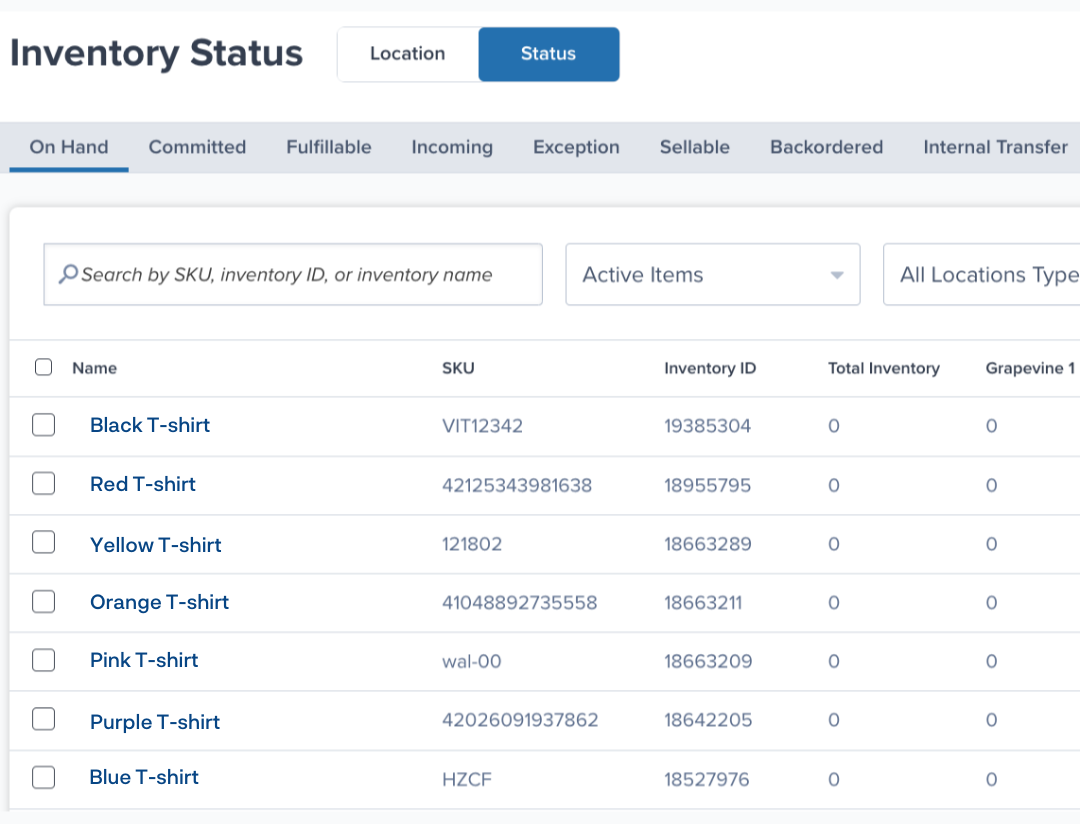
With ShipBob, brands fulfill both DTC and B2B Best Buy orders from a single inventory pool. This means you don’t have to split stock between channels or worry about overselling.
Here’s how unified inventory management benefits your operations:
- Fewer stockouts and overstocking: All inventory is available for any channel, reducing the risk of missed sales or excess carrying costs.
- Simplified forecasting: Real-time visibility across all channels makes it easier to plan replenishments and respond to demand spikes.
This approach helps brands scale efficiently, especially as order volumes grow across DTC and retail partners.
Fast onboarding via SPS Commerce
Onboarding with Best Buy EDI through ShipBob and SPS Commerce is designed to be fast and hands-off for merchants. The integration is pre-built and tested, so you don’t need technical expertise or a dedicated IT team.
A typical onboarding flow includes:
- Guided setup and certification: SPS Commerce manages the technical EDI connection, while ShipBob configures fulfillment workflows to match Best Buy’s requirements.
- Zero technical lift: Merchants provide business data and authenticate connections; the rest is handled by ShipBob and SPS Commerce.
This streamlined process lets brands start selling to Best Buy in weeks, not months.
Real-time monitoring & support
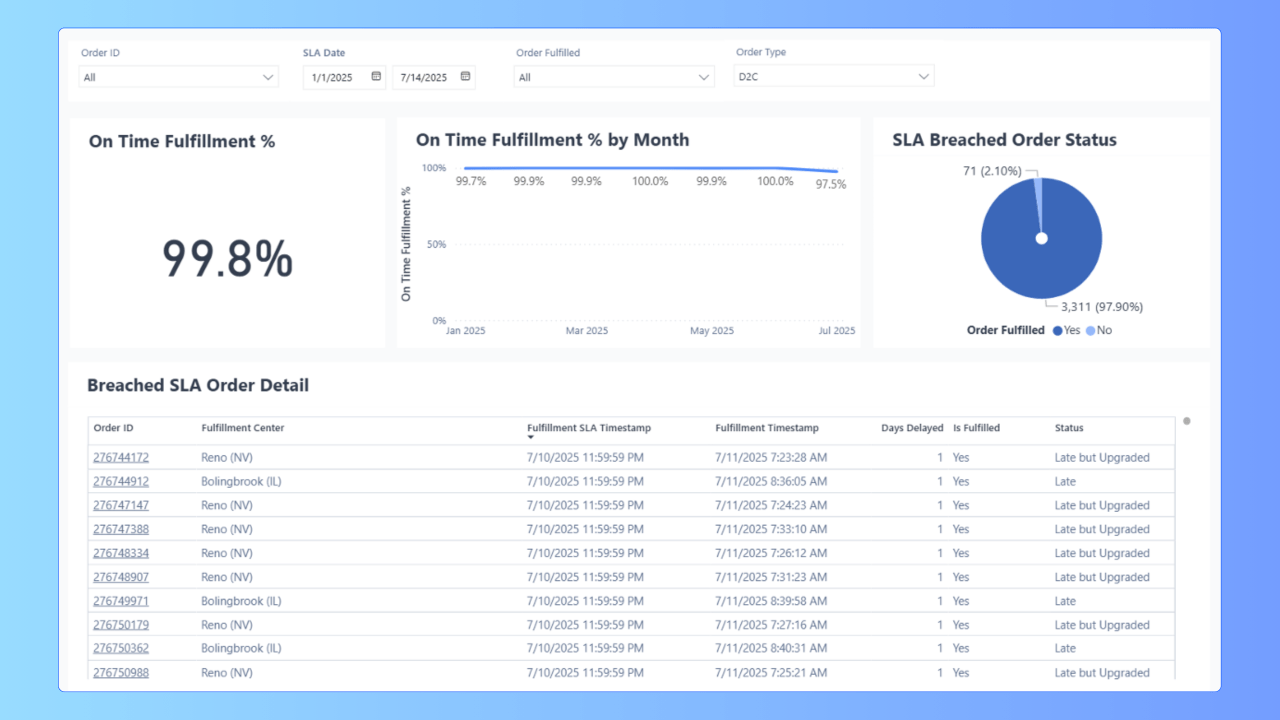
ShipBob’s dashboard gives you real-time visibility into every Best Buy order, with automated alerts and dedicated support to resolve issues before they become costly.
Key monitoring and support features include:
- Dashboards and notifications: Track order status, inventory levels, and fulfillment progress across all channels in one place.
- Issue resolution workflows: Actionable alerts guide users to resolve problems quickly, while ShipBob’s B2B team handles compliance and routing questions.
With these tools, brands can prevent fulfillment delays and minimize chargebacks, keeping retail relationships strong.
Know the core Best Buy EDI documents and data fields
Best Buy requires vendors to send a specific set of EDI documents in the right format and sequence. Missing or mis-formatted documents can trigger chargebacks, payment delays, or shipment rejections. Understanding these requirements is essential for smooth operations.
850 – Purchase Order
The 850 purchase order is the official trigger for fulfillment. Best Buy sends this document to vendors, detailing SKUs, quantities, pricing, and delivery instructions.
To ensure smooth processing, brands should:
- Validate every SKU code: Cross-check incoming SKUs against your product catalog and Best Buy’s Product Data Management portal before accepting the order.
- Follow quantity and timing rules: Only ship the quantities and units specified, and acknowledge receipt with a 997 within 24 hours.
This prevents acceptance errors and downstream invoice mismatches.
856 – Advance Ship Notice
The 856 ASN tells Best Buy exactly what’s in each shipment, down to the carton and pallet level. It must match the physical shipment precisely.
Common ASN pitfalls include:
- Incorrect SSCC-18 labels: Every carton and pallet needs a unique, properly placed GS1-128 barcode that matches the ASN data.
- Packing mismatches: The ASN’s structure must reflect the actual arrangement of items, cartons, and pallets. Any discrepancy can cause rejections and chargebacks.
Attention to detail here is critical for avoiding costly delays at the distribution center.
810 – Invoice
The 810 invoice requests payment, and must match both the original PO and the ASN for a “three-way match.” Best Buy audits every field for accuracy.
To avoid payment delays:
- Match invoice to ASN/PO: Ensure SKUs, quantities, and prices align across all documents.
- Audit tax, discount, and freight fields: Only include charges that match the vendor agreement, and double-check payment terms to avoid correction fees.
Getting this right keeps cash flow steady and minimizes disputes.
997 – Functional Acknowledgment
The 997 is an electronic receipt confirming that a document (like an 850 or 856) was received and is syntactically correct.
Automating 997 delivery status offers two main benefits:
- Reduces exception handling: Automated 997s confirm receipt within 24 hours, preventing compliance violations.
- Creates an audit trail: Every transaction is logged, making it easier to resolve disputes or track down missing documents.
This step is simple to automate with ShipBob’s SPS Commerce integration.
163 – Transportation Appointment Request
The 163 is required for scheduling truckload (TL) and less-than-truckload (LTL) deliveries to Best Buy distribution centers.
Key points to remember:
- Use the 163 for dock appointments: Carriers submit this request to secure a delivery slot, including all PO numbers and carton counts.
- Follow lead times and reschedule rules: Appointments must be requested from at least five to seven business days in advance, and reschedules require a valid reason code.
Missing or incorrect 163 requests can result in refused shipments and added costs.
Other document sets to prepare
Depending on your business model or region, Best Buy may require additional EDI documents.
Here’s a quick table summarizing common additional EDI documents:
| Document | Purpose | When Required |
| 846 – Inventory Advice | Communicate inventory levels | Drop-ship models, Vendor Managed Inventory |
| 940 – Warehouse Shipping Order | Authorize 3PL shipments | When using a 3PL for fulfillment |
| 852 – Product Activity Data | Receive POS and sales data | Optional, for sales analysis |
| Returns docs | Manage returns and credits | As needed, varies by region |
Requirements may differ for Best Buy Canada or specialty product lines, so always consult the latest routing guide.
Complete Best Buy’s EDI testing and certification process
Certification is mandatory before you can process live orders with Best Buy. The process ensures your EDI documents are formatted correctly and your systems can communicate seamlessly.
Step 1: Register and gather vendor onboarding paperwork
Start by registering as a Best Buy vendor and collecting all required paperwork. This includes:
- Your vendor number
- Payment setup forms
- Access to the routing guide
You’ll find the latest forms and instructions on the Best Buy Partner Portal.
Step 2: Choose and connect your EDI translator or managed service
Next, decide whether to build an in-house EDI solution or use a managed service. Most brands opt for a plug-and-play option like ShipBob’s SPS Commerce integration, which handles mapping, testing, and ongoing compliance. This choice can dramatically reduce onboarding time and IT resource requirements.
Step 3: Perform test document exchanges
Best Buy requires a sequence of test cycles before going live. You’ll need to:
- Exchange test 850 → 856 → 810 cycles. Each document must be formatted and sequenced correctly.
- Track turnaround times. Automated responses like 997s are nearly instant, while manual reviews may take a few business days.
Monitoring your status through the EDI provider’s dashboard helps keep the process on track.
Step 4: Resolve errors and retest
Testing often uncovers errors such as missing REF*DP segments or invalid UPCs. Common error codes and their fixes include:
- MG/RMS_INVALID_UPC: Verify and correct UPCs in the Best Buy PDM portal.
- MB/RMS_INVALID_PO: Ensure the PO number matches the original 850.
- MID/ASN_NO_PACK_NO_TARE_SSCC: Add missing SSCC-18 numbers at the carton or pallet level.
ShipBob’s real-time monitoring and support help clear these errors quickly, so you can move to production without delays.
Step 5: Move to production and monitor first orders closely
Once certified, confirm that Best Buy receives your first live ASN before the shipment leaves the dock. Create an internal checklist to monitor every step (from PO review to invoice transmission) to catch issues early and maintain compliance. Staying vigilant during your first orders sets the tone for a successful long-term partnership.
Stay compliant with shipping, labeling, and dock rules
Strict adherence to Best Buy’s shipping, labeling, and dock rules is essential to avoid chargebacks and keep your retail relationship healthy. Even minor mistakes can result in costly penalties or refused shipments.
Label and packing specifications
Best Buy enforces detailed requirements for GS1-128 label placement, barcode size, and human-readable fields.
To meet these standards:
- Apply GS1-128 labels correctly: Place labels on the lower-right corner of the carton, at least 2 inches from any edge, and never over a seam.
- Structure inner packs, master cases, and pallets as required: Each carton should contain only one SKU and one PO, and pallets must use approved GMA Grade A hardwood.
Following these specifications ensures shipments are received without delays or manual intervention.
Transportation appointment and routing
Scheduling dock appointments for Best Buy distribution centers requires precise timing and documentation.
Key best practices include:
- Use the 163 request for TL/LTL shipments: Submit appointment requests at least five to seven business days in advance, and include all necessary PO numbers and carton counts.
- Respect distribution center hours and blackout periods: Avoid scheduling deliveries on weekends or major holidays, and always check for updated hours in the routing guide.
Proper routing prevents missed appointments and keeps your shipments moving.
Chargeback hotspots and how to avoid them
Chargebacks most often result from late ASNs, incorrect carton counts, or missing SSCC labels.
To minimize penalties, ShipBob’s B2B team:
- Follows retailer guides to the letter: Associates are trained on Best Buy’s specific requirements for packing, labeling, and routing.
- Automates ASN generation: Using real-time fulfillment data, ShipBob ensures that electronic documents match the physical shipment.
This proactive approach helps brands avoid the most common (and expensive) compliance pitfalls.
Why you need the right Best Buy EDI partner
Most mid-market brands choose to outsource Best Buy EDI compliance because building and maintaining an in-house solution is costly, complex, and resource-intensive. The right partner can make the difference between seamless scaling and operational headaches.
Comparing EDI software, VANs, and 3PL-managed options
There are three main approaches to Best Buy EDI. Here’s a table comparing your options:
| Approach | Cost | Scalability | IT Resource Needs | Integration |
| In-house EDI software | High upfront investment, ongoing staff | Poor | High | Manual, slow |
| VAN (Value-Added Network) | Usage-based, moderate | Moderate | Moderate | Needs EDI translator |
| 3PL-managed (ShipBob + SPS) | Subscription/transaction | Excellent | Low | Pre-integrated, turnkey |
For most brands, a 3PL-managed solution delivers faster onboarding and less operational risk.
Key evaluation criteria
When evaluating EDI partners, focus on:
- Transaction volume capacity: Can the system handle your current and projected order volume?
- Real-time visibility and support SLAs: Are dashboards and alerts available, and how quickly are issues resolved?
- Mapping flexibility and analytics: Does the solution adapt to changing retailer requirements and provide actionable insights?
Asking these questions during demos ensures you choose a partner that can support your growth.
Where ShipBob fits
ShipBob’s SPS Commerce integration is purpose-built for Best Buy EDI. It automatically exchanges POs and ASNs, is adaptable to new requirements, and provides a unified dashboard for all channels.
If Best Buy updates its protocols, ShipBob’s system and trained associates update workflows for you so you stay compliant without extra effort.
Turn compliance into an omnichannel advantage with unified inventory and fulfillment
EDI compliance is just the starting point of B2B. With ShipBob, brands can turn compliance into a strategic advantage by unifying inventory and fulfillment across every channel – DTC, marketplaces, retail distribution and dropshipping, and more.
Merge Best Buy, DTC, and marketplace orders in one system
Managing all orders from a single inventory pool reduces stockouts and simplifies forecasting. For example, when a Best Buy PO is received, inventory is automatically reserved, but DTC orders can still ship on time from the same pool.
This unified approach means fewer missed sales and more accurate demand planning.
Automate workflows and tap analytics for faster decisions
ShipBob’s real-time dashboard tracks order status, retailer performance, and shipping zones. Brands can quickly identify trends and make data-driven decisions – a level of insight and agility that’s only possible with a single, integrated platform.
Scale internationally with partner-led strategy
ShipBob enables brands to manage US EDI compliance and expand internationally from one platform. You get visibility into cross-border shipments and customs prep, all without juggling multiple systems. This makes it easier to grow globally while maintaining operational consistency.
Get started with ShipBob today
Mastering EDI documents, testing, and routing is essential for retail success, but it doesn’t have to be overwhelming. ShipBob simplifies every step, so you can focus on scaling your brand.
Click the button below to see how ShipBob can help you automate Best Buy EDI and fulfillment, reduce chargebacks, and unlock new retail partnerships.
FAQs about Best Buy EDI compliance
Below are answers to more of your common queries and questions around compliance with Best Buy’s EDI standards.
How long does Best Buy EDI testing take?

With ShipBob and SPS Commerce, onboarding and testing can be completed in as little as 2–6 weeks. In-house or custom implementations may take several months.
What happens if my 856 ASN is late or incorrect?
Late or inaccurate ASNs are the top cause of chargebacks. Best Buy may reject your shipment, delay payment, or add penalties to your invoice.
Can ShipBob act as my Best Buy EDI partner?
Yes, ShipBob integrates directly with SPS Commerce to provide a turnkey EDI and fulfillment solution for Best Buy and other major retailers.
How does ShipBob’s SPS Commerce integration work?
Best Buy POs flow automatically into the ShipBob dashboard. Orders are fulfilled according to retailer guidelines, and compliant ASNs and invoices are generated and transmitted back to Best Buy without manual intervention.
What are the typical chargebacks for Best Buy vendors?
Common chargebacks include late ASNs, incorrect carton counts, invalid SSCC labels, and invoice mismatches. Fees are deducted directly from payments.
Do I need separate inventory for DTC and Best Buy orders?
No. ShipBob enables you to fulfill all orders from a single inventory pool, helping you reduce stockouts and simplify inventory management.
How much does EDI software cost compared to a 3PL-managed solution?
In-house EDI software requires high upfront investment and ongoing IT costs. 3PL-managed solutions like ShipBob offer predictable subscription or transaction-based pricing and lower operational overhead.
Does Best Buy require EDI for dropshipping orders?
Yes. Best Buy requires EDI compliance for both retail distribution and dropshipping (Supplier Direct Fulfillment) orders.
How often does Best Buy update its EDI guidelines?
Best Buy periodically updates its EDI requirements. ShipBob’s team monitors these changes and updates workflows to keep your brand compliant.
