

Table of Contents
** Minutes
Understanding Amazon’s fulfilment models and their costs
6 hidden Amazon fees eating into your profits
How Amazon fees impact your bottom line
4 strategies to reduce your Amazon Seller fees
Proactive tips for planning around future Amazon fee changes
Selling on Amazon offers incredible growth potential for ecommerce businesses, but those profits can quickly disappear if you’re not carefully managing Amazon’s complex fee structure. From referral percentages that vary by category to fulfilment costs that fluctuate seasonally, these fees can significantly impact your bottom line.
This comprehensive guide will help you navigate Amazon’s fee landscape and protect your margins. We’ll break down every cost you’ll encounter (from basic referral fees to hidden charges that catch even experienced sellers by surprise) and provide actionable strategies to minimise them.
What are Amazon seller fees?
Amazon seller fees encompass a wide range of costs, including referral fees, account fees, fulfilment fees, and additional service fees.
These fees can quickly add up, especially for low-margin products. A thorough understanding of your cost structure is crucial for making informed decisions about pricing, inventory management, and fulfilment strategies.
Types of Amazon seller fees
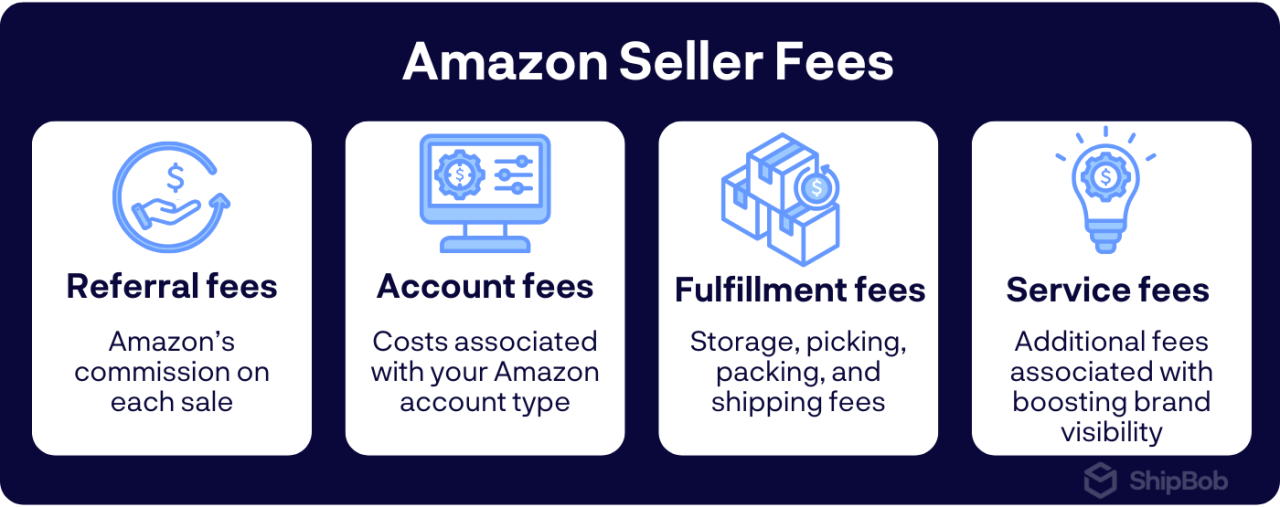
Let’s break down the four major fee categories you’ll encounter:
- Referral fees: Amazon’s commission on each sale, ranging from 8% (some electronics) to 45% (Amazon Device Accessories). Example: A $20 book incurs a 15% referral fee ($3).
- Account fees: Choose between the Individual plan ($0.99 per item sold) or Professional plan ($39.99 monthly subscription). The Professional plan is more cost-effective for brands selling over 40 items per month.
- Fulfilment fees: Fulfilled by Amazon (FBA) fees cover storage, picking, packing, and shipping. Costs vary by product size, weight, and season (higher during holidays). Example: A small standard item under 1 lb costs $3.07 to fulfil (as of 2023).
- Additional service fees: Optional costs like advertising (Sponsored Products), premium placements (Lightning Deals), and other visibility-boosting services.
These fees add up quickly. For a $30 product with 15% referral fee ($4.50), $5 FBA fee, and $1 advertising cost, you’re paying $10.50 in fees, leaving just $19.50 before product costs.
Standard vs. category-based referral fees
Referral fees (Amazon’s commission) vary significantly by category:
- Books, Music, Videos, Games, Software: 15%
- Electronics: 8% (items $100+) or 15% (under $100)
- Clothing & Accessories: 5% (items under $15), 10% (items between $15-20), 17% (items $20+)
- Jewelry: 20% on first $250, then 5% on remainder
- Sports & Outdoors: 15%
- Home & Garden: 15%
- Beauty & Personal Care: 8% (items $10+) or 15% (under $10)
Some categories also have minimum referral fees, meaning you pay whichever is greater: the percentage or the minimum amount.
Example: A $10 book incurs a 15% fee ($1.50). A $300 jewellerypiece incurs 20% on the first $250 ($50) plus 5% on the remaining $50 ($2.50), totaling $52.50.
Monthly subscription vs. individual seller fees
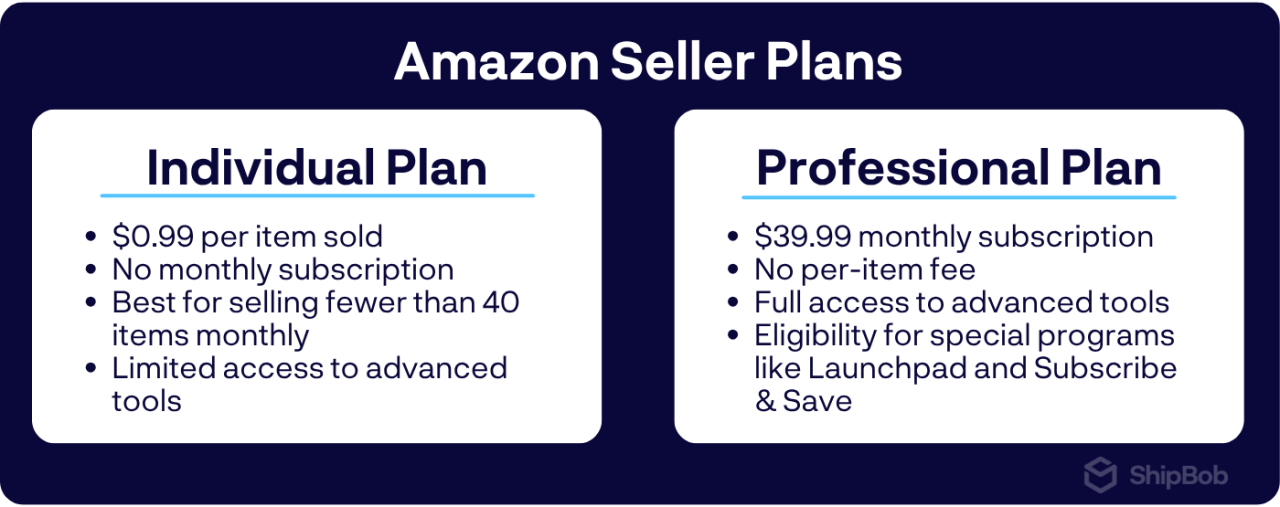
Choose between two selling plans:
Individual plan:
- $0.99 fee per item sold
- No monthly subscription
- Best for selling fewer than 40 items monthly
- Limited access to advanced tools
Professional plan:
- $39.99 monthly subscription
- No per-item fee
- Cost-effective when selling more than 40 items monthly
- Full access to advanced tools (API integration, bulk uploads, enhanced reporting)
- Eligibility for special programs like Launchpad and Subscribe & Save
You can switch between plans as your business evolves. Start with the Individual plan if you’re new, then upgrade to Professional as your sales volume increases.
Understanding Amazon’s fulfilment models and their costs
As an Amazon seller, you have three main options for fulfilling your orders:
- Fulfilment by Amazon (FBA)
- Fulfilment by Merchant (FBM)
- Seller Fulfilled Prime (SFP)
Each model comes with its own set of costs and considerations that can significantly impact your bottom line.
FBA fees
FBA is a popular choice for many sellers, as it allows them to leverage Amazon’s vast fulfilment network and Prime shipping benefits. However, this convenience comes at a cost. FBA fees include:
- Pick and pack fees: These are charged per unit and vary based on the size and weight of your products.
- Weight-based shipping fees: Amazon charges shipping fees based on the weight of your items, with rates varying by product category and shipping speed.
- Dimensional weight considerations: For larger items, Amazon may calculate shipping fees based on dimensional weight, which takes into account the size of the package in addition to its actual weight.
- Monthly and long-term storage fees: Amazon charges monthly storage fees based on the amount of space your inventory occupies in their warehouses. Long-term storage fees apply to items that have been in fulfilment centres for more than 365 days.
It’s important to note that FBA fees can add up quickly, especially for sellers with large or heavy products. In some cases, FBA fees can exceed 30% of an item’s selling price, making it difficult to maintain profitability.
FBM fees and hidden costs
With FBM, sellers are responsible for storing, packing, and shipping their own orders. While this model allows for greater control over the fulfilment process, it also comes with its own set of costs that may not be immediately apparent.
In addition to the direct fees associated with FBM, such as referral fees and closing fees, sellers must also consider the following hidden costs:
- Shipping materials and packaging: Sellers must purchase their own boxes, mailers, labels, and other packaging supplies.
- Labor for order processing: Time spent picking, packing, and shipping orders can add up, especially for high-volume sellers.
- Customer service requirements: FBM sellers are responsible for handling customer inquiries, returns, and refunds, which can be time-consuming and costly.
- Returns handling: Processing returns in-house can be a significant expense, particularly for products with high return rates.
SFP: Balancing Prime access with cost control
Seller Fulfilled Prime offers a middle ground between FBA and standard FBM. With SFP, sellers can fulfil their own orders while still offering Prime shipping benefits to their customers. However, maintaining SFP status requires meeting strict performance standards, including:
- Fast shipping timeframes: SFP sellers must offer two-day or next-day shipping to Prime customers.
- Weekend fulfilment: Orders must be processed and shipped on weekends to maintain Prime eligibility.
- Same-day processing: SFP orders must be processed and shipped on the same day they are received.
Meeting these requirements can be challenging for sellers who handle fulfilment in-house, as it requires a significant investment in infrastructure and labour. Partnering with a third-party logistics provider like ShipBob can make SFP more manageable by providing the necessary resources and expertise to maintain Prime-level service.
By leveraging ShipBob’s nationwide fulfilment network and advanced technology, sellers can offer Prime shipping while maintaining greater control over their inventory and costs. This approach allows for the benefits of Prime without the high fees associated with FBA.
6 hidden Amazon fees eating into your profits
Beyond standard charges, Amazon imposes several less obvious fees that can silently drain your profits. Even experienced sellers get caught off guard by these “hidden” costs. Here are six unexpected Amazon fees and practical ways to protect your margins.
1. Long-term storage fees
FBA items stored longer than 365 days incur hefty fees up to $6.90 per cubic foot. To avoid these charges, maintain healthy inventory turnover by regularly reviewing stock levels and removing slow-moving items before the one-year mark.
2. Removal and disposal fees
Removing unsold inventory from Amazon’s warehouses costs $0.25-$2.00 per unit for returns to you, or $0.15+ per unit for disposal. Prevent these fees by monitoring inventory performance and running promotions for slow-moving products. When removal becomes necessary, compare return versus disposal costs to choose the most economical option.
3. Prep and labelling fees
Amazon charges $0.50-$2.00 per unit for services like polybagging, bubble wrapping, and FNSKU labelling. Save money by either handling prep work yourself or work with a fulfilment partner that can help. For example, brands that partner with ShipBob unlock cost-effective FBA prep services that ensure compliance.
4. Returns processing fees
Amazon charges for processing returns, up to 20% of the item’s price in some categories. Minimise these costs by providing detailed product descriptions and high-quality images that set accurate customer expectations. When returns happen, consider offering exchanges or store credit instead of refunds to offset processing fees.
5. Seasonal shipping surcharges
During peak periods like the holiday season, Amazon adds surcharges of $0.35-$3.00 per FBA unit. Larger items may also face dimensional weight pricing that significantly increases costs. Manage these expenses by adjusting your pricing seasonally and optimising packaging to reduce dimensional weight. Using ShipBob for fulfilment during peak periods can help avoid these surcharges.
6. Miscellaneous and high-volume fees
Growing businesses face additional costs like inventory placement fees ($0.005 per ASIN monthly) and referral fee minimums on low-priced items. Regularly audit your account settings to disable unused premium services, bundle low-priced items to avoid minimum fees, and optimise inventory placement. Consider third-party tools to better track and manage these often-overlooked costs.
How Amazon fees impact your bottom line
Amazon’s complex fee structure can dramatically reduce your actual profits. Let’s break down the real impact with a simple example.
Consider selling a product for $30 with a $10 cost of goods sold (COGS). While the initial math suggests a $20 profit, Amazon’s fees quickly change this picture:
- 15% referral fee: $4.50
- FBA fulfilment fee (small standard item): $3.07
- Monthly storage fee: $0.40 per unit
- COGS: $10.00
This reduces your profit to $12.03, without potential return processing fees ($2.12-$5.00 per return) or advertising costs.
What looked like a $20 profit can quickly shrink to just a few dollars or even become a loss. This demonstrates why tracking your all-in cost structure is essential for maintaining profitability on Amazon.
Step-by-step cost calculations with Seller Central
Amazon offers two key tools to help you track fees:
- Fee Preview: Access this under the “Inventory” tab in Seller Central. Enter your product details (dimensions, weight, price, category) to get estimated referral and FBA fees. Remember, these are just estimates. Actual costs may vary due to dimensional weight, returns, or seasonal charges.
- Fee Dashboard: For actual fee data, go to “Reports” > “Payments” > “Fee Dashboard.” Here you can view monthly breakdowns, analyse specific fee types, and export data for deeper analysis.
While helpful, Amazon’s tools don’t calculate true profit margins after all fees. For complete visibility, consider using third-party calculators or creating your own spreadsheet to track actual profitability.
Budgeting for seasonal or variable sales
Amazon fees fluctuate seasonally, with storage fees spiking during Q4 holiday season. To manage these variable costs effectively:
- Track your sales patterns and forecast monthly volume using historical data
- Implement just-in-time inventory by sending only 2-4 weeks of expected stock to Amazon
- Store excess inventory with a fulfilment partner like ShipBob to avoid Amazon’s higher storage fees
- Adjust your pricing during peak seasons to maintain margins when fulfilment costs increase
Tax and bookkeeping considerations
Most Amazon fees qualify as tax-deductible business expenses. For proper accounting:
- Separate Amazon fees (operating expenses) from product costs (COGS)
- Use accounting software that integrates with Amazon to automatically categorize fees
- Consider working with an ecommerce-specialized accountant for accurate financial records
Understanding how fees impact your bottom line enables smarter decisions about pricing, inventory, and fulfilment strategies. Next, we’ll explore specific tactics to reduce your Amazon fees and boost profitability.
4 strategies to reduce your Amazon Seller fees
While Amazon fees are unavoidable, you can minimise their impact and protect your profits with these proven tactics that won’t compromise product quality or customer experience.
1. Optimise inventory management
Control your Amazon storage fees by maintaining optimal inventory levels. Focus on improving your inventory turnover rate (how quickly you sell through stock) to reduce storage costs and avoid long-term storage penalties.
Calculate your turnover rate by dividing your annual COGS by average inventory value (example: $500,000 COGS ÷ $100,000 inventory = 5 turnover rate). Aim for a rate of 4-6, meaning you sell through inventory every 2-3 months.
Consider these approaches:
- Implement just-in-time (JIT) inventory: Order only what you’ll sell in the next 2-4 weeks
- Use ShipBob to store inventory outside Amazon’s warehouses: Distribute stock strategically while maintaining fast shipping
2. Diversify with FBM through a fulfilment partner
While FBA offers convenience and Prime benefits, Amazon Fulfilment by Merchant (FBM) often provides better cost control, especially for larger or heavier items that incur high dimensional weight charges.
However, managing FBM independently requires significant time and resources. Partner with ShipBob to get the best of both worlds: lower fulfilment costs with professional-grade logistics.
With ShipBob handling your FBM orders, you can seamlessly manage inventory across multiple sales channels from a single dashboard.
3. Leverage professional FBA prep services
Outsourcing your FBA prep to ShipBob prevents costly compliance errors while saving time. ShipBob’s comprehensive prep services include:
- FNSKU barcode labelling
- Polybagging and bubble wrapping
- Bundling and kitting
- Inspections and insertions
- Palletizing and shrink wrapping
Professional prep ensures your products meet Amazon’s requirements, preventing chargebacks, inventory rejections, and shipping delays that can erode your margins.
4. Conduct regular fee audits
Review your Amazon fee statements monthly through Seller Central’s Fee Dashboard to catch unexpected charges and identify savings opportunities. Track key metrics in a spreadsheet to spot trends and forecast future costs.
Adjust your pricing strategy as fee structures change, and consider dynamic pricing tools that automatically update prices based on your costs, competition, and target margins.
Evaluate these thresholds when considering alternative fulfilment methods:
- Size/weight: Items over 18″ or 3 pounds often cost less to fulfil outside FBA
- Sales velocity: Products selling fewer than 10 units monthly may incur disproportionate storage fees
- Seasonality: Use FBM for seasonal items to avoid long-term storage fees
- Returns: Products with >5% return rates may be cheaper to process through a fulfilment provider
“
ShipBob’s omnifulfillment solution could handle every sort of order we had, and had no qualms whatsoever about facilitating our FBA prep orders for Amazon. Multichannel fulfilment with ShipBob is affordable, too, as not having to do any shipping ourselves enables us to keep low overhead, and ShipBob’s transparent pricing across channels provides even more cost-savings.”Nathan Garrison, Co-Founder and CEO of Sharkbanz
Proactive tips for planning around future Amazon fee changes
Amazon updates fees 2-3 times yearly, so staying ahead of changes is crucial for protecting profits. Here’s how to prepare:
1. Monitor Amazon announcements and policy updates
Check Seller Central’s “Announcements” section regularly, where Amazon typically provides 30-60 days’ notice before fee changes. Enable email notifications and bookmark Seller Central News. Major changes usually come in January (effective February/March) and August (effective September/October), with Q4 holiday surcharges announced around April/May.
Set up Google Alerts for “Amazon FBA fee changes” and join seller communities like Amazon Seller Forums or Reddit’s r/FulfillmentByAmazon to learn from experienced sellers.
2. Adjust pricing and packaging strategies
Verify your product measurements match Amazon’s records to prevent fee discrepancies. Use the Fee Preview tool when increases are announced to identify affected products.
Consider a tiered approach: absorb minor increases on competitive items while passing larger increases to consumers on unique products with loyal customers.
Optimise packaging to cut costs. For example, bundling three accessories can help sellers reduce fulfilment fees. Another strategy is to reduce dimensional weight. Some brands can do this by switching from boxes to polybags. Implementing these can result in major savings
3. Conduct quarterly margin audits
Download fee reports quarterly and calculate true profitability using these formulas:
- Net revenue = Gross sales − Referral fees − Closing fees
- Fulfilment costs = FBA fees + Storage fees + Inbound shipping
- Marketing costs = PPC spend + Promotions + Coupons
- True profit = Net revenue − COGS − Fulfilment costs − Marketing costs − Returns/Customer service
- True profit margin = (True profit ÷ Gross sales) × 100
Watch for warning signs: storage fees exceeding 5% of sales, fulfilment fees above 20% of product price, or Amazon fees consuming more than 35% of your selling price.
4. Expand into international or multi-channel fulfilment
Diversify by expanding to international Amazon marketplaces to hedge against regional fee increases. Reduce Amazon dependency by selling through multiple channels like Walmart, TikTok Shop, and your own website.
ShipBob’s global network makes international expansion simple with fulfilment centres across North America, Europe, and Australia, letting you store inventory closer to customers without managing complex cross-border logistics.
5. Automate financial tracking
Use tools like A2X, Sellics, or SellerBoard that integrate with both Amazon and ShipBob to track fees accurately. Automation eliminates the typical 1-3% error rate of manual tracking while saving 5-10 hours weekly.
ShipBob’s analytics dashboard provides clear visibility into fulfilment costs across all channels, helping you identify savings opportunities and compare FBA with alternatives, without the surprise fees and complex calculations that often complicate Amazon’s invoices.
How ShipBob helps Amazon sellers control costs
ShipBob offers Amazon sellers a flexible solution that balances costs, control, and customer experience as Amazon’s fees change. By combining ShipBob’s technology with your Amazon business, you can adjust your fulfilment strategy while maintaining Prime-level delivery standards.
FBA prep and optimised inbound shipping
ShipBob’s specialized FBA prep services ensure compliance while preventing costly errors:
- Proper poly bagging with required warnings
- Bundle creation to reduce per-item fees
- Box content information that prevents processing fees
Our prep services eliminate common compliance fees while preventing inventory refusals and delays.
NOTE: Effective January 1, 2026, Amazon will no longer offer FBA prep and labelling services. In lieu of Amazon’s services, brands can leverage ShipBob for seamless FBA prep.
Automated FBA prep
With ShipBob’s automated FBA prep, brands can forego the manual steps required for FBA prep.
In a few clicks, brands can create new FBA prep orders in the ShipBob dashboard. ShipBob then shares that info to Amazon Seller Central via API. From there, ShipBob picks, packs, and prints and applies Amazon labels. After, brands can view tracking updates and signed BOLs in the ShipBob dashboard.
This automated solution reduces the time spent on FBA orders.
“We’ve saved a lot of time using ShipBob’s FBA prep automation feature for parcel. With the FBA prep automation, we don’t have to lift a finger outside of submitting the inventory transfer request in the ShipBob dashboard. Then ShipBob handles retrieving all of the box and shipping labels from Amazon Seller Central through the direct integration. Now, it takes 20% of the time it used to take to send a shipment over to Amazon.”
Nadine Joseph, Founder & CEO of Peak and Valley
Real-time visibility and transparency
Our dashboard breaks down all fulfilment costs per order, helping you identify optimisation opportunities that Amazon’s reporting might miss.
This visibility highlights cost outliers before they impact your margins. Our dimensional weight analysis identifies packaging improvements, while storage reports help optimise inventory levels.
Unlike Amazon’s complex fee structure, ShipBob offers straightforward, predictable pricing that simplifies financial planning and pricing decisions.
Our analytics suite includes inventory forecasting, sales velocity tracking, and geographic distribution analysis to optimise stock levels, reduce storage costs, and improve delivery speeds.
Global fulfilment network to offset fee hikes
With facilities across North America, Europe, and Australia, you can strategically distribute inventory across our network and store products closer to customers while maintaining a unified inventory pool that adapts to demand and cost considerations.
This approach reduces dependency on any single Amazon region, giving you more leverage and flexibility. During peak seasons when Amazon adds surcharges, you can shift volume to more cost-effective locations.
“
We’re also glad to partner with ShipBob so we can use their facilities in the US, the EU, Australia, and beyond. Some 3PLs we worked with also didn’t have any flexibility to offer things like custom label jobs for Amazon and other customisation capabilities such as kitting at scale.“Jesse Leeworthy, Director & Co-Founder at memobottle
Start shipping with ShipBob
Need a new fulfilment partner with FBA prep capabilities? Connect with our team to get started.
FAQs about Amazon seller fees
Below are answers to more questions and challenges surrounding Amazon seller and marketplace fees.
How do I calculate Amazon seller account fees for my products?

Use Amazon’s Fee Calculator by entering your product details (dimensions, weight, price, and category) to get a breakdown of referral fees, fulfilment fees, and other applicable charges. For deeper insights, consider third-party tools that offer profit margin calculations and scenario testing to make smarter pricing decisions.
Which selling plan should I choose: individual or professional?
Choose based on your monthly sales volume: Individual plan ($0.99/item) works best if you sell fewer than 40 items monthly. Professional plan ($39.99/month) is more economical above that threshold and includes additional benefits like API access, advanced tools, and access to restricted categories. You can switch plans as your business grows.
Where do I track hidden fees, like removal or disposal fees?
Find these in your Seller Central account under Reports > Fulfilment Reports, which details all FBA-related costs. Set up alerts for unexpected charges to stay informed. Third-party tools often provide better visibility than Amazon’s native reporting. ShipBob’s reporting features offer clear, consolidated views of your fulfilment costs to complement Amazon’s limited transparency.
Can I offer Prime shipping without FBA to avoid high fulfilment fees?
Yes, through Seller Fulfilled Prime (SFP). This program requires meeting strict shipping speed and service standards that can be challenging to maintain independently. Partnering with ShipBob helps you meet SFP requirements while reducing costs compared to FBA. Our nationwide network enables 2-day delivery across most of the US, maintaining your Prime badge with lower fulfilment costs.
Are Amazon fees tax-deductible?
Most Amazon fees (referral, FBA, subscription) qualify as ordinary business expenses and are tax-deductible. Properly categorize these fees in your accounting records and maintain documentation. Consult a tax professional for specific guidance on deductions, categorization, and required documentation.
How does ShipBob help reduce my reliance on FBA?
ShipBob offers four key solutions to reduce FBA dependency:
- FBA Prep: We handle labelling, packaging, and bundling to help you avoid non-compliance fees.
- Seller Fulfilled Prime: Our network helps you maintain Prime status without FBA’s high costs.
- Multi-Channel Fulfilment: Manage inventory across multiple sales channels to diversify revenue streams.
- International Fulfilment: Reach global customers through our international fulfilment centres.
These services create a more flexible fulfilment strategy with greater cost control.
What happens if I don’t pay my Amazon seller fees?
Amazon will first attempt to charge your payment method on file. If unsuccessful, they may suspend your selling privileges until payment, withhold future earnings, or ultimately close your account and pursue legal action. Stay on top of payments and contact Amazon’s seller support if you face payment challenges to develop a resolution plan.


