

Table of Contents
** Minutes
What you need to know about Amazon inventory management
How Amazon’s fulfilment network operates
5 techniques to avoid Amazon inventory management problems
Must-have features of an Amazon inventory management system
Going beyond FBA: Multi-channel inventory management strategies
Safeguarding your brand on Amazon
Effective inventory management is essential for Amazon success. As the world’s largest online marketplace, Amazon demands precise stock control to maximise your potential.
Well-managed Amazon inventory directly boosts performance metrics, customer satisfaction, and profits. However, many sellers struggle to maintain optimal inventory across Amazon’s complex fulfilment network.
This guide delivers key Amazon inventory strategies, from demand forecasting to brand protection, to help you optimise operations and scale with confidence. We’ll also show how ShipBob’s platform seamlessly integrates with Amazon to help you outsource critical inventory tasks while focusing on growing your business.
What you need to know about Amazon inventory management
Amazon inventory management involves tracking and optimising stock levels for products sold on the platform, from ordering and storing to tracking and replenishing inventory across Amazon’s fulfilment network or your own facilities.
+
Managing inventory effectively helps you meet Amazon’s strict performance standards, which leads to better visibility, more sales, and access to programs like Seller Fulfilled Prime.
–
Poor inventory management can result in penalties, account suspensions, or loss of selling privileges.
Your inventory strategy directly affects your bottom line. Too much stock ties up capital and incurs storage fees, while too little leads to stockouts, lost sales, and damaged customer relationships. Finding the right balance is essential for Amazon success.
A quick recap of the differences between FBA and FBM
Amazon sellers have two fulfilment options, each with distinct inventory management implications:
Fulfilment by Amazon (FBA): Amazon handles storage, picking, packing, and shipping. Benefits include Prime eligibility and access to Amazon’s logistics network, but you’ll need to follow strict packaging guidelines and rely on Amazon’s tracking systems.
Fulfilled by Merchant (FBM): You manage all fulfilment aspects yourself, including storage, order processing, shipping, and customer service. This requires more work but offers greater flexibility and control over your inventory processes.
| Aspect | FBA | FBM |
| Storage | Amazon’s fulfilment centres | Seller’s own facilities or 3PL |
| Shipping | Handled by Amazon | Arranged by seller |
| Returns | Processed by Amazon | Managed by seller |
| Inventory visibility | Limited to Amazon’s reports | Full control over tracking systems |
Choosing the right fulfilment method is crucial for developing an inventory strategy that aligns with your business needs and goals.
How Amazon’s fulfilment network operates
Amazon’s fulfilment network is a powerful logistics system designed to deliver products quickly and efficiently. Understanding this network helps sellers optimise their inventory management and enhance customer experience.
The inventory journey through Amazon’s network
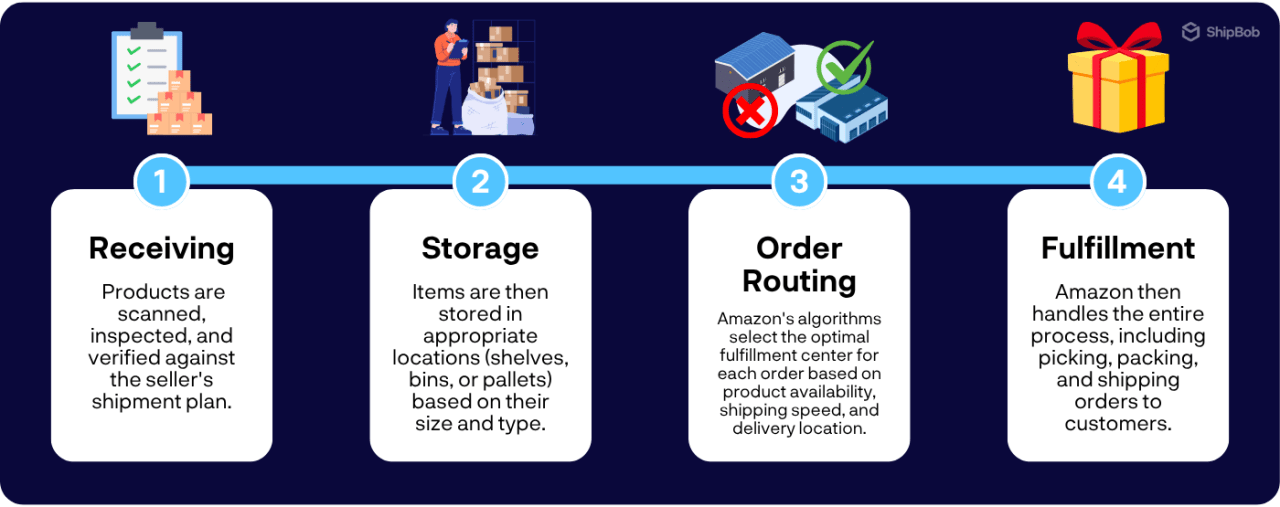
Amazon’s inbound shipment requirements
Amazon maintains strict requirements for inbound shipments to ensure efficiency.
Sellers must properly package, label, and prepare products according to Amazon’s guidelines, including using correct barcodes and following preparation instructions.
Failing to meet these requirements can cause delays, inventory loss, or shipment rejection. Following Amazon’s standards helps sellers avoid costly mistakes and ensures products become available for sale quickly.
Exploring Amazon facility types and “The Amazon Effect”
Amazon’s network includes several facility types, each with a specific role:
- Fulfilment centres: The largest facilities, storing millions of products and handling most order processing
- Sortation centres: Organise packages by postcode and consolidate them for streamlined delivery
- Delivery stations: Prepare packages for final delivery to customers
Amazon’s competitive edge comes from its advanced technology and data analytics. Every item is tracked with barcodes, providing real-time visibility into inventory. This data powers Amazon’s algorithms, optimising everything from inventory placement to shipping routes.
This highly efficient system has created “The Amazon Effect,” where customers now expect fast, free shipping and immediate gratification. As other retailers must adapt to keep pace, this has transformed how businesses approach inventory management and fulfilment, with many adopting Amazon’s data-driven, customer-focused model.
For Amazon sellers, success depends on understanding this network and implementing similar data-driven approaches. Using tools like real-time tracking, predictive analytics, and automated replenishment helps sellers optimise operations and deliver the seamless experience Amazon customers expect.
5 techniques to avoid Amazon inventory management problems
Effective Amazon inventory management is a continuous cycle that requires a systematic approach. By implementing these five best practices, you can optimise your inventory levels, improve cash flow, and maintain strong performance metrics on the Amazon marketplace.
1. Demand forecasting and replenishment planning
Accurate demand forecasting is the foundation of effective inventory management. By analising historical sales data and identifying seasonal patterns, you can better predict future demand and plan your inventory accordingly.
To calculate reorder points and safety stock levels, consider factors like:
- Lead times from suppliers
- Sales velocity of each product
- Variability in demand
- Amazon-specific events (such as Prime Day or holiday seasons)
Regularly review your forecast accuracy and make adjustments as needed to improve precision over time.

2. Product receiving and FBA prep
To ensure your inventory is received and processed efficiently at Amazon’s fulfilment centres, follow their strict guidelines for inbound shipments, including:
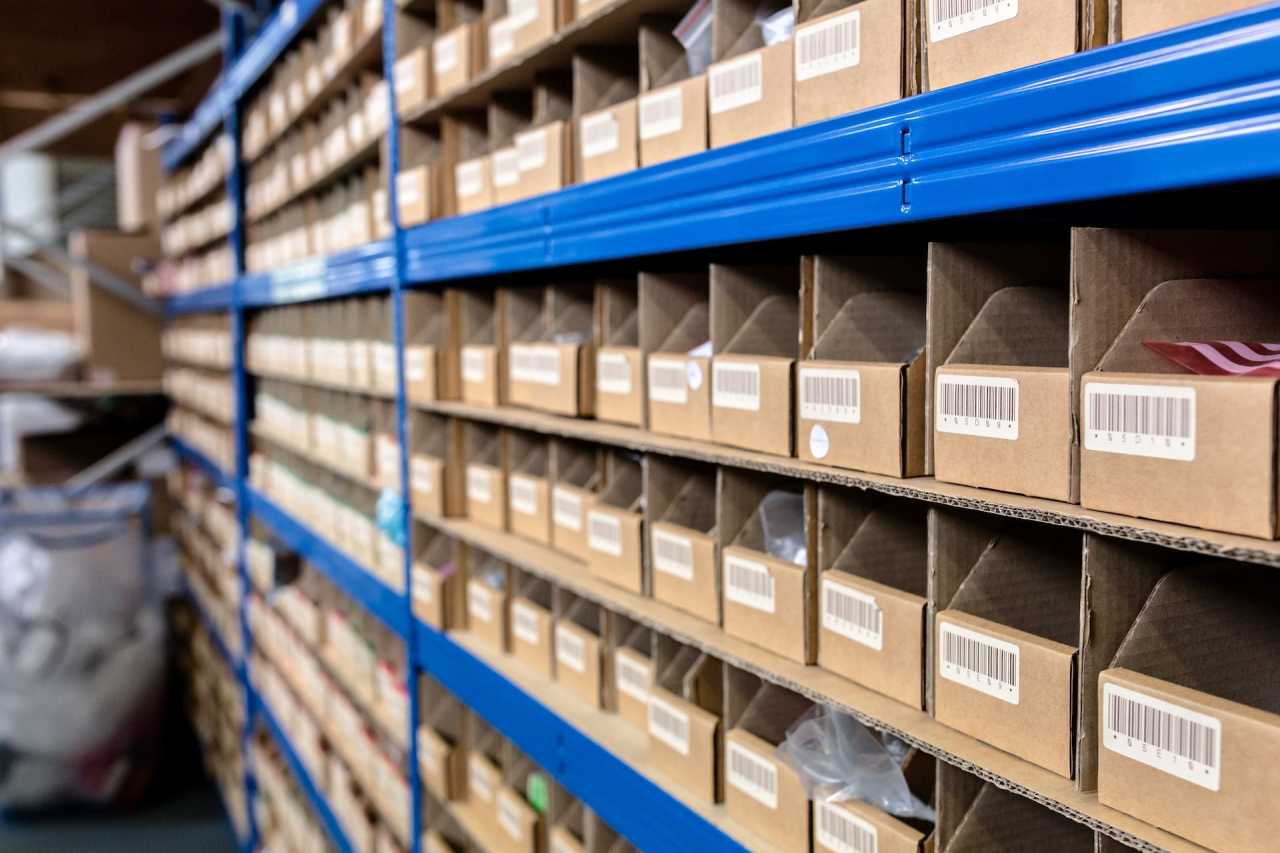
- Use proper labelling with FNSKUs (Fulfilment Network Stock Keeping Units).
- Adhere to polybag requirements for certain products.
- Ensure all items are properly prepped according to Amazon’s standards.
Develop a checklist for your FBA prep process to ensure consistency and compliance. Common reasons for inbound shipment rejections include incorrect labelling, missing prep, or damaged packaging, so pay close attention to these details to avoid delays and additional costs.

3. Order fulfilment and shipping optimisation
Whether you’re using FBA or fulfilling orders yourself (FBM), efficient order processing is key to maintaining high seller metrics and customer satisfaction.
For FBA sellers:
- Optimise inventory placement to leverage Amazon’s network of fulfilment centres.
- Use Amazon’s inventory placement service when appropriate.
- Monitor performance metrics to identify areas for improvement.
For FBM sellers:
- Streamline your pick, pack, and ship processes to minimise turnaround times.
- Consider multi-channel fulfilment strategies to consolidate inventory.
- Use automation tools to reduce manual processing.

4. Stockout prevention and overstock management
Stockouts can lead to lost sales, poor customer experience, and a drop in your Amazon search rankings. On the flip side, overstocking can tie up capital and result in costly long-term storage fees.
To maintain optimal inventory levels:
- Set up alerts for low stock levels based on sales velocity.
- Automate replenishment based on real-time sales data and lead times.
- Implement strategies for slow-moving inventory (bundling, promotions, liquidation).
- Regularly review inventory performance metrics.
Make data-driven decisions to prevent both stockouts and overstocks, balancing customer satisfaction with capital efficiency.
5. Returns and reverse logistics streamlining
Amazon’s customer-centric returns policy can be a double-edged sword for sellers. While it builds trust and loyalty with buyers, it also creates challenges in managing returned inventory efficiently.
Develop a clear process for handling returns that includes:
- Inspecting and grading returned items quickly.
- Restocking resellable items promptly to maintain inventory levels.
- Considering refurbishment options for lightly damaged products.
- Liquidating or disposing of unsellable items efficiently.
By streamlining your reverse logistics, you can turn returns into opportunities and maintain a healthy inventory balance.

Must-have features of an Amazon inventory management system
As your Amazon business grows, a dedicated inventory management system becomes essential for tracking stock, orders, and fulfilment. An effective system should streamline operations, provide real-time visibility, and support data-driven decisions.
The most critical feature is seamless Amazon Seller Central integration that automatically syncs inventory levels, orders, and shipment data, eliminating manual updates and reducing errors. Your system should also connect with other sales channels and tools in your ecommerce ecosystem to provide a complete view of inventory across all channels.
✅ Essential system capabilities
Key features to look for include:
- Real-time inventory tracking across multiple locations (FBA warehouses, warehousing partner facilities, your own warehouse).
- Automated reorder calculations based on sales velocity and lead times.
- Demand forecasting using historical data to predict future sales.
- Performance metrics like turnover rate and SKU profitability.
- Customisable alerts for low stock levels and aging inventory.
- Barcode scanning capabilities for efficient receiving and processing.
- Accounting software integration for financial reporting.
Choose a system that matches your business size and can scale with your growth.
📈 Interpreting Amazon inventory reports
Amazon provides valuable inventory data through Seller Central reports. Two essential reports are:
Inventory Age report (Reports > Fulfilment > Inventory > Inventory Age): Shows how long each unit has been in Amazon’s fulfilment centres, helping identify slow-moving products at risk of long-term storage fees.
Restock Inventory report (Reports > Fulfilment > Restock Inventory): Recommends which products to reorder and in what quantities based on sales history and current stock levels.
When analising these reports, look for trends that can guide your inventory decisions:
- Products consistently appearing in the Inventory Age report may need promotions to clear excess stock.
- Frequent stockouts in the Restock report signal the need to adjust reorder points.
- Seasonal fluctuations that require inventory planning adjustments.
If you find discrepancies between Amazon’s reports and your records, first verify your own data for accuracy, then contact Amazon Seller Support with supporting documentation to resolve remaining issues.
💸 Preventing costly long-term storage fees
Amazon charges significantly higher long-term storage fees for inventory that remains in fulfilment centres for over 365 days. These fees are assessed semi-annually (February 15th and August 15th).
To identify at-risk inventory, check the Inventory Age report for items in the “181-365 days” or “365+ days” columns. For these products, consider:
- Running promotions to clear excess stock.
- Bundling slow-moving items with popular products.
- Removing inventory to store elsewhere (your warehouse or a fulfilment partner).
- Donating or disposing of unsellable inventory.
When choosing a strategy, weigh the costs against potential benefits. A promotion might reduce short-term profits but cost less than storage fees. Removing inventory incurs shipping costs but may be worthwhile with cheaper storage alternatives.
The key is maintaining lean, fast-moving inventory by regularly reviewing stock levels, adjusting reorder points based on sales velocity, and proactively managing slow-moving products. This approach minimises storage costs while maximising Amazon profitability.
Going beyond FBA: Multi-channel inventory management strategies
Expanding beyond Amazon opens new growth opportunities but requires smarter inventory management. A multi-channel approach gives you wider market reach, reduces platform dependency, and creates more stable revenue streams.
The key challenge is inventory synchronisation. Without proper systems, you risk overselling (accepting orders you can’t fulfil) or underselling (missing sales opportunities).
Multi-channel management best practices
To effectively manage multi-channel inventory:
- Use one centralised system connected to all sales channels.
- Allocate inventory based on each channel’s performance.
- Maintain buffer stock to prevent stockouts.
- Track channel performance with unique SKUs.
- Regularly optimise your inventory distribution.
Real-time inventory visibility is essential. Modern platforms update stock levels instantly after each sale, preventing overselling and protecting your seller ratings.
Adopting Amazon’s multi-node approach
Amazon strategically distributes inventory across multiple fulfilment centres to optimise delivery speed and cost. You can implement a similar strategy by:
- Partnering with an expert provider with a multi-location network.
- Positioning inventory near customer clusters.
- Using sales data to optimise stock levels at each location.
- Implementing cross-docking for quick inventory movement.
- Continuously improving placement with real-time data.
The results speak for themselves:
This strategy also creates resilience. When a California seller faced wildfire disruptions, their distributed inventory allowed seamless fulfilment from other locations. This redundancy ensures business continuity during regional disruptions, weather events, or supply chain challenges.
Safeguarding your brand on Amazon
Protecting your Amazon brand from counterfeits and unauthorised sellers is essential for maintaining customer trust. Amazon offers key protection programs to help secure your intellectual property and prevent listing hijacking.
Amazon brand protection programs
Start by enrolling in Amazon Brand Registry, which requires a registered trademark in each country where you sell. This program provides:
- Better control over your product listings.
- AI-powered counterfeit detection and removal.
- Search tools to identify potential infringement.
- Specialised brand protection support.
For additional security, consider Amazon’s Transparency program, which uses unique serial codes customers can scan to verify product authenticity.
While these tools are valuable, remain proactive by:
- Regularly searching for unauthorised listings of your products.
- Monitoring reviews for mentions of counterfeits.
- Reporting suspected infringement promptly.
- Taking legal action when necessary against persistent offenders.
Customised returns management for brand protection
Returns offer an opportunity to protect your brand while gathering customer feedback. Implement a returns strategy that preserves brand value and prevents counterfeit items from re-entering the supply chain.
Create a clear inspection process for returned items, where you:
- Check for damage and verify authenticity markers.
- Decide whether to restock, refurbish, or dispose based on condition.
- Ensure restocked items meet your packaging and labelling standards.
- Consider selling refurbished items as “like new” with clear condition disclosure.
- Properly dispose of unsellable items through destruction, donation, or specialised disposal.
Use returns data to improve your products and reduce future returns. Analyse common issues to enhance quality control, protecting your reputation and building customer loyalty.
Ready to streamline your Amazon inventory with ShipBob?
Managing Amazon inventory gets complex as you expand across channels. ShipBob simplifies everything with solutions that optimise your operations.
With just a few clicks, ShipBob connects to Amazon Seller Central, automatically syncing inventory, orders, and shipment data in real-time, with no manual entry needed.
Whether you use FBA, FBM, or both, ShipBob adapts to your preferred fulfilment strategy.
FBA sellers gain real-time visibility into stock levels and performance metrics, making it easy to optimise inventory and reduce storage fees. You can set reorder points, monitor inventory age, and spot slow-moving products before they incur expensive long-term storage fees.
ShipBob’s FBM integration
For sellers using FBM, ShipBob offers a powerful alternative to handling fulfilment in-house. With ShipBob’s nationwide network of fulfilment centres, you can store your inventory closer to your customers and offer fast, affordable shipping options that rival Amazon Prime.
When you use ShipBob for FBM, you get access to:
- Real-time inventory tracking across all locations.
- Automated order processing for faster fulfilment.
- Customisable packing and branding options.
- The same powerful technology that powers ShipBob’s FBA solutions.
By leveraging ShipBob’s FBM capabilities, you can maintain greater control over your inventory and customer experience while still benefiting from the speed and efficiency of a professional fulfilment partner. This can be especially valuable during peak sales periods or when Amazon’s fulfilment capacity is limited.
“We’re about to start leveraging ShipBob’s Fulfilled by Amazon (FBA) integration in the US. Fulfilled by Merchant (FBM) through ShipBob has also been a game-changer for us in the UK. Additionally, we’re looking at leveraging ShipBob for additional marketplaces like Target Plus, Walmart, and others. Basically, anything that’s available to us, we want to do to continue growing both the DTC and wholesale sides of the business.”
Danica Quilty, Ecommerce Director of Lyres
ShipBob’s WMS for in-house operations
If you prefer to handle fulfilment in-house, ShipBob also offers a standalone warehouse management system (WMS) that can help you optimise your operations and stay connected to your other sales channels.
With ShipBob’s WMS, you get access to powerful tools like:
- Barcode scanning for accurate inventory tracking.
- Pick/pack optimisation to improve efficiency.
- Real-time inventory visibility across all locations.
- Seamless integration with Amazon Seller Central and other platforms.
ShipBob’s WMS is designed to be user-friendly and scalable, so you can start small and expand your capabilities as your business grows. Whether you’re operating out of a single warehouse or multiple locations, ShipBob’s WMS can help you streamline your processes and improve your efficiency.
“Now that our team has adopted ShipBob’s WMS, we’re able to perform more complex tasks, increase efficiency, and instill inventory quality control – the types of things that are necessary in all warehouse environments that we just haven’t had for a long time! It’s really helped us raise the bar and raise our standards for what warehouse success looks like.”
Tucker Robinson, Warehouse Director at Savannah Bananas
ShipBob’s inventory dashboard and analytics
Regardless of which fulfilment strategy you use, ShipBob’s inventory dashboard and analytics tools give you unparalleled visibility into your Amazon inventory and performance.
From the ShipBob dashboard, you can:
- View real-time stock levels across all fulfilment locations.
- Track key metrics like inventory turnover and days of supply.
- Analyse revenue by SKU to identify top performers.
- Make data-driven decisions about your inventory strategy.
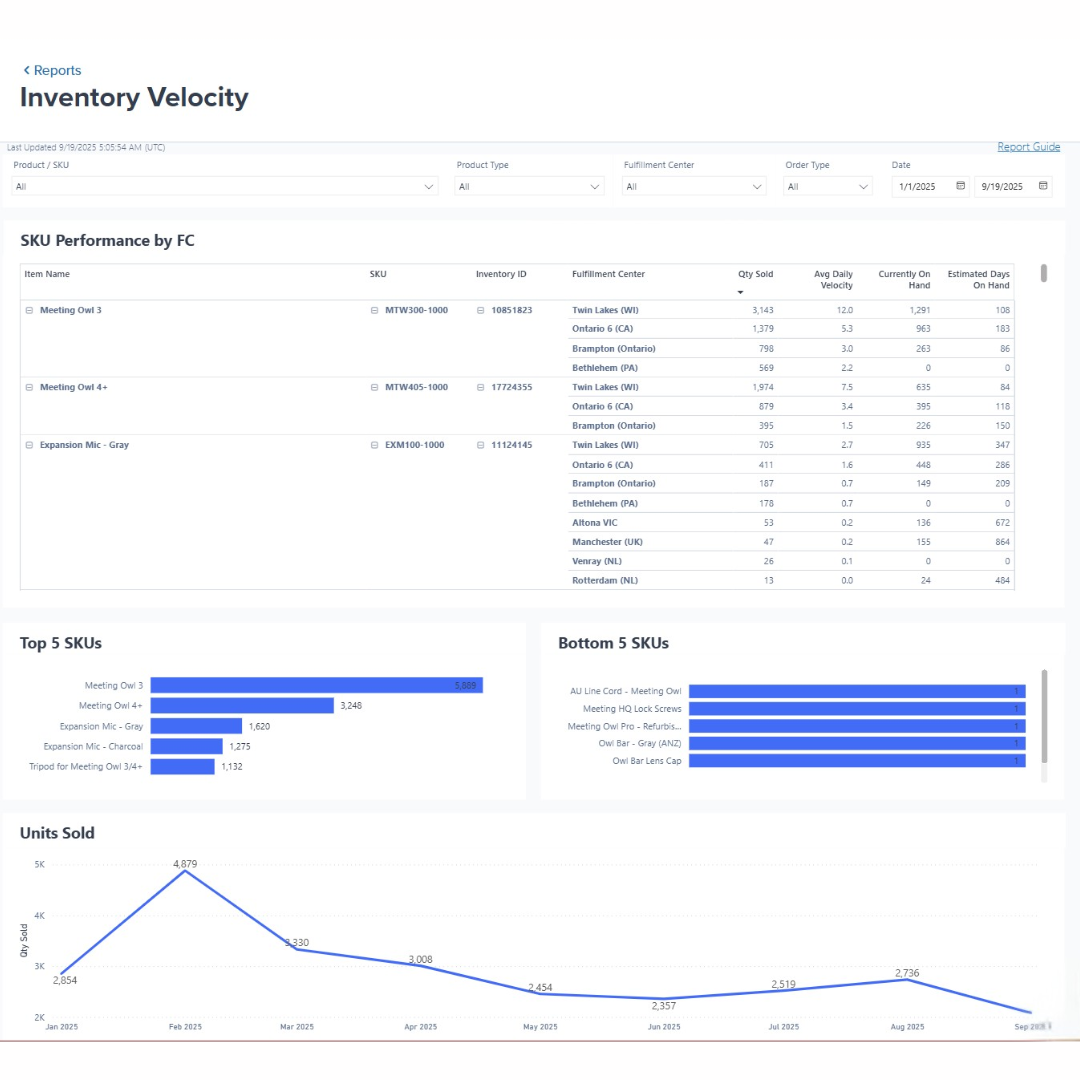
ShipBob’s platform also includes powerful forecasting and automation tools that help you optimise inventory levels and avoid stockouts or excess stock. You can set custom reorder points based on your sales velocity and lead times, and receive automatic notifications when it’s time to restock.
“One of my favorite parts of ShipBob’s solution is the analytics I get through the ShipBob dashboard. I use the reporting constantly, especially to track my stock. It’s even helping me get better at inventory forecasting.
Before, I was just fumbling through the demand planning process and just ordering inventory based on what sold out. But now I have insight into metrics like SKU velocity and inventory days on hand, and I’m using that to decide what to reorder and how much of it I need. That helps a lot, especially now that the brand is scaling and I’m ordering my products in bigger batches.”
Luke Rolls, Founder of The Protein Pancake
FBA prep and Amazon inventory support
ShipBob offers specialized services to support your Amazon inventory management, including:
- FBA prep to ensure proper packaging and labelling.
- Cross-docking for efficient inventory movement.
- Inventory transfers between FBA and other locations.
- Returns processing and reintegration.
With ShipBob’s FBA prep service, you can ensure that your inventory is properly packaged, labelled, and shipped to Amazon’s fulfilment centres, reducing the risk of delays or rejections.
“We also do a lot of business on Amazon, and ShipBob helps us automate and save time there as well. We previously used Amazon Fulfilled by Merchant (FBM) through ShipBob, which was extremely easy to set up and very convenient. Now we use Fulfilled by Amazon (FBA), and ShipBob’s FBA prep solution is by far the easiest solution I have ever used.
Amazon shipments can get really complicated and very tricky, and they’re also extremely strict and rigid about how they want to receive their inventory. Fortunately, ShipBob has really invested in their FBA Prep solution to make it as hands-free and simple as possible. There’s an automatic connection with our Amazon account that creates shipments within the ShipBob dashboard. We don’t have to go over to Amazon to create those shipments anymore, which is a huge time saver.”
Hayden Pembridge, VP of Operations at Nood
ShipBob offers powerful integration capabilities, flexible fulfilment options, and advanced analytics and automation tools to help you take control of your Amazon inventory and grow your business with confidence.
To learn more about how ShipBob can support your Amazon selling strategy, click the button below to get in touch.
FAQs about managing Amazon inventory
Below we address more challenges and queries often encountered by aspiring and growing sellers looking to manage their Amazon inventory systems.
What is an Amazon inventory management system?

An Amazon inventory management system is software that helps sellers track and optimise their Amazon inventory. These systems sync with Seller Central in real time, forecast inventory needs, and automate reordering to maintain optimal stock levels.
By connecting with Amazon and other sales channels, these systems create a unified view of your inventory data for smarter purchasing and pricing decisions. This technology significantly outperforms manual tracking methods, saving time, cutting costs, and boosting efficiency for Amazon sellers.
How can I avoid overstock or stockouts on Amazon?
To prevent overstock and stockouts on Amazon, use a three-part approach:
- Accurate forecasting: Analyse past sales data, watch competitor trends, and account for seasonality
- Regular inventory reviews: Monitor performance metrics and adjust purchasing accordingly
- Proactive management: Set up automatic alerts for low stock and potential overstock situations
Plan strategically for busy seasons and promotions without tying up too much capital. Regularly check your inventory metrics and adjust your approach to balance product availability with efficient resource use.
Can a 3PL or fulfilment partner help with Amazon FBA inventory management?
Yes, expert fulfilment partners like ShipBob can greatly improve your Amazon FBA inventory management. They handle critical FBA prep tasks (such as labelling, packaging, and shipping to Amazon fulfilment centres), which ensures compliance with Amazon’s requirements and reduces shipment rejections.
Fulfilment providers also offer additional benefits:
- Alternative storage options outside Amazon’s network to avoid long-term fees
- Multi-channel fulfilment capabilities for efficient inventory management
- Scalable infrastructure to support business growth
- Expertise in Amazon’s complex requirements and processes
As your Amazon business grows, a logistics partnership provides the infrastructure and support needed to handle increased volume and complexity.
What are the best practices for advanced Amazon demand forecasting?
Analyse your historical sales data, considering seasonality patterns and cyclical trends, product lifecycle stages, market trends and competitor activity, and Amazon-specific metrics like Best Seller Rank and reviews.
Use statistical methods (exponential smoothing, moving averages) to identify patterns and project demand. Invest in forecasting software that connects with Amazon’s API for real-time data and machine learning insights.
Regularly review and adjust your forecasts based on performance. This data-driven approach helps optimise inventory, cut costs, and boost customer satisfaction.
How can I reduce Amazon storage fees while maintaining adequate stock levels?
To cut Amazon storage fees without risking stockouts:
- Regularly review inventory performance to identify slow-moving products.
- Clear excess stock through bundling, promotions, or liquidation before long-term fees apply.
- Balance availability and storage costs through accurate forecasting.
- Evaluate each SKU’s profitability and adjust stock levels accordingly.
- Consider using a fulfilment platform or your own warehouse for inventory that doesn’t need immediate FBA placement.
Stay informed about Amazon’s fee changes to proactively adjust your strategy. Consistent monitoring helps reduce costs while maintaining excellent customer service.
How do I protect my brand from counterfeits in Amazon’s marketplace?
Protect your brand from Amazon counterfeits by:
- Enrolling in Amazon’s Brand Registry for enhanced listing control and protection tools.
- Implementing strong inventory controls using unique identifiers (barcodes, serial numbers).
- Maintaining detailed supply chain records to verify authentic products.
- Regularly monitoring your listings and customer reviews for signs of counterfeit activity.
- Promptly reporting suspicious activity to Amazon’s infringement team.
Consider consulting an IP attorney for additional support with persistent issues. Staying vigilant and using Amazon’s protection tools helps safeguard your reputation and preserve customer trust.


