

We’ve all had that one food item that’s been in our fridge forever. It’s long expired and no longer edible, so until you clear out your refrigerator, it just takes up space.
Aged inventory in a warehouse is much the same thing. Without a clear view of how long products are sitting on shelves, ecommerce businesses risk tying up capital, wasting valuable storage space, and reducing your margin with unsold goods.
That’s where inventory aging reports come in. These reports break down how long inventory has been in storage to help you pinpoint slow-moving stock before it becomes a liability.
In this guide, we’ll walk through how inventory aging reports work, why they matter, and how to use them to turn aging inventory from a blind spot into a strategic advantage.
What is an inventory aging report?
An inventory aging report is an analytical tool that tracks how long inventory has been sitting in storage without being sold. This report categorizes inventory items based on the length of time they have been in stock, typically segmented into 30-day, 60-day, 90-day, or longer periods.
An inventory aging report highlights items that may be tying up valuable capital and taking up precious warehouse space, allowing companies to take action before the situation worsens.
By providing a clear picture of which products are moving slowly or becoming stagnant, inventory aging reports enable businesses to make informed decisions about their inventory management strategies.
Aged inventory vs. slow-moving stock
While often used interchangeably, there is a difference between aged inventory and slow-moving stock.
- Aged inventory refers to items that have been in storage for specific time periods, such as 30 days or more, regardless of their sales velocity.
- Slow-moving stock describes items that are selling at a slower pace than expected, even if they haven’t been in inventory for an extended period.
For example, consider a clothing retailer that stocks a particular style of jeans. If a batch of these jeans has been in inventory for over 90 days, they would be considered aged inventory. However, if a new line of t-shirts is selling at a much slower rate than anticipated, even though they’ve only been in stock for a few weeks, they would be classified as slow-moving stock.
Both aged inventory and slow-moving stock can have a significant impact on a company’s cash flow and warehouse efficiency. Aged inventory ties up working capital and may require discounting or liquidation to free up space for newer, more profitable items. Similarly, slow-moving stock can indicate waning demand or poor forecasting, leading to overstocking and reduced profitability.
Why inventory aging reports matter for ecommerce businesses
Inventory aging reports play a critical role in optimising inventory management and maintaining the financial health of ecommerce businesses.
Impact on financial statements
Aged inventory can have a significant impact on a company’s financial statements, including the balance sheet, income statement, and cash flow statement.
As inventory sits in storage, it incurs carrying costs such as storage fees, insurance, and potential obsolescence, which can erode profit margins. In some cases, businesses may need to write down or write off obsolete inventory, further affecting their bottom line.
By monitoring inventory aging, companies can proactively manage these risks and maintain healthier financial ratios and valuations.

Operational & strategic decision-making
Inventory aging reports provide valuable insights that inform purchasing decisions and help optimise reorder points.
When they identify slow-moving products, businesses can adjust their purchasing strategies to avoid overstocking and tying up working capital in excess inventory.
Additionally, these reports improve demand forecasting accuracy by revealing trends in product popularity and seasonality. With data-driven insights, companies are equipped to make strategic decisions that optimise warehouse space utilisation and streamline operations.

Preventing overstocks & preserving brand reputation
Effective inventory aging management is essential for maintaining customer satisfaction and protecting brand reputation.
Shipping outdated or near-expiry products to customers can lead to negative experiences and damage a brand’s image. A business that proactively monitors inventory age can ensure that customers receive fresh, high-quality products, reducing the risk of returns and complaints.
Inventory aging reports also help prevent overstocking situations that can lead to obsolete inventory, allowing companies to maintain a lean and efficient supply chain while upholding their commitment to customer satisfaction.

Key components of an effective inventory aging report
Creating an effective inventory aging report requires several key components that work together to provide comprehensive insights.
Here are the essential elements for generating actionable data that benefits your inventory management.
Time buckets (30, 60, 90 days, etc.)
One of the most crucial aspects of an inventory aging report is the categorization of inventory into time buckets. These buckets represent the length of time an item has been in storage, typically broken down into 30, 60, and 90-day intervals. However, the specific time periods may vary depending on your industry and product types.
When setting up your time buckets, consider factors such as product lifecycle, demand patterns, and inventory turnover rates. For example, a fashion retailer might use shorter time buckets to account for seasonal trends and rapidly changing styles, while a business selling non-perishable goods may opt for longer intervals.
FIFO vs. FEFO considerations
Another important component of an inventory aging report is the inventory valuation method used. The two most common methods are First-In-First-Out (FIFO) and First-Expired-First-Out (FEFO).
- FIFO assumes that the oldest inventory is sold first, making it a suitable choice for businesses dealing with non-perishable or slow-moving goods.
- FEFO prioritizes the sale of items with the earliest expiration dates, making it ideal for businesses handling perishable products or items with strict sell-by dates.
When creating your inventory aging report, it’s essential to choose the appropriate valuation method for your business and ensure that it’s consistently applied across all inventory records.
SKU-level details and categorization
To gain granular insights into your inventory performance, your inventory aging report should include SKU-level details. This means tracking the age of each individual product rather than just broad categories.
In addition to SKU-specific data, consider categorizing your products by attributes such as supplier, product type, or sales channel. This will allow you to identify trends and patterns within specific segments of your inventory.
Including product costs and retail values in your report can also provide valuable context for decision-making. By understanding the financial impact of aged inventory, you can prioritize actions and optimise your inventory management strategy.
Integrating real-time 3PL data
If you’re working with a third-party logistics (3PL) provider, integrating real-time data from their platform can significantly enhance the accuracy and timeliness of your inventory aging report.
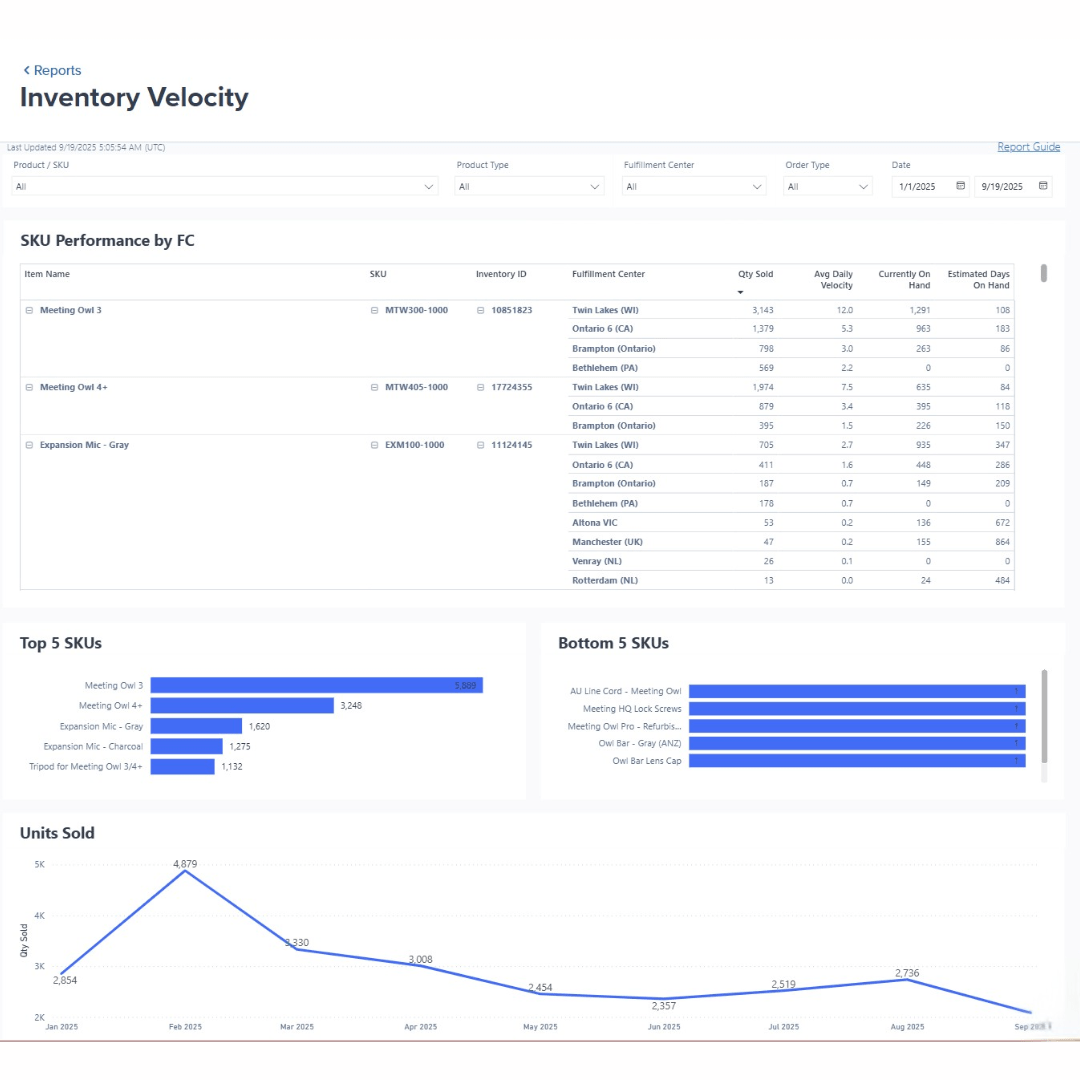
Unlike static spreadsheets that may quickly become outdated, a 3PL’s inventory management system should provide minute-by-minute updates on your inventory levels and movement across multiple fulfilment centres. This real-time visibility enables you to make more responsive decisions and take proactive measures to address aging inventory issues.
ShipBob’s platform, for example, offers seamless integration with your ecommerce store, allowing you to access up-to-date inventory data and monitor inventory velocity at any given moment.
Reconciling data with physical counts & financial records
To ensure the accuracy of your inventory aging report, it’s crucial to regularly reconcile the data with physical inventory counts and financial records.
First, establish a process for conducting periodic inventory audits and comparing the results with your aging report. This will help you identify any discrepancies and make necessary adjustments to maintain data integrity.
Next, align your aging report data with your general ledger inventory accounts to ensure consistency between your inventory management and accounting systems. This reconciliation process will help you avoid potential financial misstatements and maintain accurate records for tax and compliance purposes.
Create an inventory aging report in 5 steps
Creating an inventory aging report may seem daunting at first, but by following a systematic approach, you can streamline the process and gain valuable insights into your stock management. Here are six steps to help you build an effective aging report.
Step 1: Collect and organise your inventory data
To begin, gather all relevant inventory data from your various systems.
- Look into your warehouse management system (WMS), enterprise resource planning (ERP) software, and ecommerce platforms.
- Extract essential information like purchase dates, costs, and quantities for each SKU.
- Clean and standardize the data to ensure consistency, especially if you’re working with multiple data sources.
Step 2: Define your aging buckets
Next, establish appropriate time periods for your aging buckets based on your product lifecycle, industry standards, and business goals. Common buckets include 30, 60, 90, and 120+ days, but you may need to customise these intervals depending on your specific products and sales patterns.
For example, a fashion retailer might use shorter buckets to account for seasonal trends, while a business selling perishable goods may need more granular intervals to monitor expiration dates closely.
Step 3: Calculate aging metrics (FIFO, FEFO, etc.)
With your data organised and aging buckets defined, it’s time to apply the appropriate aging formulas to your inventory.
For most businesses, the First-In-First-Out (FIFO) method is standard, in which you assign the oldest purchase date to the items or batches that came into your warehouse first. However, if you’re dealing with perishable or expiration-sensitive products, the First-Expired-First-Out (FEFO) method, in which you assign the oldest purchase date to the products with the nearest expiration date, may be more suitable.
To calculate aging using either method:
- Sort your inventory data by purchase date (FIFO) or expiration date (FEFO).
- Assign each item to the appropriate aging bucket based on the current date and the defined time periods.
- For partially sold or split inventory batches, allocate the remaining quantity to the original purchase or expiration date.
Consider using inventory management software or spreadsheet formulas to automate these calculations and minimise manual effort.
Step 4: Generate and format your report
Once you’ve calculated the aging metrics for your inventory, it’s time to create a clear and actionable report.
- Use tables, charts, and heatmaps to visualise your data effectively, making it easy to identify patterns and potential issues at a glance.
- Include key performance indicators (KPIs) and metrics that are relevant to your business, such as the percentage of inventory in each aging bucket, the total value of aged stock, and the average age of your inventory.
- Consider your audience and tailor the format accordingly. For example, executives may prefer a high-level summary with key insights and recommendations, while operations teams may require more granular data and detailed action plans.
Step 5: Analyse findings and implement adjustments
With your inventory aging report in hand, it’s time to interpret the results and take action.
Identify slow-moving or stagnant inventory that may be racking up storage costs and taking up space, and develop strategies to move them out. Depending on the situation, you may need to:
- Adjust prices or run promotions to encourage sales.
- Bundle slow-moving items with popular products.
- Liquidate or donate excess inventory.
- Reconsider future purchasing decisions for sluggish SKUs.
Use your findings to inform demand forecasting, reorder points, and inventory allocation across your distribution network. Regularly monitoring and acting on your inventory aging reports will help you optimise your inventory levels, reduce carrying costs, and improve overall profitability.
Bonus: Advanced approaches with automation and dynamic dashboards
As your business grows and your inventory management needs become more complex, consider leveraging automation and advanced analytics tools to scale your aging analysis.
Integrate your inventory data with business intelligence platforms like Power BI, Tableau, or Looker to create dynamic dashboards that provide real-time insights into your stock levels and aging patterns.
Explore industry-specific adaptations to tailor your aging analysis to your unique needs. For example:
- Perishable goods retailers can implement expiration tracking and alerts to ensure timely stock rotation.
- Fashion and seasonal businesses can adjust their aging buckets to account for shorter product lifecycles and trend-driven demand.
- Technology companies can monitor aging closely to minimise the risk of obsolescence for rapidly evolving products.
- Large enterprises with extensive catalogues can leverage machine learning algorithms to identify aging patterns across thousands of SKUs.
For businesses with multiple distribution centres, consider implementing global inventory lifecycle tracking to monitor aging patterns across your entire network. This approach enables you to identify regional trends, optimise stock balancing between facilities, and make data-driven decisions to minimise aging inventory across your supply chain.
By following these six steps and continually refining your approach, you can create comprehensive inventory aging reports that drive better decision-making and improve your bottom line.
Inventory aging report example (& best practices)
To better understand how to create and interpret an inventory aging report, let’s walk through a comprehensive example that you can use as a template for your own business.
Sample data set demonstration
Consider a fictional ecommerce business called “Acme Apparel” that sells a variety of clothing and accessories. They have three main product categories: t-shirts, pants, and hats. In this example, we’ll use 30, 60, 90, and 120+ day aging buckets to analyse their inventory.
| SKU | Category | Units in Stock | Cost per Unit | Retail Price | Days in Inventory |
| TS001 | T-Shirts | 500 | $5 | $20 | 45 |
| TS002 | T-Shirts | 250 | $6 | $22 | 75 |
| JN001 | Pants | 200 | $15 | $50 | 60 |
| JN002 | Pants | 150 | $18 | $55 | 90 |
| HT001 | Hats | 300 | $8 | $30 | 30 |
| HT002 | Hats | 100 | $10 | $35 | 120 |
By categorizing the inventory into aging buckets, we can quickly identify which items require immediate attention:
| Aging Bucket | SKUs | Total Units | Total Cost | Total Retail Value |
| 0-30 Days | HT001 | 300 | $2,400 | $9,000 |
| 31-60 Days | TS001, JN001 | 700 | $5,500 | $21,000 |
| 61-90 Days | TS002, JN002 | 400 | $5,700 | $15,500 |
| 91-120+ Days | HT002 | 100 | $1,000 | $3,500 |
This example demonstrates that while most of Acme Apparel’s inventory is relatively fresh (0-60 days), there are some items – particularly in the 61-90 and 91-120+ day buckets – that may require special attention to prevent further aging.
Interpreting charts and tables
When analising your inventory aging report, look for patterns and trends that can guide your decision-making. In Acme Apparel’s case, we can see that:
- The majority of their inventory (67%) falls within the 0-60 day buckets, indicating a generally healthy stock rotation.
- However, 27% of their inventory is in the 61-90 day bucket, suggesting a potential slowdown in sales for certain SKUs (TS002 and JN002).
- Only 6% of their inventory is over 90 days old, but this still represents a significant value ($3,500 retail) that may need to be addressed through promotions or other strategies.
When presenting these findings to different stakeholders, tailor your insights to their specific concerns. For example:
- Operations teams may be interested in the total units and cost of aged inventory, as this impacts warehouse space and cash flow.
- Marketing and sales teams may focus on the retail value of aged items, as this represents potential revenue that could be recovered through targeted campaigns.
- Finance teams will want to understand the overall impact of aged inventory on the company’s financial statements and profitability.
Customising aging buckets for seasonal & high-volume brands
Businesses with seasonal demand patterns or frequent product launches may need to adjust their aging buckets to better align with their unique sales cycles. For example:
- A fashion brand that releases new collections every quarter may use 30, 60, and 90-day buckets to closely monitor inventory freshness and identify slow-moving styles.
- A holiday-focused retailer may define aging buckets around key sales periods (e.g., 0-30 days before Christmas, 31-60 days after Christmas) to ensure adequate stock levels during peak times and quickly clear excess inventory post-season.
- High-SKU-count businesses may benefit from more granular aging buckets (e.g., 15, 30, 45, 60+ days) to closely track inventory turns and prevent stockouts.
By tailoring your aging buckets to your business’s specific needs and sales patterns, you can create more actionable insights and make informed decisions to optimise your inventory management.
How ShipBob’s 3PL services enhance inventory aging management
Working with a trusted fulfilment partner like ShipBob can significantly enhance your ability to manage inventory aging effectively. As an expert supply chain enablement platform, ShipBob offers advanced technology and expertise that can help you make data-driven decisions and optimise your stock levels.
Supporting inventory aging analysis
ShipBob’s intuitive dashboard provides inventory management capabilities and real-time visibility into your stock levels and aging patterns across all fulfilment centres. The platform tracks each item’s history from receipt to shipment, giving you a comprehensive view of your inventory’s lifecycle.
Key features that support aging analysis include:
- Real-time stock level monitoring to prevent stockouts and overstocking
- Detailed item history tracking to identify slow-moving or stagnant inventory
- Customizable reorder points based on historical sales data and forecasted demand
- Automated alerts for low stock levels or aging thresholds
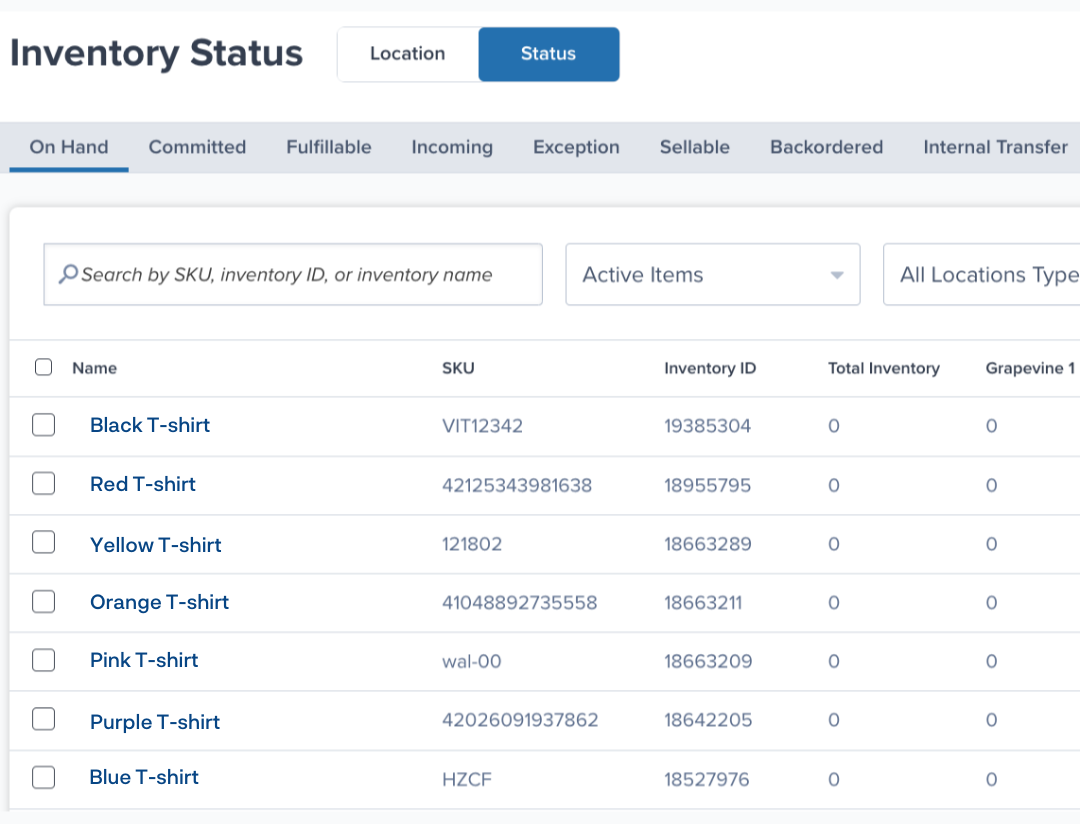
Leveraging ShipBob’s powerful reporting tools, you can quickly identify slow-moving inventory and take proactive steps to minimise aging-related issues.
FIFO and FEFO order allocation in practice
ShipBob’s advanced order allocation engine automatically implements First-In-First-Out (FIFO) and First-Expired-First-Out (FEFO) rules to ensure that your oldest or nearest-to-expiry inventory is shipped first. This helps reduce the risk of items becoming aged or obsolete while sitting in the warehouse.
When setting up your ShipBob account, you can easily customise your allocation preferences for each SKU based on its unique characteristics and requirements. For example:
- Non-perishable goods can be set to follow a strict FIFO methodology, ensuring that the oldest inventory is always shipped first.
- Products with expiration dates or shelf-life concerns can be configured to follow FEFO rules, prioritizing items with the earliest expiry dates.
- Seasonal or trend-sensitive products can be allocated based on a combination of FIFO and sales velocity data to optimise stock rotation.
“Many of our products have expiration dates, so it’s incredibly important for us to track and maintain inventory freshness – and ShipBob’s lot control features make that really easy.
When we send new inventory to ShipBob, all we have to do is mark it as a lot product in the ShipBob dashboard and list the lot number and expiration date for each lot on the warehouse receiving order (WRO). From there, ShipBob handles receiving and stores each lot separately for trackability and so there’s no confusion when it’s time to pick.
We use the FEFO (First Expired, First Out) method of inventory management, meaning that we want to prioritize picking inventory units that have the earliest expiration date. Thankfully, ShipBob’s default logic is designed to always ship items with the nearest listed expiration date first, so that works out perfectly.
At our scale, it would be impossible to manually check the expiration date of every single unit we ship, so leveraging ShipBob’s lot capabilities gives us much more peace of mind.”
Neil Blewitt, SVP of Operations at Bloom Nutrition
By automating these allocation rules, ShipBob helps you maintain a lean, fresh inventory and reduces the risk of aging-related issues impacting your bottom line.
Preventing customer experience pitfalls with aging data
One of the most significant risks of aged inventory is the potential for outdated or expired products to reach your customers. This can lead to negative reviews, returns, and long-term damage to your brand reputation.
ShipBob’s inventory insights and lot management features help you proactively identify at-risk inventory and take corrective action before it impacts your customers.
“In the UK, supplements are categorized as a food item, which means we have to meet certain storage criteria. It’s been very comforting that ShipBob is able to help us with food safety compliance.
Over the course of our partnership, ShipBob has evolved their inventory management tools, which is important for a business like ARTAH. All of our products come in a batch and all supplements are date coded, so we operate on a first-in, first-out (FIFO) basis. If we ever have an issue with products, I’m able to track it down to the lot number and where exactly it’s stored in the fulfilment centre, which is crucial in our supply chain. This has been really helpful for us.
It’s also important that if any other product compliance issues arise, we’re very safeguarded by ShipBob’s technology. We’re backed by ShipBob’s WMS system that has all of the details I need at my fingertips. If push comes to shove and I’m in crisis mode, I know that ShipBob’s tech will allow me to find what I need to come to a resolution.”
Connor Stewart, Head of Operations + Impact at ARTAH
By leveraging ShipBob’s aging management features, you can protect your brand reputation, minimise customer complaints, and maintain a high level of customer satisfaction.
For more information on how ShipBob can help you optimise your inventory management, click the button below to get in touch.
Inventory Aging Report FAQs
Here are answers to come of the most common questions about inventory aging reports.
What is the difference between an aged inventory report and standard inventory tracking?

An aged inventory report focuses on how long items have been sitting in storage, categorizing them into time buckets (e.g., 30, 60, 90+ days) to identify slow-moving or stagnant stock.
In contrast, standard inventory tracking primarily focuses on quantities on hand, incoming, and committed, without considering the time aspect.
Why are time buckets important in an inventory aging report?
Time buckets are crucial in an inventory aging report because they help categorize inventory based on how long it has been in storage. Different time periods indicate varying levels of concern, with older buckets signaling potential obsolescence or slow-moving stock. By grouping items into these buckets, businesses can quickly identify which products need immediate attention and prioritize actions accordingly.
For example, a retailer might use 30, 60, and 90+ day buckets to assess their inventory health. Items in the 90+ day bucket would be flagged as high-risk and targeted for aggressive clearance strategies, while those in the 30-day bucket might only require minor adjustments to pricing or promotions.
How often should I generate an inventory aging report?
The frequency of generating inventory aging reports depends on various factors, such as business type, sales volume, and product characteristics.
In general, high-volume businesses with fast-moving stock should review aging reports monthly, while slower-moving inventories might only require quarterly analysis.
Seasonal businesses may need to adjust their reporting schedule to account for peak and off-peak periods.
How do I reconcile an inventory aging report with physical stock counts?
To reconcile an inventory aging report with physical stock counts, follow these steps:
- Schedule regular physical counts (e.g., monthly, quarterly) based on your business needs.
- Select a representative sample of items from each aging bucket for counting.
- Conduct the physical count and compare results to the aging report data.
- Investigate and resolve any discrepancies between the report and actual stock levels.
- Update your inventory records to reflect the accurate counts.
- Repeat this process consistently to maintain data integrity and identify potential issues.
If significant discrepancies occur, conduct a more comprehensive count and review your inventory management processes to identify the root cause of the problem.
How can I adapt my aging buckets for seasonal or perishable goods?
When adapting aging buckets for seasonal or perishable goods, consider the following guidelines:
- Align bucket timeframes with product lifecycles and expiration dates. For example, perishable items may require shorter intervals (e.g., 7, 14, 30 days), while seasonal goods might use longer periods tied to specific selling seasons.
- Adjust your analysis frequency to match demand patterns. Review aging reports more often during peak seasons to quickly identify and address slow-moving stock.
- Set different threshold levels for each bucket based on the expected sell-through rate for seasonal or perishable items. What may be considered “aged” for a seasonal product might differ from a year-round staple.
- Monitor sell-through velocity alongside aging data to predict when stock may become obsolete or expire, and proactively adjust purchasing and pricing strategies.
What actions should I take when inventory falls into older age buckets?
When inventory falls into older age buckets, consider these strategies to minimise the impact on your business:
- Review pricing and promotion strategies to incentivize sales of slower-moving items. Targeted discounts, bundles, or marketing campaigns can help liquidate aging stock.
- Analyse sales channels and consider expanding distribution to outlets more likely to sell older inventory, such as discount stores or online marketplaces.
- Evaluate the potential for repurposing or repackaging the product to appeal to a different customer segment or sales channel.
- If the stock is unlikely to sell through normal channels, explore bulk sales or liquidation options to recover some value and free up warehouse space.
- As a last resort, consider donating or disposing of the inventory to minimise carrying costs and write-downs.
Does ShipBob offer tools to help manage aging inventory?
Yes, ShipBob provides a suite of tools to help ecommerce businesses manage aging inventory effectively, including:
- A dashboard with built-in inventory management capabilities and real-time visibility into stock levels and velocity across all fulfilment centres
- Lot management capabilities for tracking and monitoring of expiration dates for perishable goods (ensuring that older stock is prioritized for picking and reducing the risk of obsolescence)
- FIFO (First-In, First-Out) and FEFO (First-Expired, First-Out) inventory allocation methods


